MailGuard’s filter network is intercepting a new phishing campaign that uses a legitimate-looking SharePoint file share notification to trick recipients into entering their Microsoft 365 credentials. The scam is effective because it looks routine. It arrives as a SharePoint notification, it references a file “shared with you”, and it encourages a quick click to “view” what appears to be a business document.
What the scam looks like
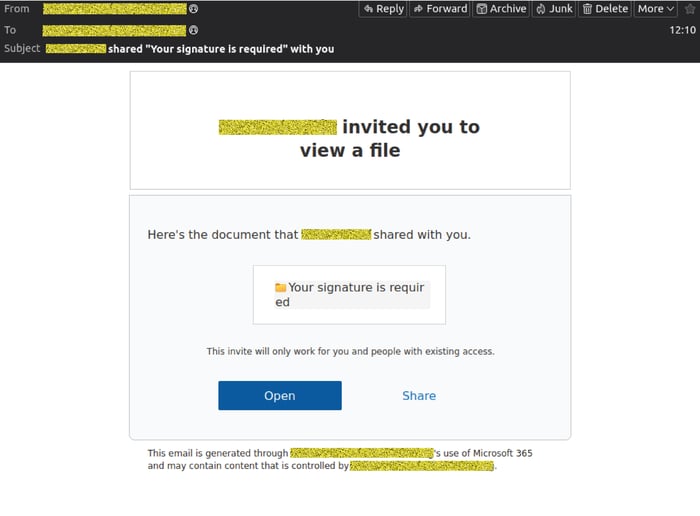
The message presents as a file share invitation, indicating a document titled “Your signature is required” has been shared (see Image below). The sender name shown is for a legitimate individual who's work account has been compromised and used to mount the attack.
At a glance, it resembles the SharePoint sharing emails many organisations receive every day, which is exactly why it is dangerous. It appears that the associated Microsoft account of an innocent user has been compromised and is being used to distribute the lure. To protect their identity, their details have been obscured in the images below.
What happens when you click “Open”
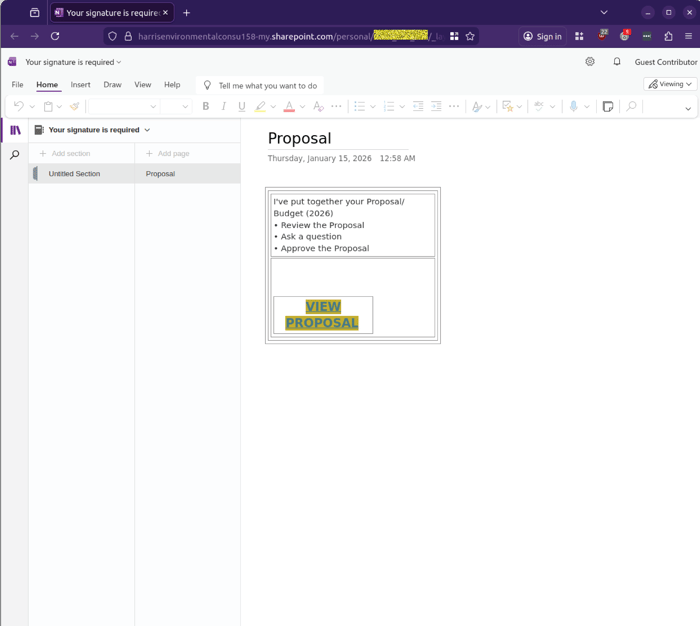
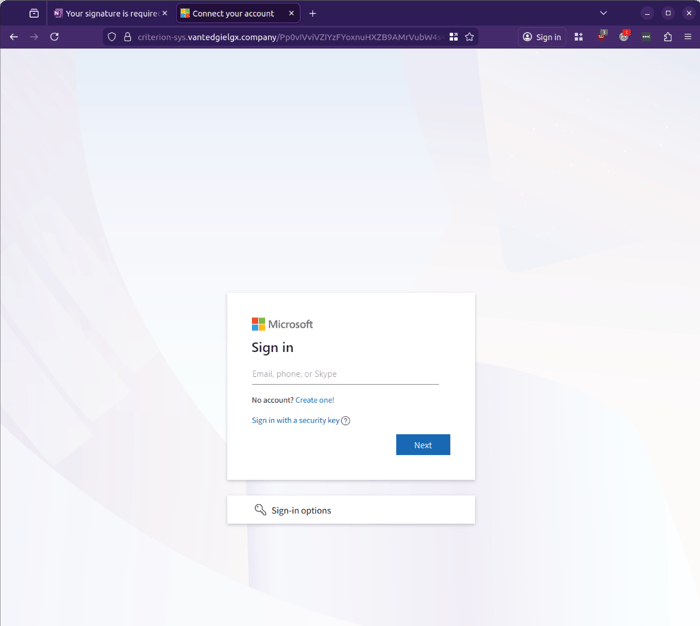
Clicking the call-to-action takes the recipient to a Microsoft lookalike sign-in flow hosted on a non-Microsoft domain. It begins with a 'Proposal' in the file titled 'Your signature is required', and clicking the link in the file takes users to the Microsoft credential phishing site outlined below.
The attack follows a familiar credential-harvesting pattern:
Page 1 requests an email address (see Image below, “Sign in” page).
Page 2 requests a password (see Image below, “Enter password” page).
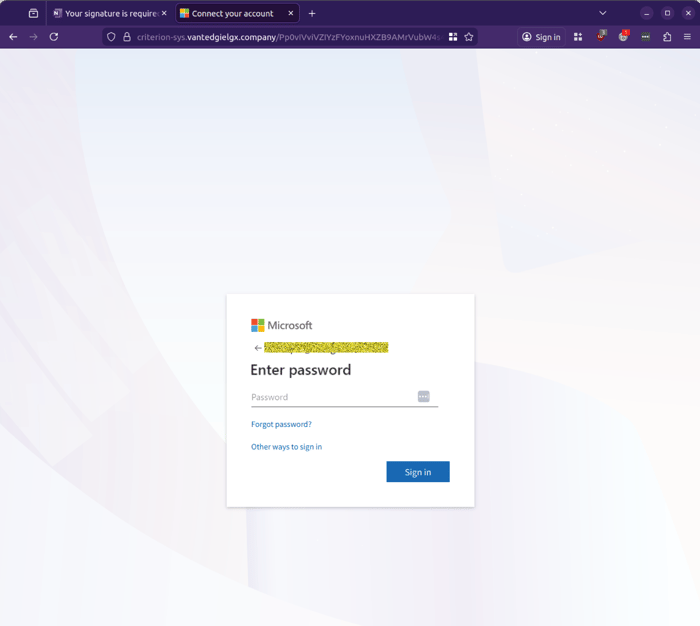
The page appears to validate credentials and can loop error messages (see Image below, “Your account or password is incorrect”), which is consistent with phishing kits that attempt to use the submitted credentials in real time.
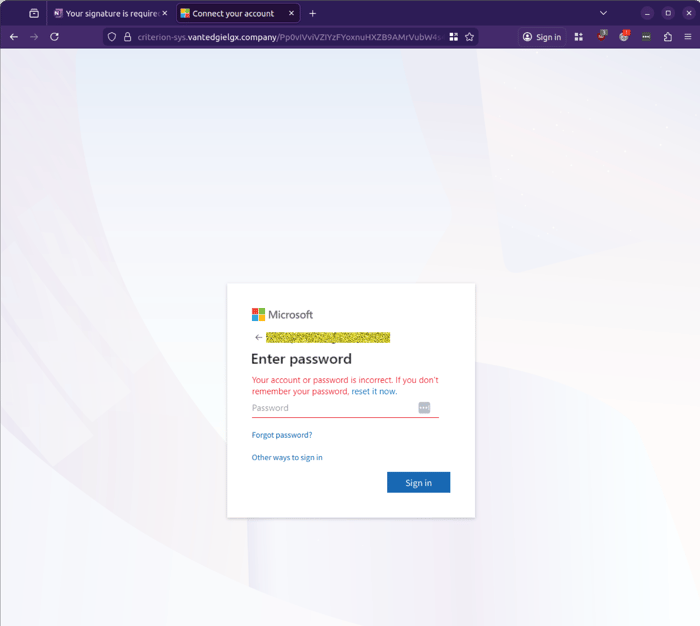
MailGuard’s operations team was unable to progress past the password stage with multiple attempts, indicating the site may be actively attempting authentication behind the scenes with the details entered by victims.
Why it works
This campaign is built around trust and momentum:
- Trust: SharePoint notifications are common, and recipients are conditioned to treat them as routine.
- Momentum: “Signature required” implies urgency and accountability, it pushes a quick response.
- Familiarity: The fake sign-in pages closely mimic Microsoft’s design, increasing the chance someone enters credentials without checking the URL.
What to watch for
Use this quick checklist before interacting with any file-share or “signature required” email:
- Were you actually expecting a file from this person or organisation?
- Does the sender’s address match a known contact, and does the context make sense?
- Do the links take you to a legitimate Microsoft domain, or something unrelated?
- Does the document title feel generic or designed to pressure action, for example “signature required”, “proposal”, “invoice”, “urgent review”?
Stay Safe, Know the Signs
MailGuard advises all recipients of these emails to delete them immediately without clicking on any links. Responding or providing personal details can lead to identity theft, data breaches, and financial losses.
Avoid emails that:
- Aren’t addressed to you personally.
- Are unexpected and urge immediate action.
- Contain poor grammar or miss crucial identifying details.
- Direct you to a suspicious URL that isn’t associated with the genuine company.
Many businesses turn to MailGuard after a near miss or incident. Don't wait until it's too late. Reach out to our team for a confidential discussion by emailing expert@mailguard.com.au or calling 1300 30 44 30.
One Email Is All That It Takes
All that it takes to devastate your business is a cleverly worded email message that can steal sensitive user credentials or disrupt your business operations. If scammers can trick one person in your company into clicking on a malicious link or attachment, they can gain access to your data or inflict damage on your business.
For a few dollars per staff member per month, you can protect your business with MailGuard's specialist AI-powered, zero-day email security. Special Ops for when speed matters! Our real-time zero-day, email threat detection amplifies our client’s intelligence, knowledge, security and defence. Talk to a solution consultant at MailGuard today about securing your company's inboxes.
Stay up-to-date with MailGuard's latest blog posts by subscribing to free updates. Subscribe to weekly updates by clicking on the button below.