MailGuard is intercepting a new phishing campaign that impersonates Medicare and attempts to steal user credentials by directing recipients to a convincing, myGov-themed sign-in page. This campaign is deliberately simple. A basic HTML email contains a single link to a phishing site. In some cases, the image content appears broken in the email client, which can be a tell that the message is not a legitimate government notification.
Once a recipient clicks through, the attack becomes a step-by-step capture flow designed to gather login details first, then additional information that helps criminals validate access and move faster.
What the scam looks like
The email claims to be from Medicare and prompts the recipient to view a new message, typically with a button such as “View Message”.
Subject line: “You have an important reminder from Medicare”
Here's an example 👇
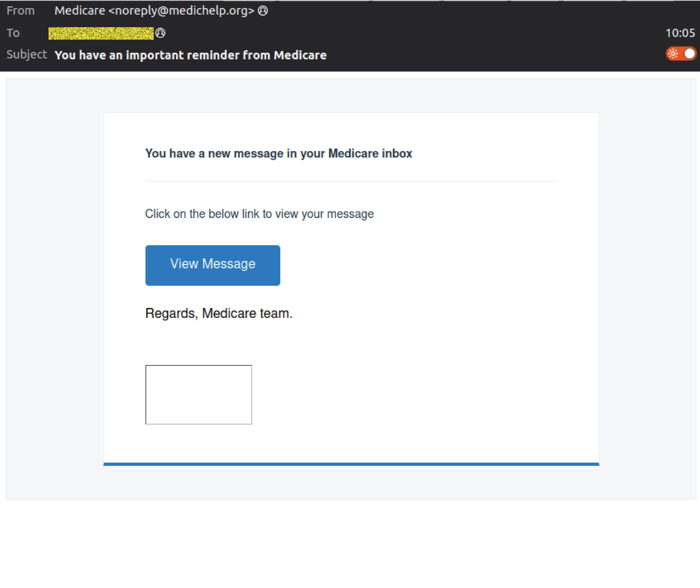
The sender details vary, another red flag for recipients and security teams. In this campaign, we observed multiple display addresses, including:
- noreply(at)donotrelypond.org
- noreply(at)medicareuk.uk
- noreply(at)medichelp.org
- de(at)lefytaxservices.org
The sending address appears to be unique per message, using “bounce” style addressing, for example:
- noreply+0b696600-079e-11f1-af8d-32f4c37d8e32_vt1(at)bounce-zem.medichelp.org
- noreply+ac8831b0-079e-11f1-af8d-32f4c37d8e32_vt1(at)bounce-zem.medichelp.org
- noreply+64ad7900-06df-11f1-acff-32f4c37d8e32_vt1(at)bounce-zem.medicareuk.uk
- noreply+503f49a0-06dd-11f1-acff-32f4c37d8e32_vt1(at)bounce-zem.donotrelypond.org
- noreply+92c56640-06df-11f1-acff-32f4c37d8e32_vt1(at)bounce-zem.medicareuk.uk
- noreply+42915350-06df-11f1-acff-32f4c37d8e32_vt1(at)bounce-zem.donotrelypond.org
If an email claims to be from an Australian government service but uses unfamiliar domains, or rotates through multiple sending addresses, it should be treated as suspicious.
How the scam works
MailGuard analysis indicates this is a credential harvesting attack, designed to capture usernames and passwords and then immediately attempts to use them.
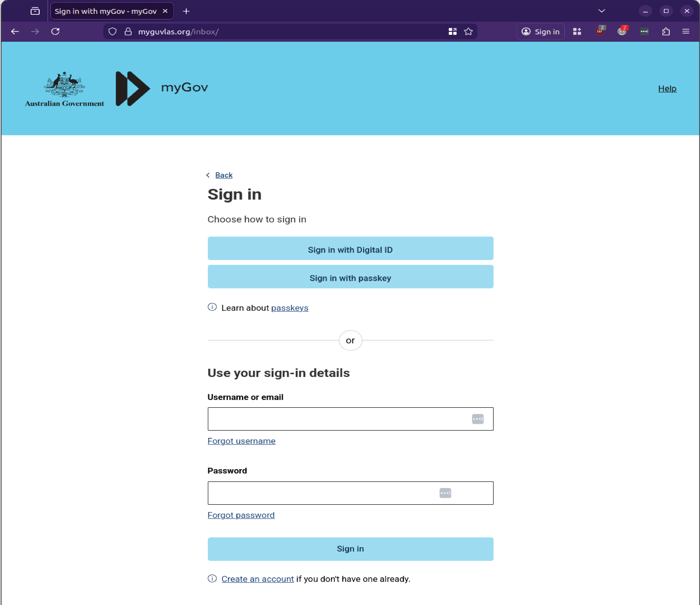
Step 1, Fake myGov sign-in page
Clicking the email link takes the recipient to a myGov-branded sign-in page that closely resembles a legitimate login experience. The first page asks for a username or email and password.
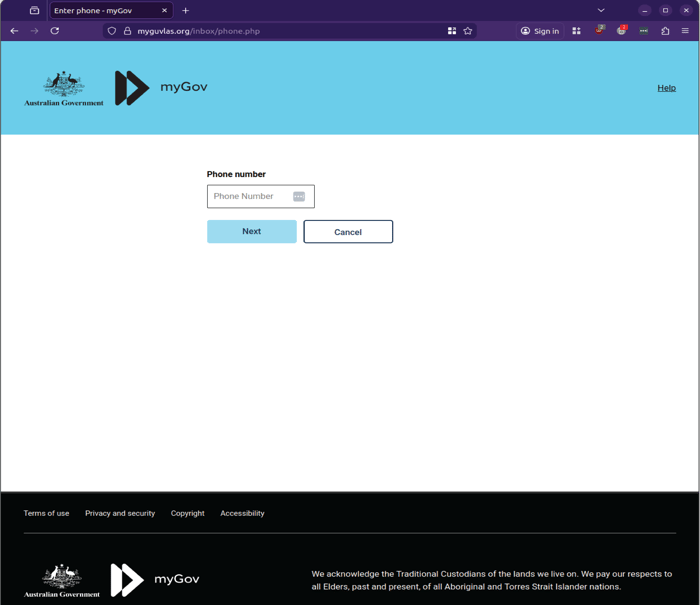
Step 2, Phone number capture
After entering credentials, the victim is prompted for a phone number.
Step 3, “Verification” loop
The third screen presents a verification step.
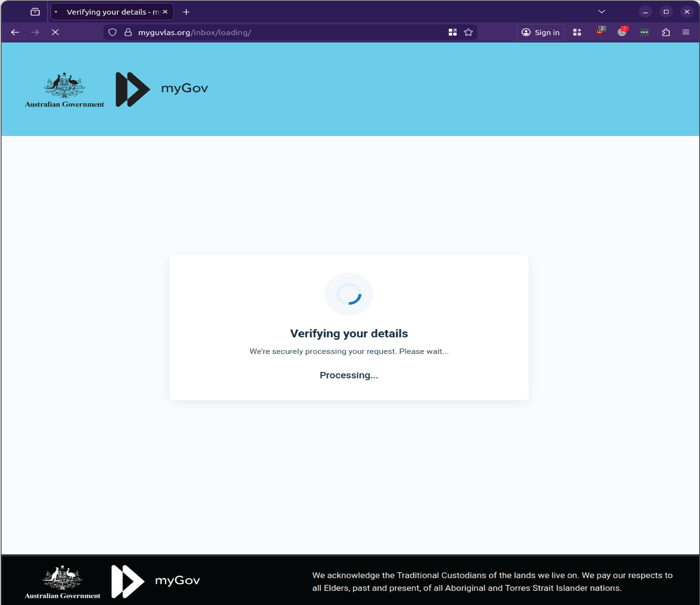
In testing, the flow could not be completed. Instead, it returned to the first page with an incorrect login warning.
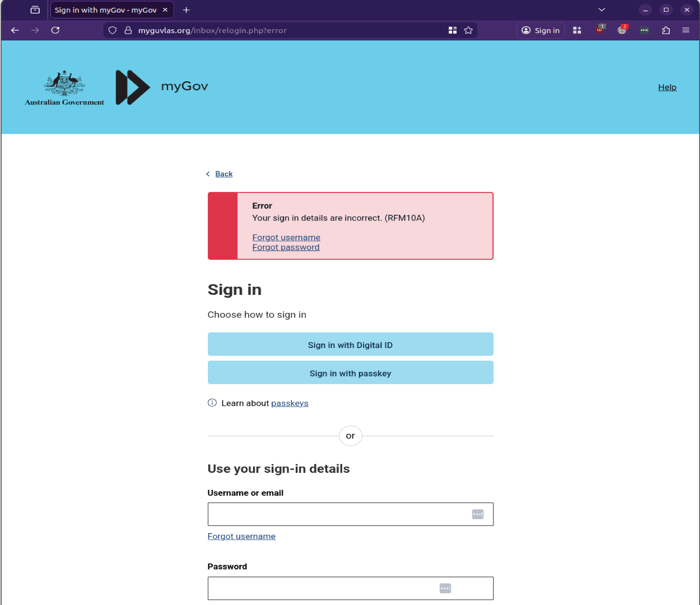
That behaviour is significant. It suggests the phishing kit may be actively attempting to log in with the credentials provided, then looping the user back when it fails, or when the attacker is trying to trigger an additional authentication requirement.
Why this matters for businesses
Government and health-related lures are effective because they create urgency and authority. People are more likely to act quickly when they believe a message relates to Medicare, myGov, or a required action.
For organisations, the risk extends beyond the individual. If a staff member reuses passwords across services, a stolen credential can quickly become a business risk, including mailbox access, identity compromise, and onward phishing from a trusted internal account. And in this scam, compromised myGov credentials may also lead criminals to business related services like the ATO.
What to watch out for
Share these indicators with staff and service desks:
- Medicare or myGov themed emails that do not address the recipient by name
- Broken images or formatting issues, especially in simple HTML emails
- “View Message” prompts that push the user to sign in immediately
- Sender domains that do not align with legitimate government services
- Extra steps after login, like phone number prompts and “verification” screens
What to do if someone interacted with the email
If a user clicked through or entered credentials:
- Reset the password immediately, especially if it is reused elsewhere
- Review MFA settings and recent sign-in activity for unusual access
- Notify IT or your security provider to check for related emails across the organisation
- Consider additional controls for high-risk accounts, especially finance, payroll, and executives
Stay Safe, Know the Signs
MailGuard advises all recipients of these emails to delete them immediately without clicking on any links. Responding or providing personal details can lead to identity theft, data breaches, and financial losses.
Avoid emails that:
- Aren’t addressed to you personally.
- Are unexpected and urge immediate action.
- Contain poor grammar or miss crucial identifying details.
- Direct you to a suspicious URL that isn’t associated with the genuine company.
Many businesses turn to MailGuard after a near miss or incident. Don't wait until it's too late. Reach out to our team for a confidential discussion by emailing expert@mailguard.com.au or calling 1300 30 44 30.
One Email Is All That It Takes
All that it takes to devastate your business is a cleverly worded email message that can steal sensitive user credentials or disrupt your business operations. If scammers can trick one person in your company into clicking on a malicious link or attachment, they can gain access to your data or inflict damage on your business.
For a few dollars per staff member per month, you can protect your business with MailGuard's specialist AI-powered, zero-day email security. Special Ops for when speed matters! Our real-time zero-day, email threat detection amplifies our client’s intelligence, knowledge, security and defence. Talk to a solution consultant at MailGuard today about securing your company's inboxes.
Stay up-to-date with MailGuard's latest blog posts by subscribing to free updates. Subscribe to weekly updates by clicking on the button below.