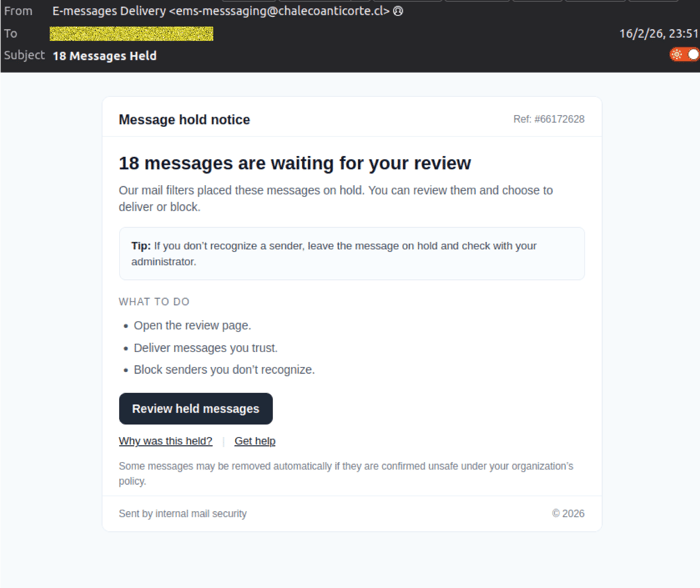
MailGuard is intercepting a new credential-harvesting campaign designed to look like an internal “message hold notice”, prompting recipients to “review held messages”and then enter their Microsoft 365 password on a convincing fake sign-in page.
The scam is technically simple, but well engineered for trust, speed, and plausibility. It relies on a clean HTML email containing a single link to a phishing site, then uses small user interface tricks, like an “attempts left” timer and a redirect to the real Office 365 login page, to reduce suspicion.
What the scam looks like
Recipients are receiving an email with:
- Subject: 18 Messages Held
- Display name: E-messages Delivery
- Display address: ems-messsaging(at)chalecoanticorte(dot)cl
The message body presents a “Message hold notice” and claims “18 messages are waiting for your review”, urging the recipient to open a “Review held messages” button.
Example email lure: “Message hold notice” and “Review held messages” CTA.
How the scam works
1) One-click delivery to a phishing site
This campaign uses a straightforward flow, a single HTML email and a single link.There are no attachments, no complex scripts in the email itself, which helps it blend in.
2) Recipient tracking is built into the URL
When the victim clicks the link, the recipient’s email address is passed to the phishing site as a URL parameter. This is a common technique used to pre-fill identity fields, tailor the page, and improve conversion rates for credential theft.
3) User-agent fingerprinting to add credibility
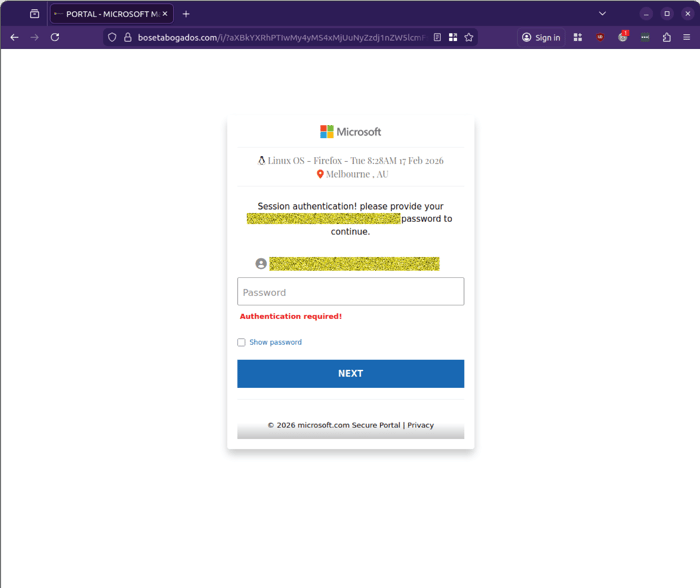
The phishing page also displays the browser user-agent string (for example,“Linux OS – Firefox”), which makes the page feel more “session-aware” and legitimate to the victim.
4) The fake Microsoft portal asks for a password
The first page prompts for the user’s password inside a Microsoft-branded “SecurePortal” style frame.
Fake Microsoft sign-in page: Requesting a password.
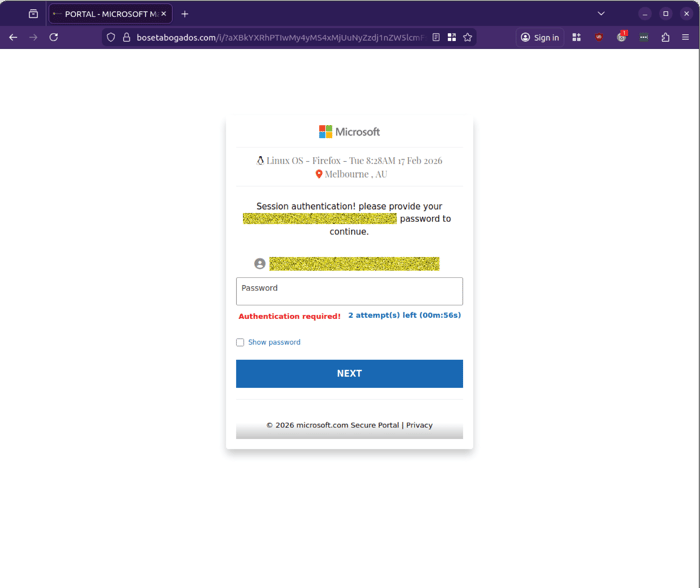
5) A timer and “attempts left” prompt is used to pressure compliance
After interaction, the prompt changes to show a countdown and “2 attempt(s) left”,creating urgency and encouraging repeated submissions.
Fake sign-in page showing “2 attempt(s) left”: And a countdown timer.
6) Redirect to the real Office 365 login page to reduce suspicion
Once the attempts are “used”, the victim is redirected to the legitimate Office 365 login page. This is a deliberate trust tactic, it can leave victims thinking they simply mistyped a password or their session timed out, while the attacker already has what they need.
Sender behaviour observed
MailGuard has observed that the sending address may be unique per send, often embedding the recipient address in a bounce-style format, for example:
- bounces+56797922-5570-james.booth=rgl.co.nz(t)em6007.chalecoanticorte.cl
- bounces+56797922-4d36-psanya=eurozhartleys.com(at)em6007.chalecoanticorte.cl
- bounces+56797922-d604-brendan=modcons.com.au(at)em6007.chalecoanticorte.cl
- bounces+56797922-6d62-brett.fifield=horticulture.com.au(at)em6007.chalecoanticorte.cl
- bounces+56797922-eb21-crichards=baxterlaboratories.com(at)em6007.chalecoanticorte.cl
- bounces+56797922-8d6b-ians=jca.org.au(at)em6007.chalecoanticorte.cl
This pattern can help the emails slip past casual scrutiny, because the address“looks” like a system-generated notification rather than a typical mailbox.
What to watch for
Even sophisticated users can be caught by messages like this because they mimic normal security workflows. Key red flags include:
- A “held messages” notice you weren’t expecting
- A sender domain that doesn’t match your organisation or your known email security provider
- Any sign-in page that appears after clicking an email link, particularly if it’s not your organisation’s known Microsoft sign-in flow
- Odd “session” details presented on the page (device, location, time) that feel like reassurance
What to do if someone clicked
Ifa user clicked the link and entered credentials, treat it as a credential compromise:
- Reset the password immediately
- Revoke active sessions (force sign-out)
- Check for MFA changes and suspicious authenticator registrations
- Review mailbox rules (forwarding rules, hidden inbox rules, deleted items)
- Hunt for follow-on activity (new OAuth consents, unusual logins, token reuse)
Stay Safe, Know the Signs
MailGuard advises all recipients of these emails to delete them immediately without clicking on any links. Responding or providing personal details can lead to identity theft, data breaches, and financial losses.
Avoid emails that:
- Aren’t addressed to you personally.
- Are unexpected and urge immediate action.
- Contain poor grammar or miss crucial identifying details.
- Direct you to a suspicious URL that isn’t associated with the genuine company.
Many businesses turn to MailGuard after a near miss or incident. Don't wait until it's too late. Reach out to our team for a confidential discussion by emailing expert@mailguard.com.au or calling 1300 30 44 30.
One Email Is All That It Takes
All that it takes to devastate your business is a cleverly worded email message that can steal sensitive user credentials or disrupt your business operations. If scammers can trick one person in your company into clicking on a malicious link or attachment, they can gain access to your data or inflict damage on your business.
For a few dollars per staff member per month, you can protect your business with MailGuard's specialist AI-powered, zero-day email security. Special Ops for when speed matters! Our real-time zero-day, email threat detection amplifies our client’s intelligence, knowledge, security and defence. Talk to a solution consultant at MailGuard today about securing your company's inboxes.
Stay up-to-date with MailGuard's latest blog posts by subscribing to free updates. Subscribe to weekly updates by clicking on the button below.