A new phishing scam is impersonating Medicare, and designed to harvest the myGov login credentials and mobile numbers of Australians, potentially intercepting SMS verification codes. While the initial email is simple, the attack itself is not. It uses a staged login process and looping behaviour to quietly test stolen credentials in real time, increasing the likelihood of account compromise. The threat is currently being intercepted by MailGuard’s AI-powered filter network.
How the scam works
The phishing email arrives using the display name Medicare, with the sender address sales(at)medicareinfo(dot)uk and rotating sending infrastructure.
The message is minimal: 'You have a new message in your medicare inbox. Click open Inbox to view'
There is no urgency, no obvious threat, and no aggressive language, and that's deliberate. It mirrors routine government myGov communications, making it far more likely to be trusted and acted on without hesitation.
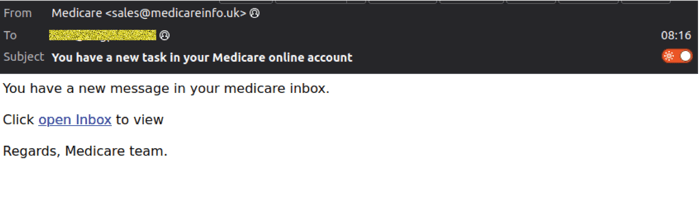
At first glance, the message is simple. But once clicked, the scam unfolds across several steps, each designed to create credibility and increase the likelihood that the victim will continue.
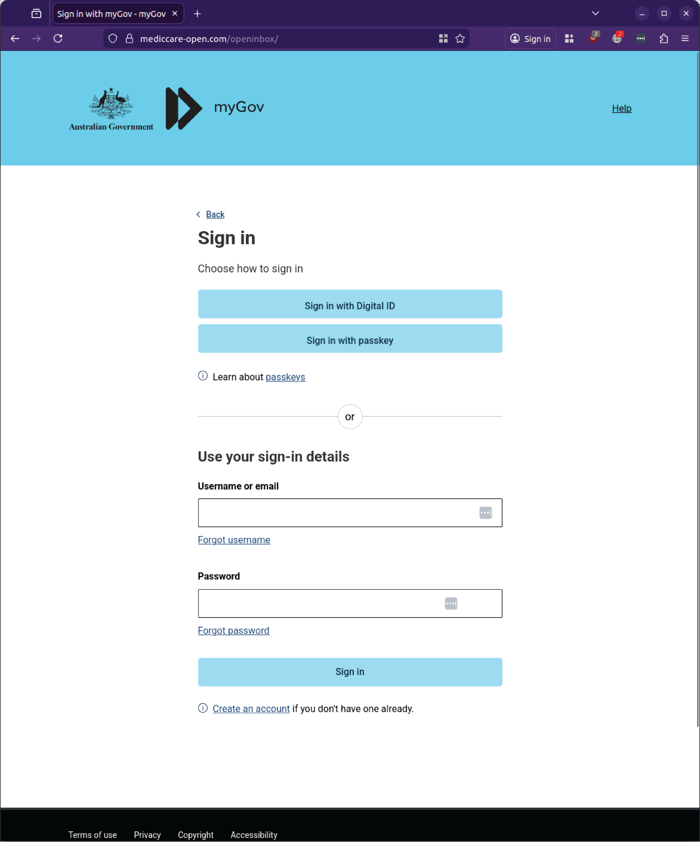
Stage one: fake myGov login page
Clicking the link directs users to a spoofed myGov login page hosted on a malicious domain. The page closely resembles the legitimate myGov sign-in experience and prompts users to enter their:
- Username or email
- Password
At this stage, credentials are captured immediately.
Stage two: phone number collection
After entering login details, the user is prompted to provide a phone number.
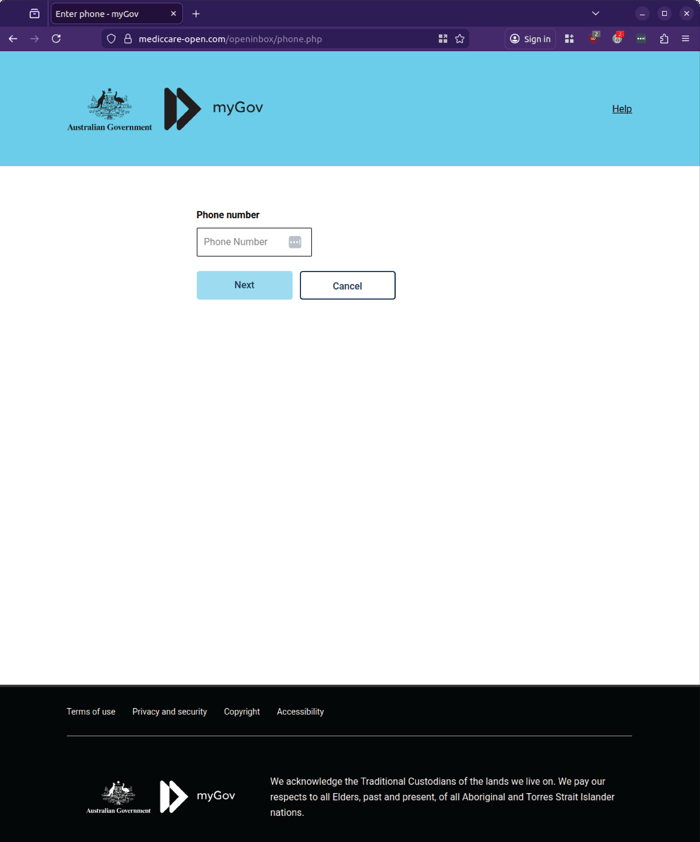
This step is critical, it allows attackers to:
- Link credentials to a specific individual
- Prepare for SMS-based interception
- Enable follow-on attacks such as account takeover or identity fraud
Stage three: verification loop and credential testing
The next screen shows a “Verifying your details” message with a loading indicator. This runs for approximately 30 seconds before returning the user to the login screen with an error.
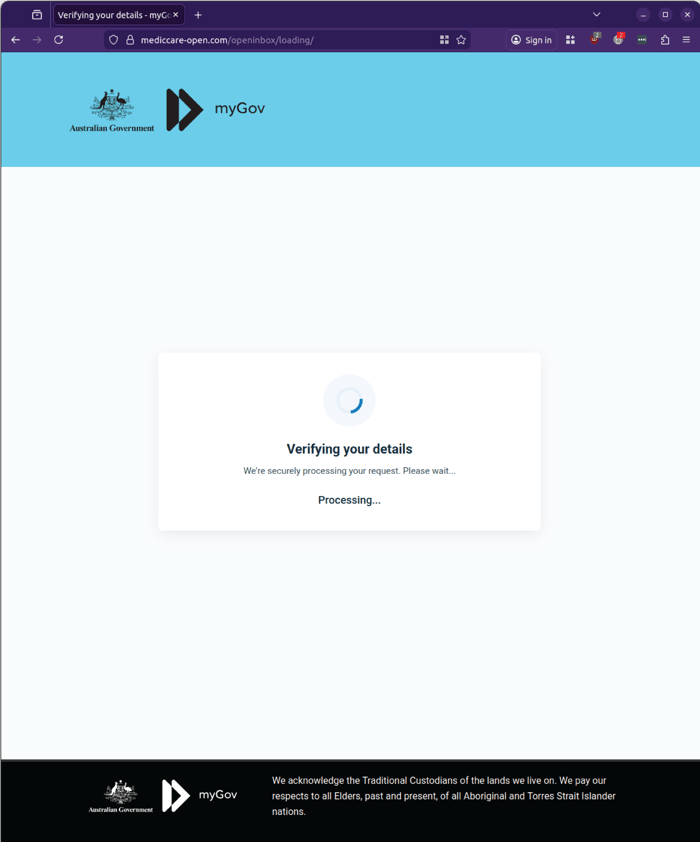
This behaviour is highly indicative of a more advanced technique. It suggests the attacker may be:
- Attempting to log in using the stolen credentials in real time
- Triggering a legitimate SMS authentication request
- Preparing to capture or socially engineer the one-time code
Stage four: reset and repeat
After the delay, users are returned to the login page with an error message:
Your sign in details are incorrect.
This creates confusion and encourages the user to try again, often re-entering credentials or continuing the process.
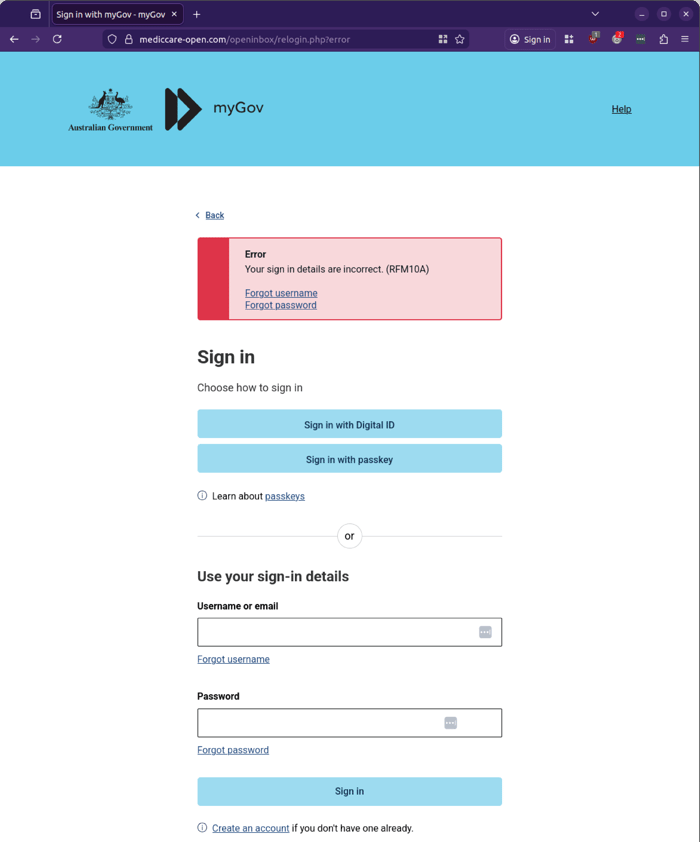
Each attempt provides the attacker with more data and more opportunity to complete the compromise.
Why this attack is dangerous
This campaign highlights a shift in phishing techniques.
Rather than simply collecting credentials, the attacker is attempting to:
- Validate credentials in real time
- Capture additional identity data
- Position for SMS-based authentication bypass
- Extend the interaction to increase success rates
The simplicity of the email masks the sophistication of the attack flow.
It does not rely on urgency or fear. Instead, it relies on familiarity and routine behaviour.
Key indicators to watch for
- Emails claiming to be from Medicare or myGov that are not addressed personally
- Sender domains that do not match official Australian government domains
- Requests to log in via links rather than through official websites
- Additional steps requesting phone numbers after login
- Unusual “verification” delays followed by login errors
Even when the page looks legitimate, the domain and workflow often reveal the deception.
Stay Safe, Know the SignsMailGuard advises all recipients of these emails to delete them immediately without clicking on any links. Responding or providing personal details can lead to identity theft, data breaches, and financial losses.
Avoid emails that:
- Aren’t addressed to you personally.
- Are unexpected and urge immediate action.
- Contain poor grammar or miss crucial identifying details.
- Direct you to a suspicious URL that isn’t associated with the genuine company.
Many businesses turn to MailGuard after a near miss or incident. Don't wait until it's too late. Reach out to our team for a confidential discussion by emailing expert@mailguard.com.au or calling 1300 30 44 30.
One Email Is All That It Takes
All that it takes to devastate your business is a cleverly worded email message that can steal sensitive user credentials or disrupt your business operations. If scammers can trick one person in your company into clicking on a malicious link or attachment, they can gain access to your data or inflict damage on your business.
For a few dollars per staff member per month, you can protect your business with MailGuard's specialist AI-powered, zero-day email security. Special Ops for when speed matters! Our real-time zero-day, email threat detection amplifies our client’s intelligence, knowledge, security and defence. Talk to a solution consultant at MailGuard today about securing your company's inboxes.
Stay up-to-date with MailGuard's latest blog posts by subscribing to free updates. Subscribe to weekly updates by clicking on the button below.