MailGuard is intercepting a new phishing campaign impersonating Disney+ that attempts to steal multiple layers of sensitive account information, including email credentials, passwords, credit card details, and an SMS verification code.
This is not a single-step credential grab. It's a multi-stage harvest designed to maximise payoff. First, it captures identity and login details.Then it pivots to payment data. Finally, it asks for an SMS code, a strong indicator the attacker is attempting to authorise a transaction in real time.
What the scam looks like
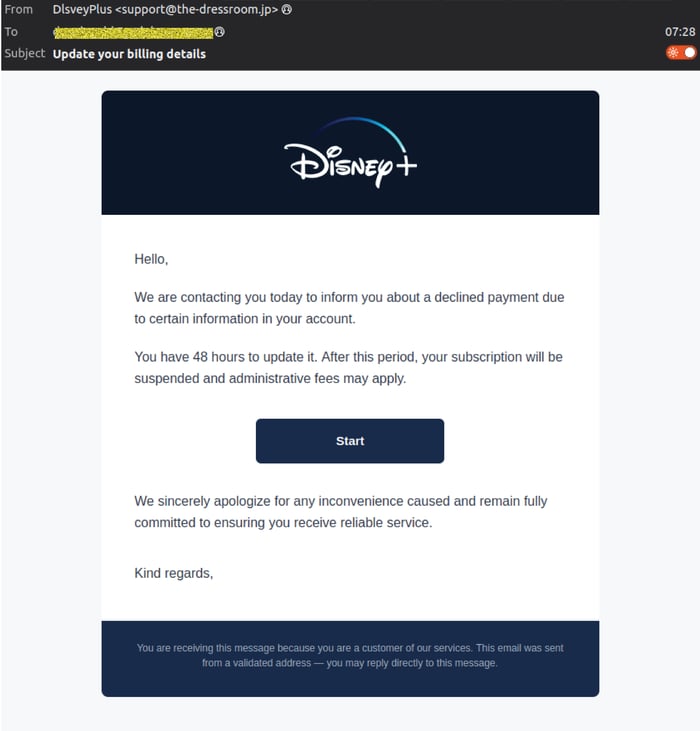
The message presents as a legitimate account notice, typically claiming a declined payment and urging the recipient to “update billing details” within a tight timeframe.
Key characteristics observed:
- Display name: DlsveyPlus
- Display address: support(at)the-dressroom(dot)jp
- Subject: “Update your billing details”
- A prominent button, such as “Start”, to begin the update process (see below)
Example phishing email impersonating Disney+, prompting the recipient to update billing details 👇
How the scam works
MailGuard detected the emails with the following flow:
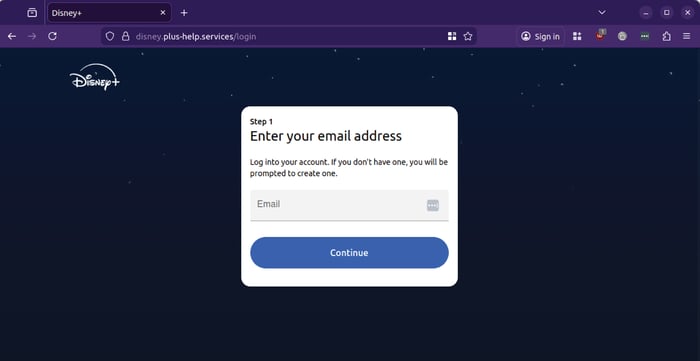
Step 1: Email address capture
After clicking the link, the victim is taken to a Disney+-themed page asking for their email address.
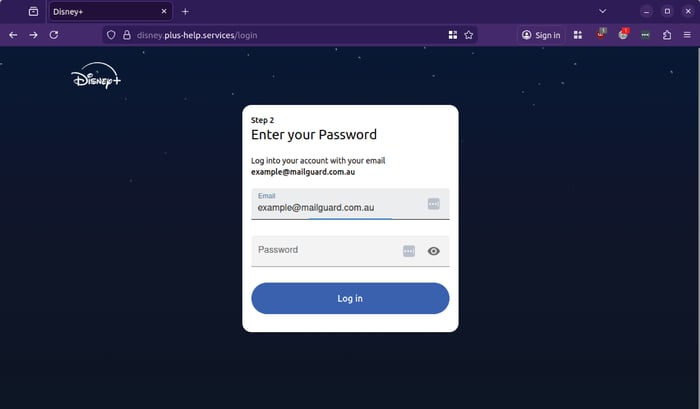
Step 2: Password capture
Next, the site requests the victim’s password. This is designed to harvest login credentials that can be reused across other services, especially where password reuse exists.
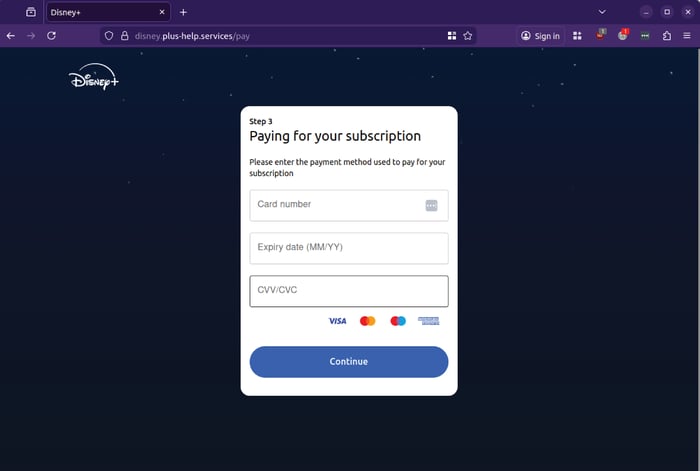
Step 3: Credit card theft
The third page requests card number, expiry date, and CVV/CVC. This turns the campaign from credential theft into direct financial fraud.
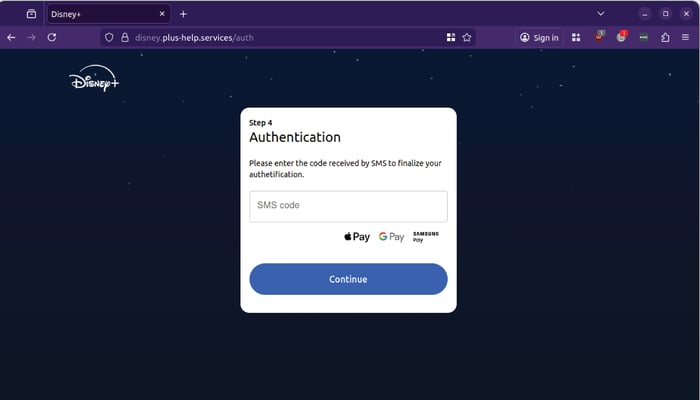
Step 4: SMS code interception
The fourth page requests an SMS code. This suggests the attacker is attempting to validate a purchase or payment action, possibly using the card details provided moments earlier.
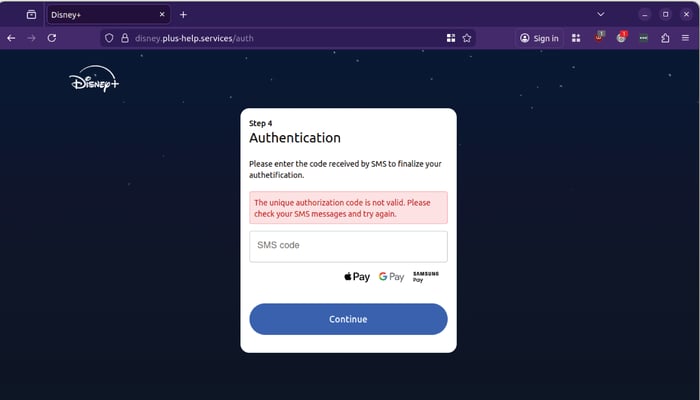
A common tactic in phishing scams, the flow indicates that the authorization code is not valid and asks the user to try again.
Why this campaign is dangerous
This scam is designed for speed and compliance. It mimics a familiar consumer workflow, it uses a common urgency trigger, and it guides users through a process that feels normal.
For businesses, the risk is broader than one person’s streaming account:
- Stolen credentials are frequently reused against corporate services
- Stolen payment details can lead to fraud, chargebacks, and financial loss
- SMS code capture indicates real-time abuse, reducing the chance a victim can intervene in time
- If a corporate identity is compromised, attackers can escalate into business email compromise, invoice redirection, and internal impersonation
Sender behaviour observed
MailGuard has observed that the sending address can be unique per message, often embedding the recipient’s email address in a bounce-style format, for example:
- bounces+44103073-a668-robertg=itrevolution.com.au(dot)em2715.the-dressroom.jp
- bounces+44103073-cff2-rwallace=wallaceintl.com.au(dot)em2715.the-dressroom.jp
- bounces+44103073-0a38-akeller=nci.net.au(dot)em2715.the-dressroom.jp
- bounces+44103073-1ea9-dcole=sundata.com.au(dot)em2715.the-dressroom.jp
- bounces+44103073-b2c5-paul=lemonbaxter.com.au(dot)em2715.the-dressroom.jp
- bounces+44103073-2d30-adam=barassiandco.com.au(dot)em2715.the-dressroom.jp
This approach can help the message appear “system generated” to some users, and can complicate simple sender-based rules.
What to watch for
Use these practical checks to help staff and teams identify similar scams:
- Any billing or account message that pushes urgency, such as “48 hours”, “fees may apply”, “account suspended”
- A sender domain that does not match the real service
- Links that take you to a login or payment page that is not the official domain
- Any page asking for credentials, then payment details, then an SMS code, this sequencing is a major red flag
Stay Safe, Know the Signs
MailGuard advises all recipients of these emails to delete them immediately without clicking on any links. Responding or providing personal details can lead to identity theft, data breaches, and financial losses.
Avoid emails that:
- Aren’t addressed to you personally.
- Are unexpected and urge immediate action.
- Contain poor grammar or miss crucial identifying details.
- Direct you to a suspicious URL that isn’t associated with the genuine company.
Many businesses turn to MailGuard after a near miss or incident. Don't wait until it's too late. Reach out to our team for a confidential discussion by emailing expert@mailguard.com.au or calling 1300 30 44 30.
One Email Is All That It Takes
All that it takes to devastate your business is a cleverly worded email message that can steal sensitive user credentials or disrupt your business operations. If scammers can trick one person in your company into clicking on a malicious link or attachment, they can gain access to your data or inflict damage on your business.
For a few dollars per staff member per month, you can protect your business with MailGuard's specialist AI-powered, zero-day email security. Special Ops for when speed matters! Our real-time zero-day, email threat detection amplifies our client’s intelligence, knowledge, security and defence. Talk to a solution consultant at MailGuard today about securing your company's inboxes.
Stay up-to-date with MailGuard's latest blog posts by subscribing to free updates. Subscribe to weekly updates by clicking on the button below.