MailGuard has identified a phishing email campaign impersonating Linkt and toll payment notices. The email is designed to pressure recipients into making an urgent “overdue” payment, then harvests credit card details and a verification code sent by SMS.
While this scam uses a consumer-style hook, it is still relevant to businesses. Payments scams are often used to steal card details directly, and to build a pathway into broader identity theft and fraud, including attempts to use harvested details in real time. Likewise, many finance teams are directly managing toll payments for corporate and fleet vehicles.
What the scam looks like
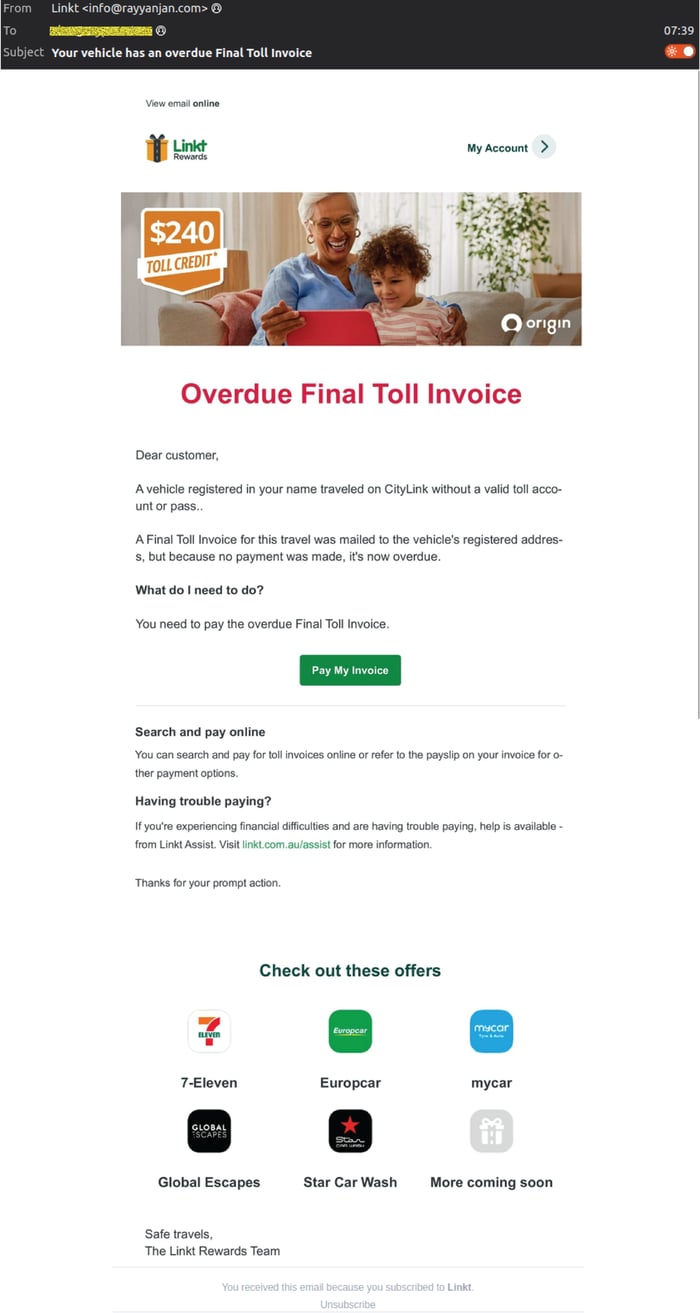
The phishing email presents as a Linkt-branded message with the subject line:
“Your vehicle has an overdue Final Toll Invoice”
Instead of typical text-based content, the email is a large image that appears legitimate and includes a prominent call-to-action such as “Pay My Invoice”. Because the content is image-based, it can appear more convincing at a glance and may bypass casual scrutiny from users who are skimming. And as an image rather than text, the email is designed to by-pass traditional email filters that may scan text content alone in emails, rather than also scanning images as more advanced AI-powered security solutions like MailGuard do.
Here's an example of the Linkt-branded phishing email with the “Overdue Final Toll Invoice” prompt and payment button 👇
Who the email is actually coming from
MailGuard observed the email using the display name “Linkt”, but the sender domains are not legitimate Linkt domains. Known sending addresses include:
- info(at)cosp1-vhdfou7v(dot)com
- info(at)ondemandtrackings(dot)com
- info(at)rayyanjan(dot)com
A legitimate Linkt or tolling notice would not be sent from unrelated domains like these. This mismatch is one of the clearest indicators the message is fraudulent.
How the scam works, step-by-step
Once a recipient clicks the image or payment button, they are taken through a payment-themed phishing flow designed to look like a normal billing process.
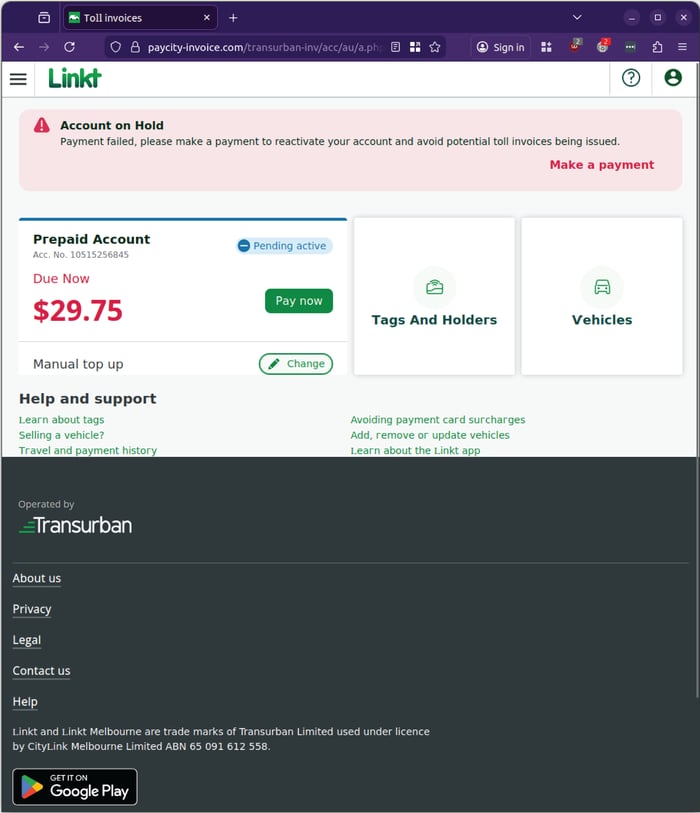
Step 1: A “confirmation” landing page
The first page is presented as a simple confirmation step, a common technique used to reduce suspicion and create momentum.
Image: Landing page showing a Linkt-style payment context and account messaging.
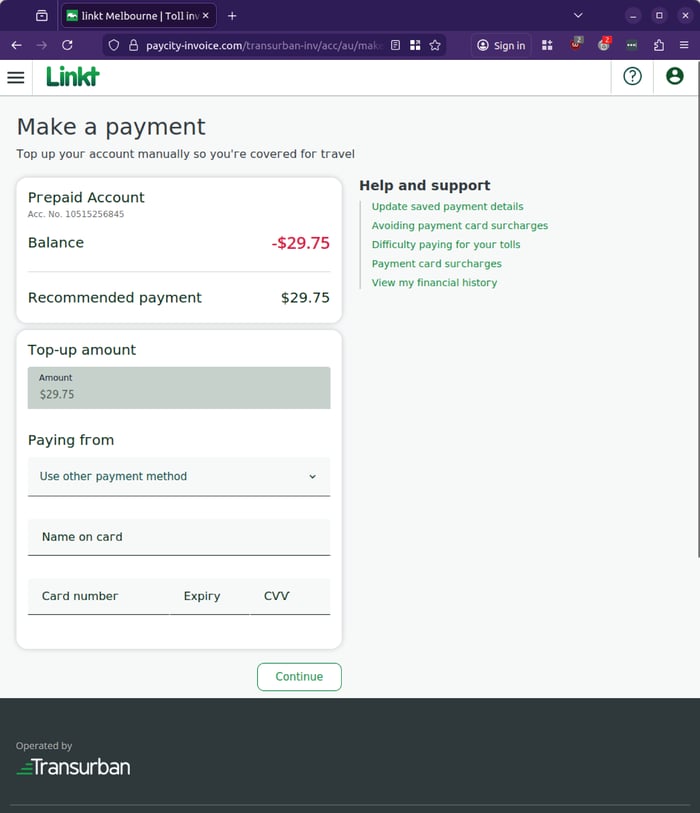
Step 2: Credit card capture and a “confirm payment” prompt
The second stage requests credit card details. After entry, a prompt appears asking the victim to confirm the payment, reinforcing the illusion of a legitimate transaction.
Image: “Confirm payment” prompt showing account details and a top-up amount.
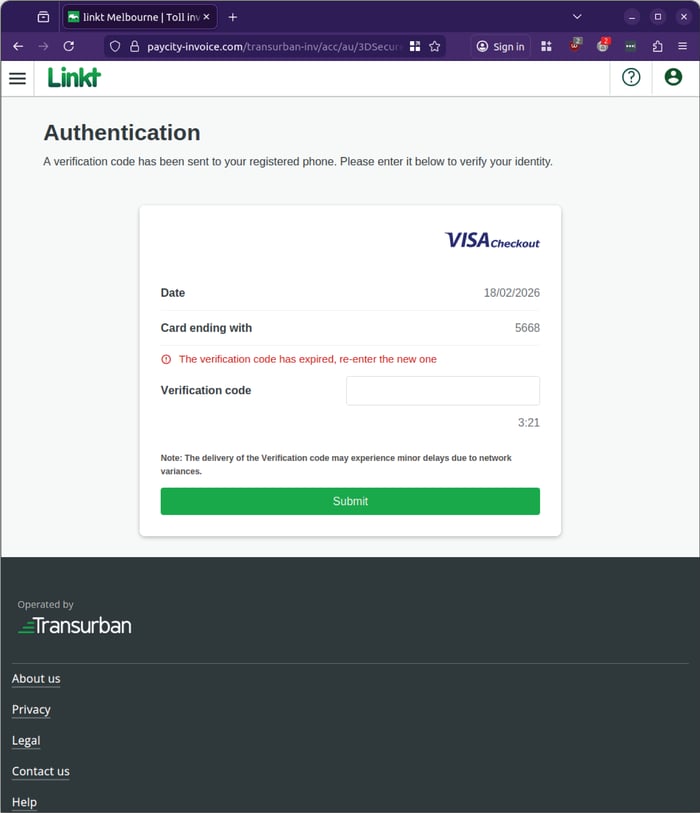
Step 3: SMS code prompt (transaction verification)
The third stage requests an SMS verification code. This is a key escalation point. It suggests the attacker may be attempting to validate a real transaction using the card details immediately, rather than simply collecting them for later fraud.
MailGuard notes that the page may request the code more than once, and may error out back to the previous step.
Image: “Authentication” page requesting a verification code.
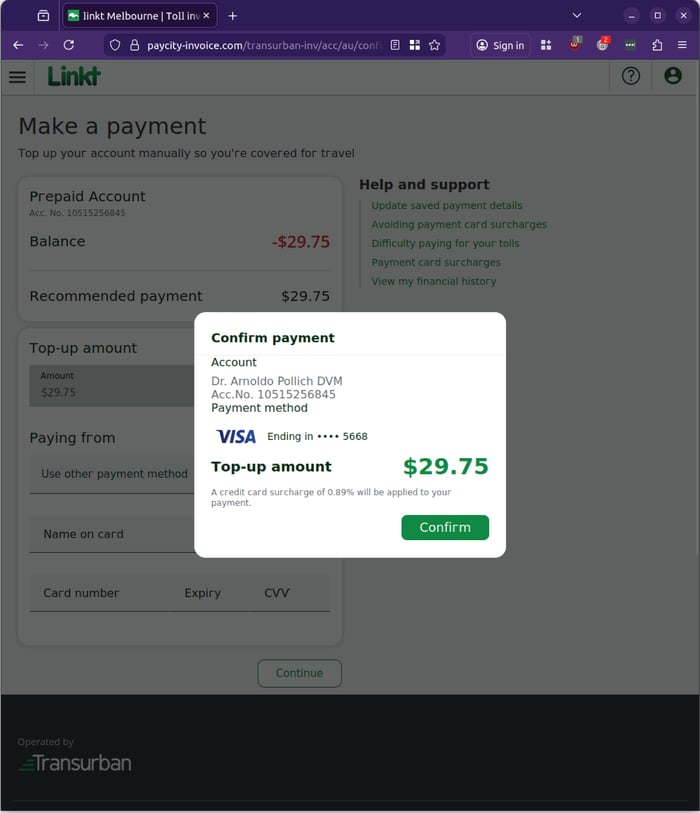
Image: Error state indicating the code has expired or is invalid.
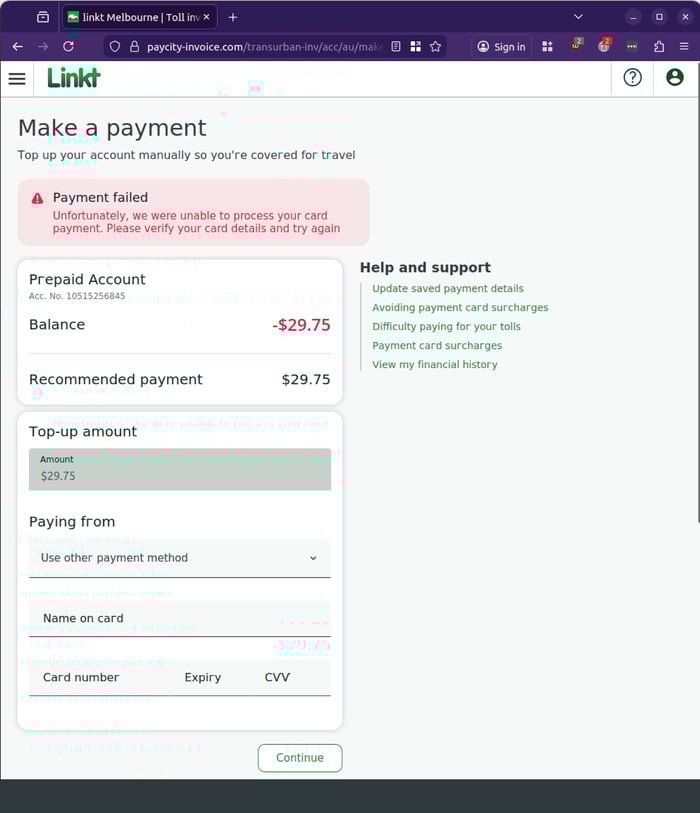
Step 4: Payment failure message (loop to re-enter details)
If the flow fails, the victim may see a “payment failed” message and be prompted to try again. This is designed to keep victims engaged, and potentially extract corrected card data or additional verification attempts.
Image: “Payment failed” error message.
Why this matters for organisations
Business leaders and security teams should treat scams like this as more than a nuisance.
- It is designed for speed and compliance. The flow mimics a normal payment experience that users are conditioned to complete quickly.
- It targets money and identity. Credit card details plus a verification code can enable real-time fraud.
- It increases risk through human workload. Every payment-themed email that reaches staff creates a decision point, one more opportunity for a mistake, one more issue for finance or IT to investigate.
Reducing this risk is not about asking staff to become fraud detectives. It is about reducing the number of high-risk emails reaching them in the first place.
What to tell your team to look for
- Linkt-branded messages where the sender domain does not match the real organisation
- Emails that are mostly one large image with a single “pay now” style link
- Urgent “overdue” language designed to trigger fast action
- Any website asking for card details and then requesting an SMS verification code
Stay Safe, Know the Signs
MailGuard advises all recipients of these emails to delete them immediately without clicking on any links. Responding or providing personal details can lead to identity theft, data breaches, and financial losses.
Avoid emails that:
- Aren’t addressed to you personally.
- Are unexpected and urge immediate action.
- Contain poor grammar or miss crucial identifying details.
- Direct you to a suspicious URL that isn’t associated with the genuine company.
Many businesses turn to MailGuard after a near miss or incident. Don't wait until it's too late. Reach out to our team for a confidential discussion by emailing expert@mailguard.com.au or calling 1300 30 44 30.
One Email Is All That It Takes
All that it takes to devastate your business is a cleverly worded email message that can steal sensitive user credentials or disrupt your business operations. If scammers can trick one person in your company into clicking on a malicious link or attachment, they can gain access to your data or inflict damage on your business.
For a few dollars per staff member per month, you can protect your business with MailGuard's specialist AI-powered, zero-day email security. Special Ops for when speed matters! Our real-time zero-day, email threat detection amplifies our client’s intelligence, knowledge, security and defence. Talk to a solution consultant at MailGuard today about securing your company's inboxes.
Stay up-to-date with MailGuard's latest blog posts by subscribing to free updates. Subscribe to weekly updates by clicking on the button below.