MailGuard has intercepted a new phishing campaign impersonating UPS. The emails tell recipients that a package is being held because an outstanding USD $8.00 packaging fee needs to be paid before delivery can continue.
The scam uses familiar UPS branding, convincing tracking-style references and a relatively small payment request to encourage recipients to follow the link. From there, victims are taken through a series of fake payment and verification pages designed to collect credit card information, SMS codes and online banking credentials.
A convincing package payment notice
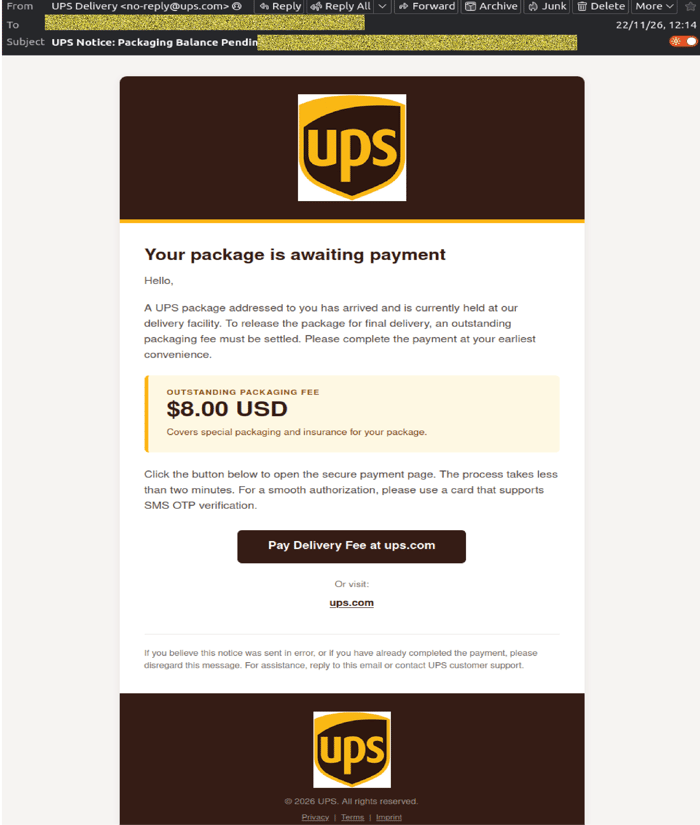
The phishing email arrives with the display name “UPS Delivery” and is designed to resemble a routine delivery notification.
MailGuard has observed two subject line variations:
“UPS Notice: Packaging Balance Pending on [tracking reference]”
and
“UPS: Settle $8.00 to Release Package ([tracking reference])”
The reference changes between emails, with examples including:
- 1ZZDY1TO0159540563
- 1ZZJOEVF7210954525
- 1Z0DQXLC8916177981
- 1Z1U6XP08025188801
The message tells recipients that a UPS package addressed to them has arrived at a delivery facility but cannot be released until an outstanding packaging fee is settled.
A highlighted section puts the “Outstanding Packaging Fee” at $8.00 USD, claiming the amount covers special packaging and insurance.
The recipient is then encouraged to click a prominent “Pay Delivery Fee at ups.com” button to complete the payment.
The email also states that the process should take less than two minutes and recommends using a card that supports SMS OTP verification. That instruction becomes particularly relevant as the phishing process continues.
Example phishing content shown using UPS branding. Not affiliated with UPS.
The fraudulent UPS delivery email claims that an $8.00 USD packaging fee must be paid before a package can be released.
Sender details designed to appear legitimate
The email presents the following sender information:
Display name: UPS Delivery
Display address: no-reply(@)ups(.)com
Sending address: no-reply(@)ups(.)com
At first glance, these details may make the message appear genuine.
However, recipients should not rely on the visible sender address alone when deciding whether an email can be trusted. A better indication appears when the recipient examines where the links actually lead.
All links observed in the malicious HTML email direct users to a web application deployed through Google Apps Script, rather than a legitimate UPS payment page.
How the scam works
Step 1: The link.
The links in the email direct recipients to a Google Apps Script web application at an address beginning:
script[.]google[.]com/macros/s/
The phishing pages themselves display UPS logos, colours and delivery-related content, but the browser shows that they are being served through Google Apps Script.
A banner visible above the phishing content also states:
“This application was created by a Google Apps Script user.”
This provides an important clue that the page is not being served from the legitimate UPS website.
Step 2: The fake packaging fee
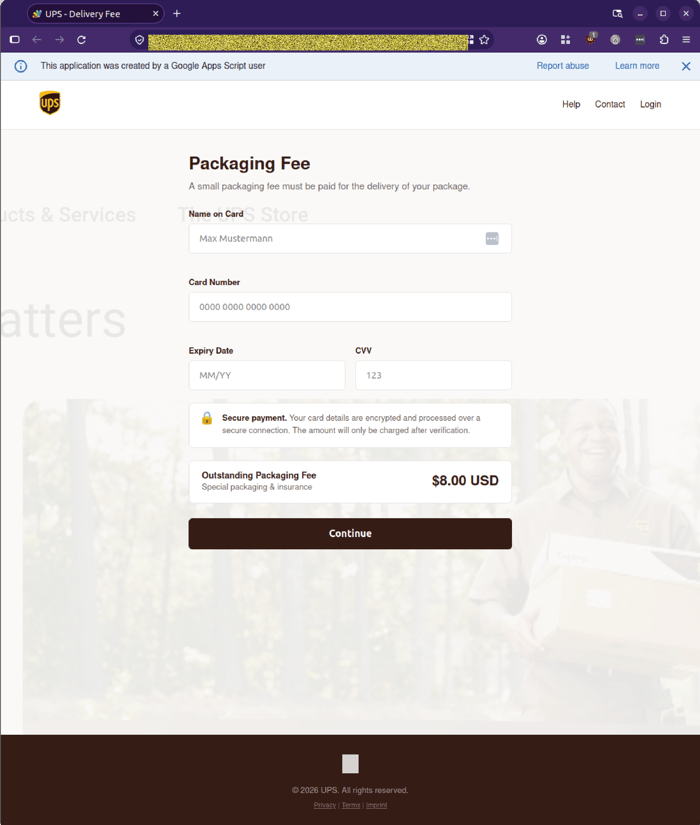
The first page is headed “Packaging Fee” and tells victims that a small fee must be paid for delivery of their package.
The page asks for:
- Name on card
- Card number
- Expiry date
- CVV
The amount is again displayed as $8.00 USD, described as an outstanding fee for “special packaging & insurance”.
To make the transaction look more trustworthy, the page includes a “Secure payment” notice claiming that card details are encrypted and processed over a secure connection.
These assurances are part of the phishing page and should not be treated as evidence that the transaction is legitimate.
Example phishing content shown using UPS branding. Not affiliated with UPS.
The fake “Packaging Fee” page asks victims to provide their cardholder name, card number, expiry date and CVV.
Step 3: The processing screen
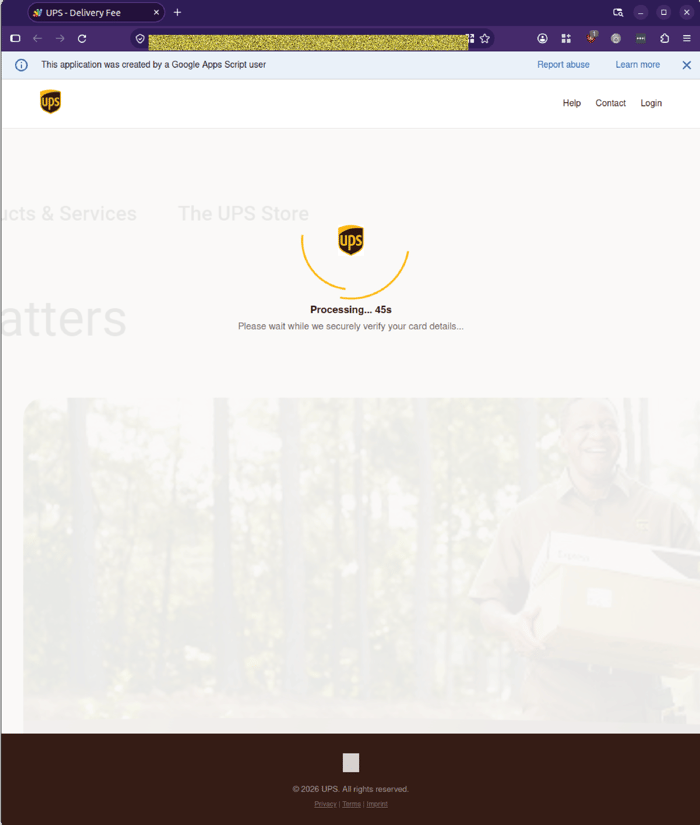
After card information is submitted, victims are shown another UPS-branded page displaying a countdown and the message:
“Processing... 45s”
The page asks the victim to wait while the website supposedly verifies the card details securely.
This processing screen helps create the impression that a genuine payment is taking place before moving the victim to the next stage.
Similar loading screens appear between other stages of the phishing process, making the experience feel more like an ordinary payment workflow.
Example phishing content shown using UPS branding. Not affiliated with UPS.
The fraudulent processing screen displayed while the phishing site claims to be verifying the victim’s card details.
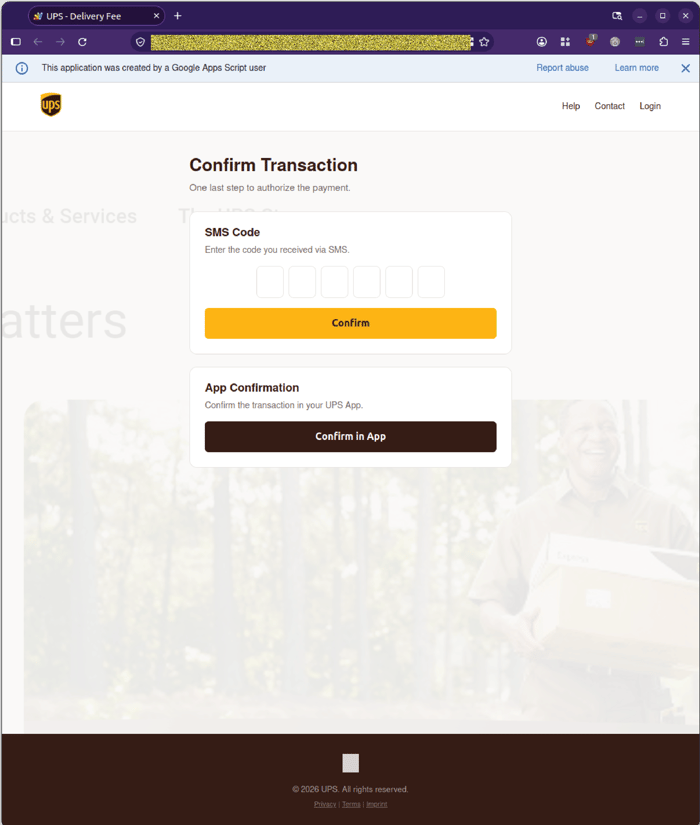
Step 4: SMS verification
The next screen is titled “Confirm Transaction” and asks the victim to enter an SMS code.
Six boxes are provided for the verification code, together with a “Confirm” button. The page also offers an apparent alternative to “Confirm in APP”.
The request for an SMS code is particularly significant because one-time passcodes may be used to authorise transactions or verify access to financial accounts.
Recipients should never provide an SMS security code in response to an unexpected delivery email or through a website reached from one.
Example phishing content shown using UPS branding. Not affiliated with UPS.
The fake “Confirm Transaction” page attempts to collect an SMS verification code from the victim.
Step 5: Bank of Scotland login
The scam then escalates beyond collecting card details.
After another loading screen, victims are presented with a page headed “Bank Of Scotland Plc Login”.
The page claims:
“Sign in with your bank credentials to pay the packaging fee.”
Victims are then asked to provide their:
- Online banking username
- Password
A genuine delivery payment should not require customers to disclose their online banking username and password. This is a strong indication that the website is attempting to steal banking credentials rather than simply collect the advertised $8.00 fee.
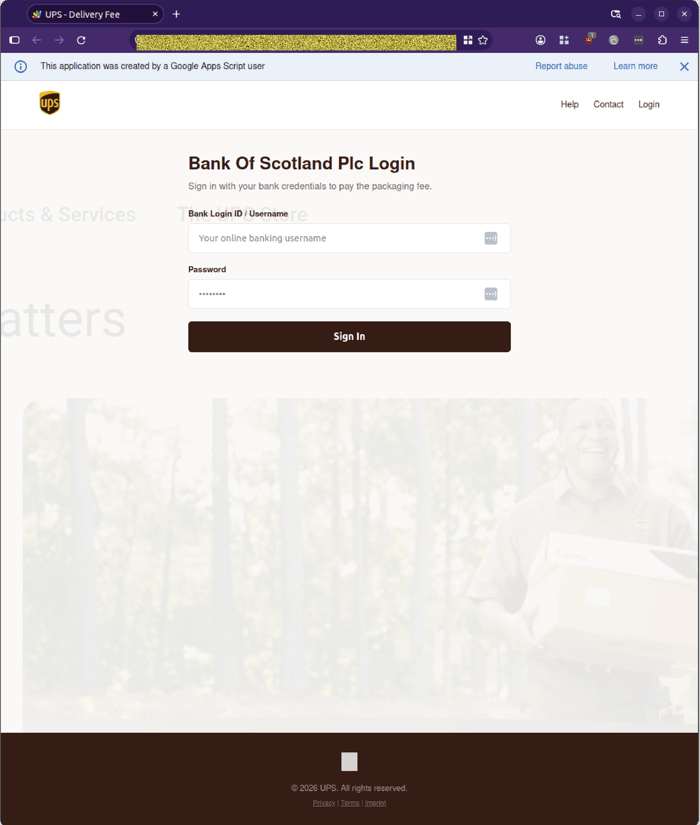
Example phishing content shown using UPS and Bank of Scotland branding. Not affiliated with UPS or Bank of Scotland.
The fraudulent banking login asks victims to enter their online banking username and password.
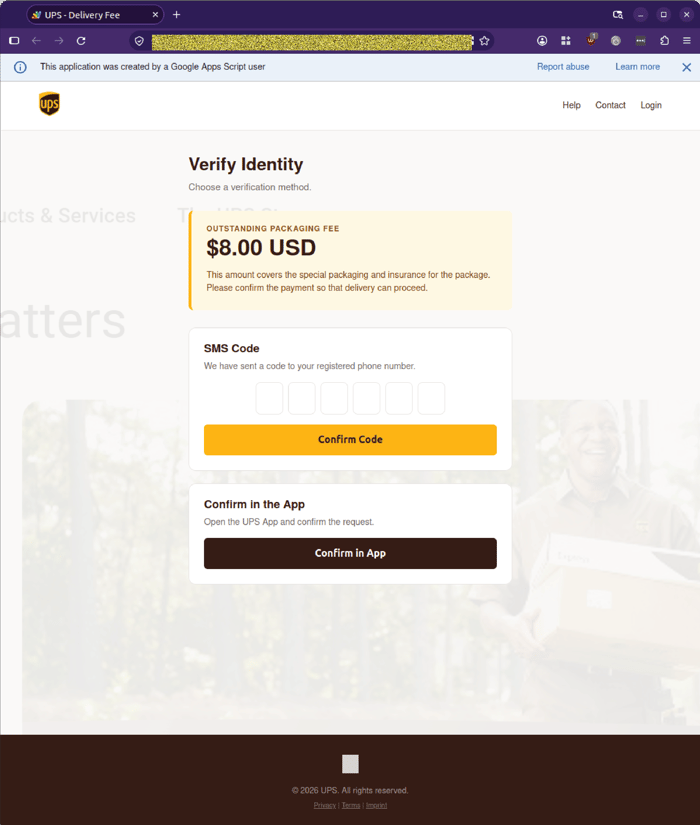
Step 6: Another verification request
After the banking login, victims encounter another page titled “Verify Identity”.
The $8.00 USD packaging fee is again displayed prominently, and the victim is told that a code has been sent to their registered phone number.
The page provides another six-digit SMS field and also presents a “Confirm in APP” option.
By requesting additional verification information after already collecting card and banking credentials, the scammers may be attempting to capture multiple pieces of information needed to access or transact from the victim's financial accounts.
Example phishing content shown using UPS branding. Not affiliated with UPS.
The fake “Verify Identity” page asks victims to submit another SMS code or approve a request through an app.
Step 7: The payment is declined
When fake information was entered during analysis, the final page displayed a “Payment Declined” message.
It claims:
“Card Not Accepted”
and tells the victim that the card was declined because SMS OTP verification is not supported.
The page then warns:
“ACTION REQUIRED — DELIVERY AT RISK”
Victims are encouraged to use another card that supports SMS OTP verification and complete the $8.00 USD packaging fee before the supposed delivery window expires.
Selecting “Pay with Another Card” returns the victim to the original payment screen.
This creates an opportunity for the attackers to collect information from another payment card while using the threat of a delayed or returned package to keep the victim engaged.
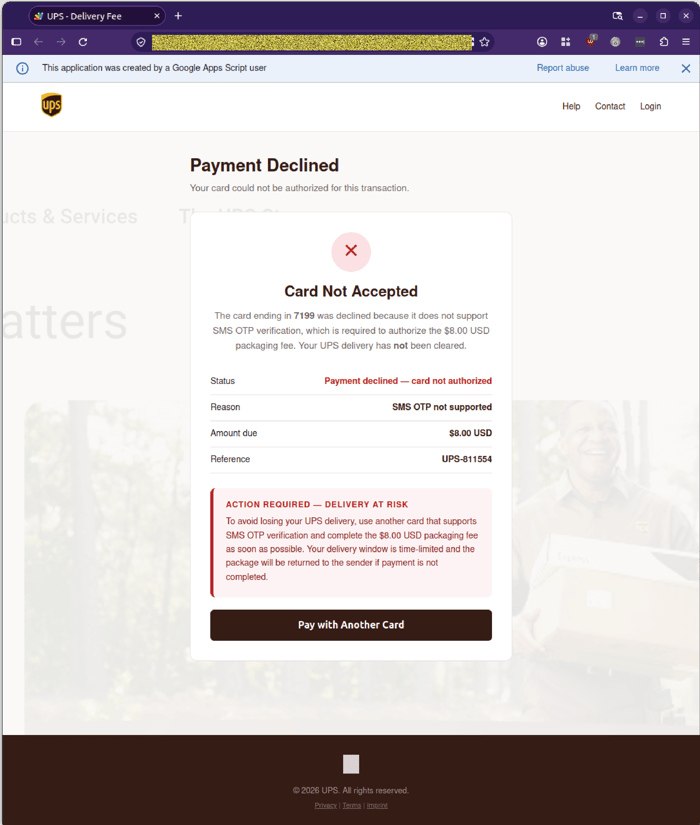
Example phishing content shown using UPS branding. Not affiliated with UPS.
The fake “Payment Declined” page encourages victims to provide another card after claiming that the first card does not support SMS OTP verification.
What to watch out for
- An unexpected packaging charge. The email claims that an $8.00 USD fee needs to be paid before a UPS delivery can proceed.
- Links that don't lead to UPS. The phishing pages are hosted through script[.]google[.]com, rather than the official UPS website.
- The Google Apps Script warning. The page itself states that the application was created by a Google Apps Script user.
- Requests for complete card details. Victims are asked for a cardholder name, card number, expiry date and CVV.
- Requests for SMS verification codes. The scam asks for one-time codes as the victim moves through the fake transaction.
- Requests for banking credentials. One stage asks specifically for a Bank of Scotland online banking username and password.
- Repeated verification requests. The phishing sequence includes more than one request for an SMS code.
- Pressure to use another card. The final page claims the payment failed and encourages victims to provide another payment card.
If you receive an unexpected UPS delivery or payment request, access the carrier’s genuine website or official app independently rather than following a link supplied in the email.
Indicators for security teams
Display address: no-reply@ups.com
Sending address: no-reply@ups.com
Phishing infrastructure: script[.]google[.]com/macros/s/
Threat type: Phishing
Amount requested: $8.00 USD
Observed subject lines: UPS Notice: Packaging Balance Pending on [random reference] / UPS: Settle $8.00 to Release Package ([random reference])
Stay Safe, Know the Signs
MailGuard advises all recipients of these emails to delete them immediately without clicking on any links. Responding or providing your personal details can result in your sensitive information being used for criminal activity and may have a severe negative impact on your business and its’ financial well-being.
MailGuard urges users not to click links or open attachments within emails that:
- Are not addressed to you by name.
- Appear to be from a legitimate company but use poor English or omits personal details that a legitimate sender would include.
- Are from businesses that you were not expecting to hear from, and/or
- Take you to a landing page or website that is not the legitimate URL of the company the email is purporting to be sent from.
- Many businesses turn to MailGuard after an incident or a near miss, often as a result of an email similar to the one shown above. If unwanted emails are a problem for your business, don’t wait until it’s too late.
Reach out to our team for a confidential discussion by emailing expert@mailguard.com.au or calling 1300 30 44 30.
One Email Is All That It Takes
All that it takes to devastate your business is a cleverly worded email message that can steal sensitive user credentials or disrupt your business operations. If scammers can trick one person in your company into clicking on a malicious link or attachment, they can gain access to your data or inflict damage on your business.
For a few dollars per staff member per month, you can protect your business with MailGuard's specialist AI-powered, zero-day email security. Special Ops for when speed matters! Our real-time zero-day, email threat detection amplifies our client’s intelligence, knowledge, security and defence. Talk to a solution consultant at MailGuard today about securing your company's inboxes.
Stay up-to-date with MailGuard's latest blog posts by subscribing to free updates. Subscribe to weekly updates by clicking on the button below.