Timed for the busy holiday shopping season, MailGuard has intercepted a new run of order confirmation emails that rely on a simple PDF attachment and a fake support phone number to extract money from victims. The lure is generic, timed to confuse shoppers during the holidays, and the payload is a call into a call centre, with the outcome financial loss for victims.
What the email looks like
- Subject and body: short, bland “Thank you! Order2025_…”, with no brand detail in the body.
- Attachment: a PDF “order acknowledgement” that carries familiar retail branding and a transaction summary. At the bottom is a prompt such as, “If this order is in error, please contact the support number above.”
- Sender: claims to be PayPal, but the message originates from a throwaway Gmail address, not a PayPal domain. MailGuard has also observed variants from other vendors like McAfee and Norton, but the objective and tactics remain the same.
The image below shows an example of one of the emails with the attached PDF.
 The attachment, in this case an invoice, includes a warning if recipients did not authorise the purchase, urging that they contact PayPal Support on the phone number provided within 24 hours to avoid account suspension.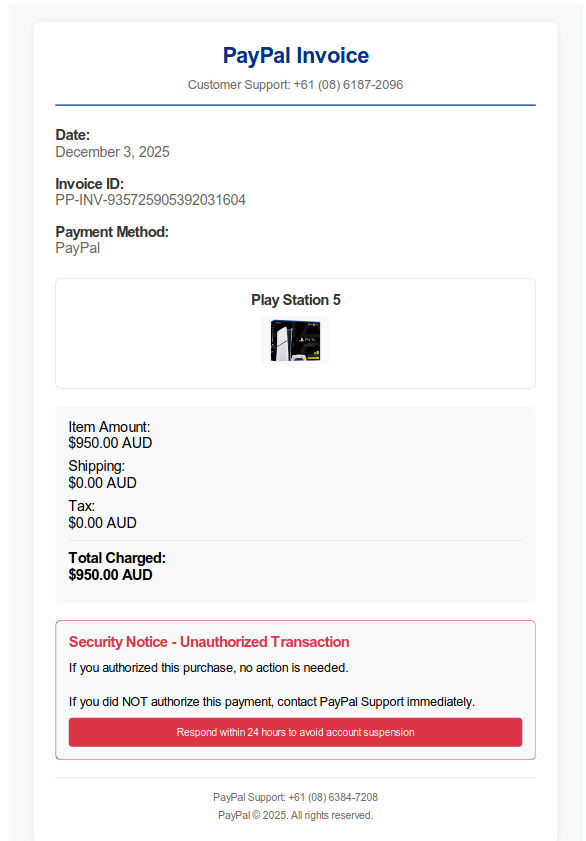
How the scam works
1. The victim opens the PDF, sees an unfamiliar purchase, then calls the fake support number seeking a refund.2. The caller is connected to a scam call centre. The operator pretends to process a refund, then claims to have refunded too much by “mistake”.
3. The victim is pressured to repay the difference using hard-to-trace methods such as gift cards or other anonymous transfers. No money is ever returned. The payment details harvested during the call are often reused.
This campaign avoids links and credential harvest pages, which helps it slide past basic email security filters. The hook is the phone call to the scam support number.
Why it is convincing
- The PDF uses known branding and standard invoice language.
- The urgency of an unexpected purchase nudges quick action.
- The phone channel feels safer than clicking a link, which lowers suspicion.
Indicators to watch
- Order confirmations from a free webmail sender, not the brand’s domain.
- Generic PDFs with minimal detail and a single support number.
- Any request on a call to install remote tools, share banking details, buy gift cards, or move funds to a “safe account”.
Stay Safe, Know the Signs
MailGuard advises all recipients of these emails to delete them immediately without clicking on any links or calling the support numbers. Responding or providing personal details can lead to identity theft, data breaches, and financial losses.
Avoid emails that:
- Aren’t addressed to you personally.
- Are unexpected and urge immediate action.
- Contain poor grammar or miss crucial identifying details.
- Direct you to a suspicious URL or support number, that aren’t associated with the genuine company.
Many businesses turn to MailGuard after a near miss or incident. Don't wait until it's too late. Reach out to our team for a confidential discussion by emailing expert@mailguard.com.au or calling 1300 30 44 30.
One Email Is All That It Takes
All that it takes to devastate your business is a cleverly worded email message that can steal sensitive user credentials or disrupt your business operations. If scammers can trick one person in your company into clicking on a malicious link or attachment, they can gain access to your data or inflict damage on your business.
For a few dollars per staff member per month, you can protect your business with MailGuard's specialist AI-powered, zero-day email security. Special Ops for when speed matters! Our real-time zero-day, email threat detection amplifies our client’s intelligence, knowledge, security and defence. Talk to a solution consultant at MailGuard today about securing your company's inboxes.
Stay up-to-date with MailGuard's latest blog posts by subscribing to free updates. Subscribe to weekly updates by clicking on the button below.