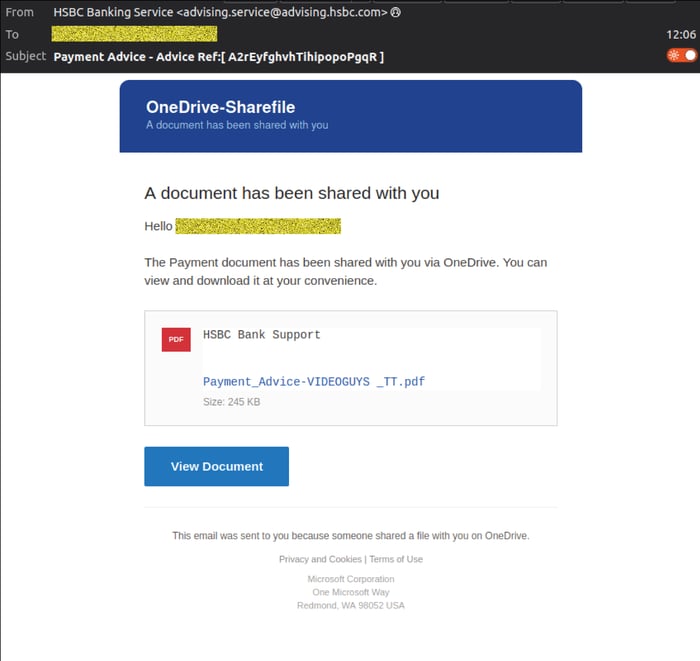
MailGuard has intercepted a phishing email impersonating HSBC, designed to trick recipients into opening a fake shared 'Payment Advice' document and entering their email password. The email claims to come from “HSBC Banking Service” and uses the subject line “Payment Advice - Advice Ref:[ A2rEyfghvhTihipopoP9qR ]”. It tells the recipient that a payment document has been shared with them via OneDrive and invites them to click a “View Document” button.
What the Email Looks Like
The message is designed to look like a file-sharing notification, with references to “OneDrive-Sharefile” and a PDF document named “Payment_Advice-(Recipient Company Name).pdf”. This gives the email a sense of familiarity, particularly for businesses that regularly receive invoices, remittance notices, or payment documents through cloud-based file-sharing platforms.
However, the email does not come from HSBC. While the display address appears as advising.service(at)advising(dot)hsbc(dot)com, MailGuard observed the actual sending address as support(at)nouveau-nes(dot)com.
Example phishing content shown using HSBC branding. Not affiliated with HSBC.
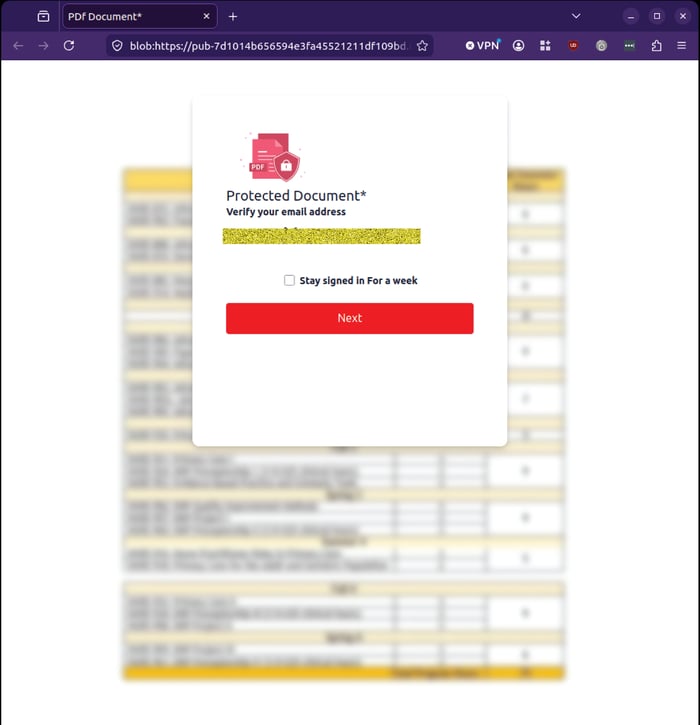
The email contains a single link directing recipients to a phishing site. After clicking the link, the recipient is shown a fake protected document page asking them to verify their email address. In the example reviewed by MailGuard, the email address is already displayed on the page, making the experience appear more personalised and legitimate.
Example phishing content shown using HSBC branding. Not affiliated with HSBC.
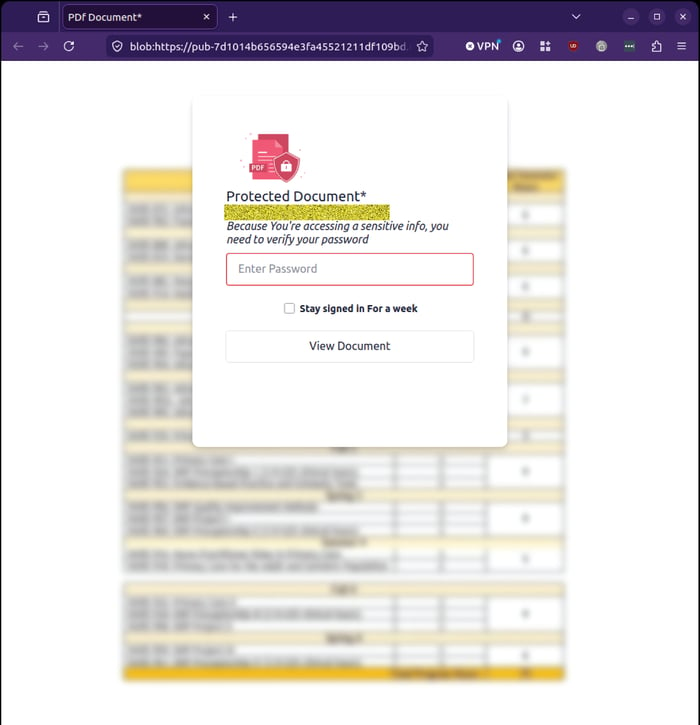
The next page asks the recipient to enter their email password to access the protected document.
Example phishing content shown using HSBC branding. Not affiliated with HSBC.
MailGuard observed that the first password attempt returns an “incorrect password” style error, a common tactic used to encourage victims to enter their credentials again. On the second attempt, the victim is redirected to a Google Drive page showing that the requested file does not exist or has been removed.
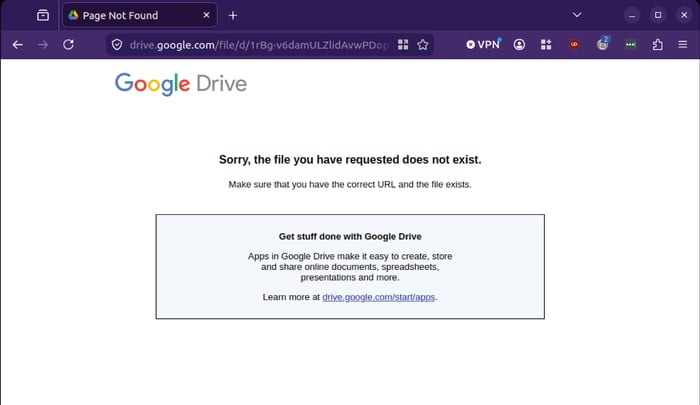
Example phishing content shown using HSBC branding. Not affiliated with HSBC.
This sequence is designed to reduce suspicion. By redirecting to a legitimate Google Drive page after credentials are entered, the scam may leave the victim believing that the document link was simply broken or expired, rather than recognising that their password may have been captured.
Why This Campaign Is Concerning
This campaign brings together several familiar business themes that attackers regularly exploit: banking, payment advice, file sharing, and protected documents. These are all trusted workflows in many organisations. Finance teams, accounts payable staff, executives, and business owners often receive payment advice documents and shared files as part of routine operations.
That familiarity is what makes the scam dangerous. The email does not rely on a dramatic threat or an unusual request. It simply presents what looks like a normal business document waiting to be reviewed. The use of HSBC branding increases credibility, while the OneDrive-style file-sharing format gives recipients a familiar reason to click. The fake protected document page then creates a plausible reason to request a password.
Warning Signs to Watch For
Recipients should be cautious of emails that:
-
Claim to contain payment advice or financial documents you were not expecting.
-
Use file-sharing language but come from a sender that does not match the platform or organisation being impersonated.
-
Ask for your email password to view a document.
-
Display a sender address that appears legitimate but is not the actual sending domain.
-
Redirect through multiple services or end on a “file not found” page after credentials are entered.
-
Create a sense of routine familiarity rather than obvious urgency.
Legitimate file-sharing services should not require users to enter their email password into an unfamiliar web page to access a document.
Stay Safe, Know the Signs
MailGuard advises all recipients of these emails to delete them immediately without clicking on any links. Responding or providing personal details can lead to identity theft, data breaches, and financial losses.
Avoid emails that:
- Aren’t addressed to you personally.
- Are unexpected and urge immediate action.
- Contain poor grammar or miss crucial identifying details.
- Direct you to a suspicious URL that isn’t associated with the genuine company.
Many businesses turn to MailGuard after a near miss or incident. Don't wait until it's too late. Reach out to our team for a confidential discussion by emailing expert@mailguard.com.au or calling 1300 30 44 30.
One Email Is All That It Takes
All that it takes to devastate your business is a cleverly worded email message that can steal sensitive user credentials or disrupt your business operations. If scammers can trick one person in your company into clicking on a malicious link or attachment, they can gain access to your data or inflict damage on your business.
For a few dollars per staff member per month, you can protect your business with MailGuard's specialist AI-powered, zero-day email security. Special Ops for when speed matters! Our real-time zero-day, email threat detection amplifies our client’s intelligence, knowledge, security and defence. Talk to a solution consultant at MailGuard today about securing your company's inboxes.
Stay up-to-date with MailGuard's latest blog posts by subscribing to free updates. Subscribe to weekly updates by clicking on the button below.