MailGuard is intercepting a new phishing campaign that impersonates Linkt, one of Australia's best-known toll road brands. The emails claim a saved payment method has failed and demand immediate payment of an outstanding toll balance. The scam combines a familiar brand, a modest dollar amount and a ticking clock, and that combination is why campaigns like this one so often succeed.
A believable notice, a very specific amount
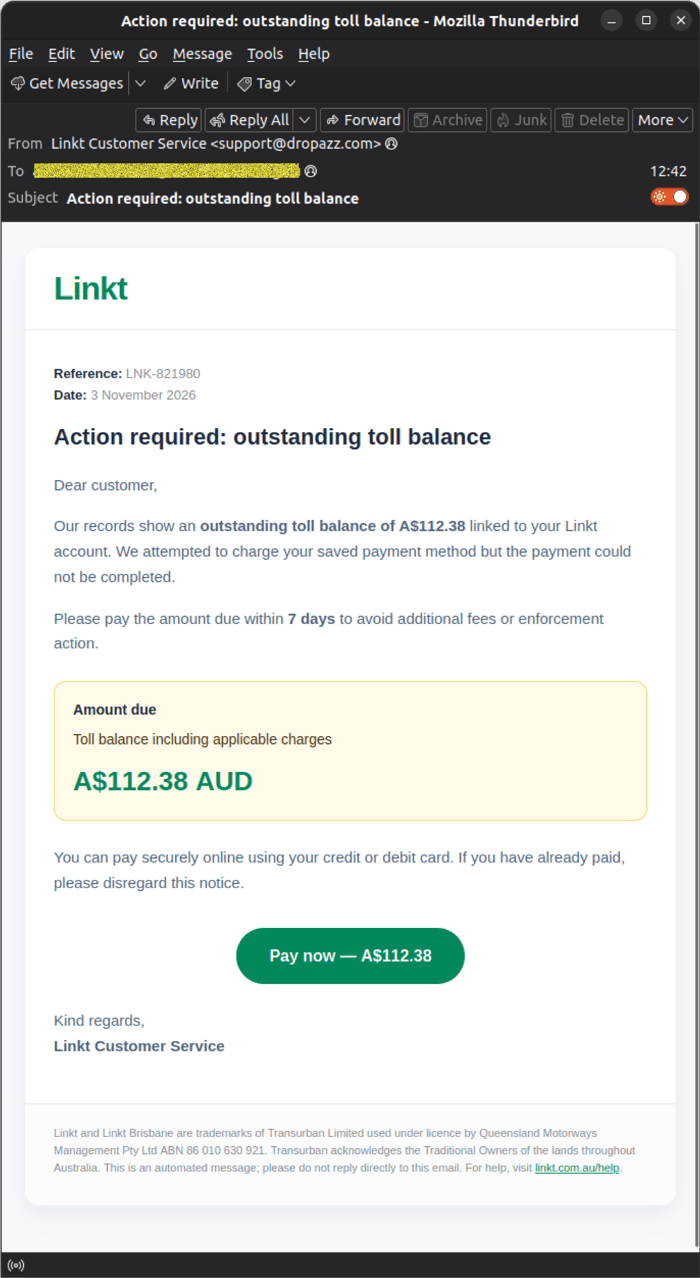
The email, titled “Action required: outstanding toll balance”, arrives in a clean, professionally branded HTML layout. It includes a reference number, a date and a prominent “Amount due” panel showing A$112.38 AUD. MailGuard analysts have observed that this figure is identical in every email, which is unusual for a genuine billing notice, where balances vary from customer to customer.
The message states that Linkt “attempted to charge your saved payment method” and that the payment “could not be completed”. It then instructs the recipient to pay within seven days to avoid “additional fees or enforcement action”, and offers a green “Pay now” button. The footer text appears to be borrowed from legitimate Linkt communications, including trademark wording and a reference to the genuine linkt.com.au/help page, which lends the message further credibility.
 Example phishing content shown using Linkt branding. Not affiliated with Linkt.
The fraudulent “Action required” email, impersonating Linkt Customer Service.
Sender details that don't add up
Although the display name reads “Linkt Customer Service”, the email has no connection to Linkt or its parent company. The display addresses use unrelated domains (5kay[.]store and dropazz[.]com), and the actual sending address is unique to each message, in the format of a long alphanumeric string at send.dropazz[.]com or rsend.5kay[.]store. Randomised, per-message sending addresses make simple sender-based blocklisting far less effective, and they point to a campaign built to evade basic filters.
The greeting is also generic (“Dear customer”), with no name and no account details that a real provider would typically include.
How the scam works
Step 1: The link. The “Pay now” button does not go directly to a malicious site. It points to a shortened link created with GeoTargetly, a legitimate link management service, which then redirects to the phishing site at linktaccount[.]sbs. Shortened URLs hide the true destination from the recipient, and from some security tools that only inspect the initial link.
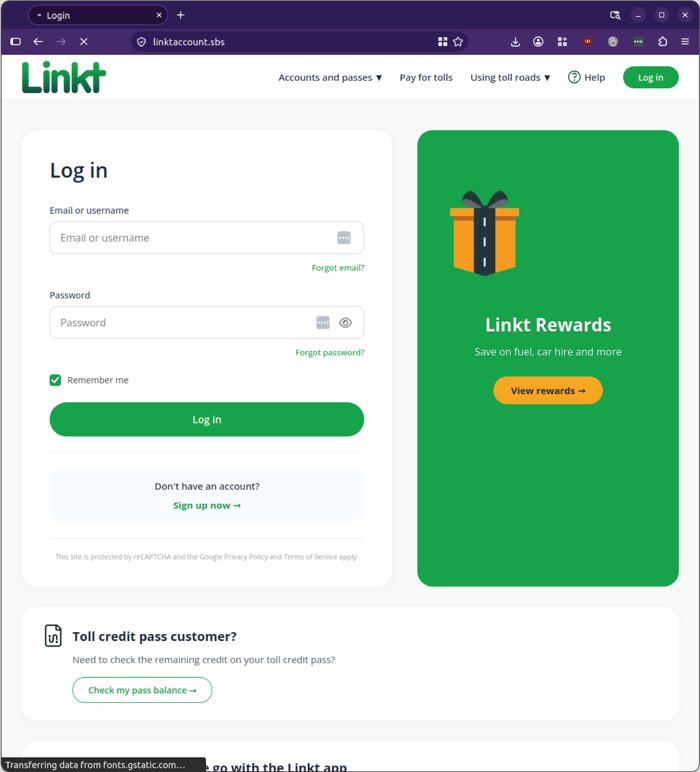
Step 2: The fake login. Victims land on a convincing replica of the Linkt login page asking for an email or username and password. Any credentials entered are captured by the scammers.
Example phishing content shown using Linkt branding. Not affiliated with Linkt.
The fake Linkt login page hosted at linktaccount[.]sbs.
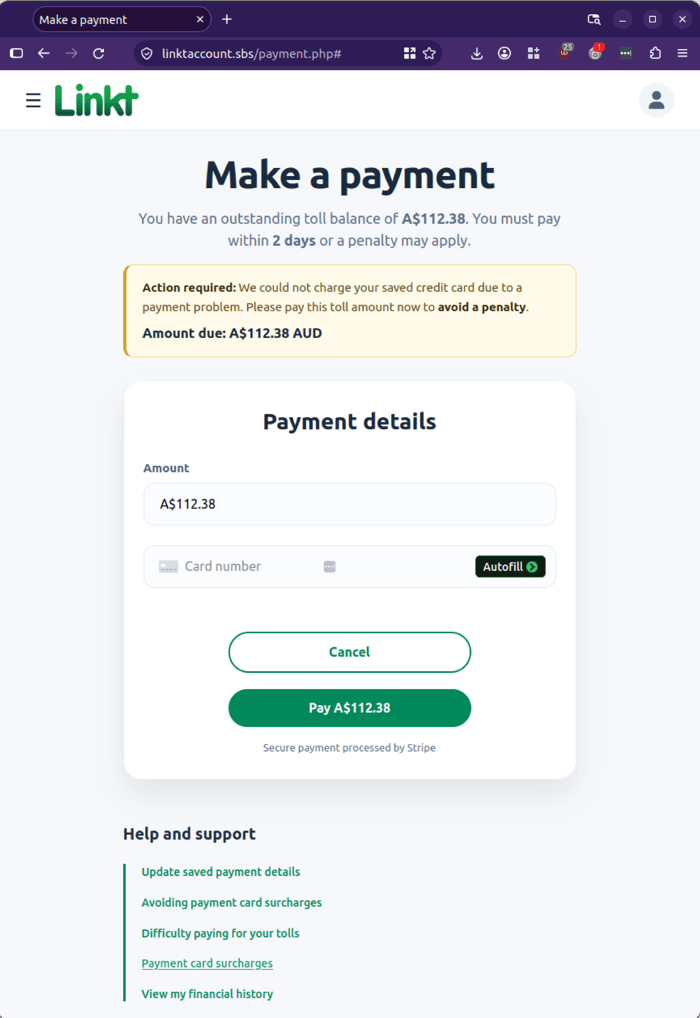
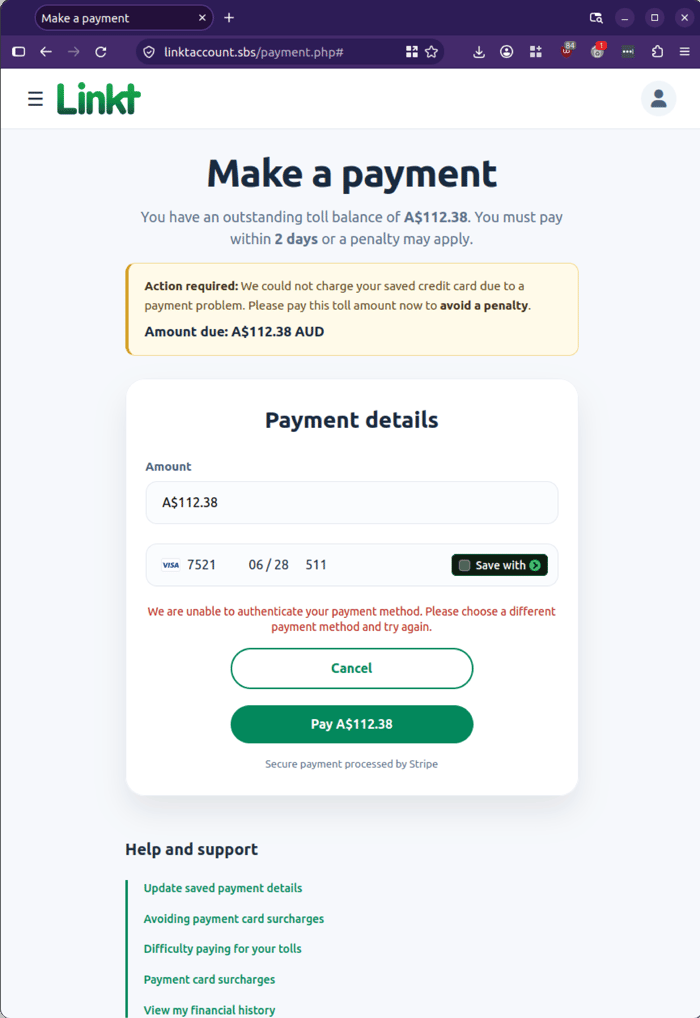
Step 3: The payment page. Victims are then taken to a “Make a payment” page that repeats the A$112.38 figure and reinforces the pressure with new wording: “You must pay within 2 days or a penalty may apply”. The deadline has shortened from the seven days quoted in the email, a classic tactic to rush the victim past any hesitation. The page includes an “Action required” banner, a card entry form and a “Secure payment processed by Stripe” notice, all designed to look like a trusted checkout.
Example phishing content shown using Linkt branding. Not affiliated with Linkt.
The fake payment page, with a shortened deadline and card entry form.
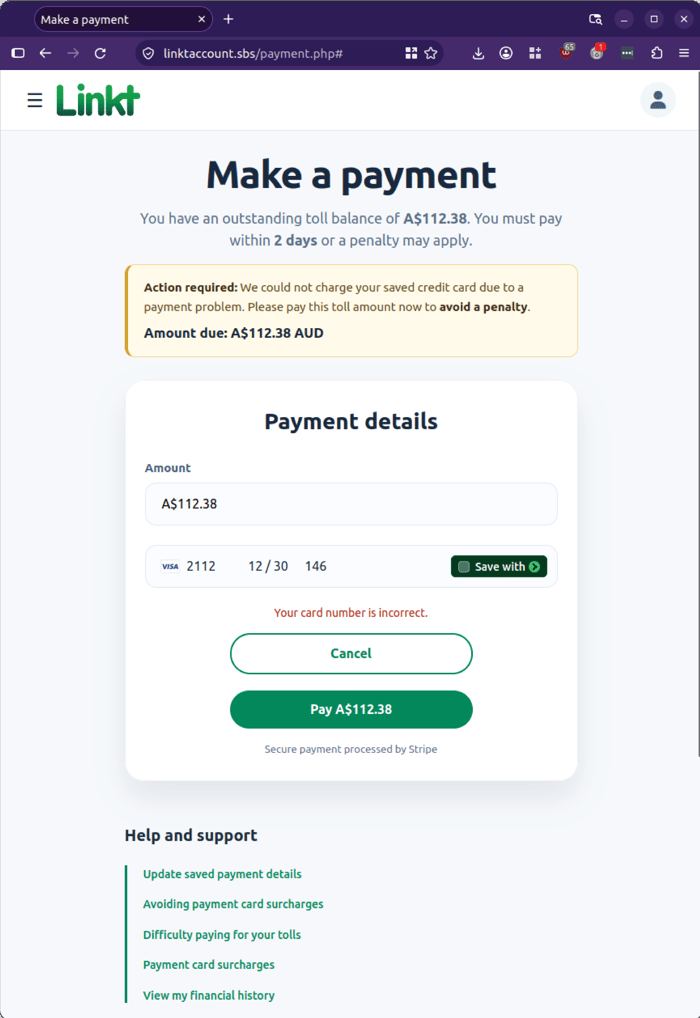
Step 4: Card harvesting. The page asks for full credit card details. MailGuard analysts were unable to progress beyond this stage, but the page returns convincing error messages such as “Your card number is incorrect” and “We are unable to authenticate your payment method. Please choose a different payment method and try again.” Messages like these can keep victims engaged and prompt them to try additional cards, giving the scammers more data to harvest.
Example phishing content shown using Linkt branding. Not affiliated with Linkt.
 Example phishing content shown using Linkt branding. Not affiliated with Linkt.
What to watch out for
-
A generic greeting. “Dear customer” rather than your name.
-
Mismatched sender details. A “Linkt” email from unrelated domains such as dropazz[.]com or 5kay[.]store.
-
Shifting deadlines. Seven days in the email, two days on the website.
-
Shortened links. A “Pay now” button that goes through a link shortener rather than a Linkt address.
-
An unfamiliar web address. The genuine Linkt website is linkt.com.au. The scam site uses linktaccount[.]sbs.
-
Unsolicited demands for payment. If in doubt, go directly to the provider’s official website or app, never through a link in the email.
Indicators for security teams
Sender domains: dropazz[.]com, send.dropazz[.]com, 5kay[.]store, rsend.5kay[.]store
Shortened URL: gtly[.]link/UdsGkBL-T
Phishing site: linktaccount[.]sbs
Subject: Action required: outstanding toll balance
Amount: A$112.38
Stay Safe, Know the Signs
MailGuard advises all recipients of these emails to delete them immediately without clicking on any links. Responding or providing your personal details can result in your sensitive information being used for criminal activity and may have a severe negative impact on your business and its’ financial well-being.
MailGuard urges users not to click links or open attachments within emails that:
- Are not addressed to you by name.
- Appear to be from a legitimate company but use poor English or omits personal details that a legitimate sender would include.
- Are from businesses that you were not expecting to hear from, and/or
- Take you to a landing page or website that is not the legitimate URL of the company the email is purporting to be sent from.
- Many businesses turn to MailGuard after an incident or a near miss, often as a result of an email similar to the one shown above. If unwanted emails are a problem for your business, don’t wait until it’s too late.
Reach out to our team for a confidential discussion by emailing expert@mailguard.com.au or calling 1300 30 44 30.
One Email Is All That It Takes
All that it takes to devastate your business is a cleverly worded email message that can steal sensitive user credentials or disrupt your business operations. If scammers can trick one person in your company into clicking on a malicious link or attachment, they can gain access to your data or inflict damage on your business.
For a few dollars per staff member per month, you can protect your business with MailGuard's specialist AI-powered, zero-day email security. Special Ops for when speed matters! Our real-time zero-day, email threat detection amplifies our client’s intelligence, knowledge, security and defence. Talk to a solution consultant at MailGuard today about securing your company's inboxes.
Stay up-to-date with MailGuard's latest blog posts by subscribing to free updates. Subscribe to weekly updates by clicking on the button below.