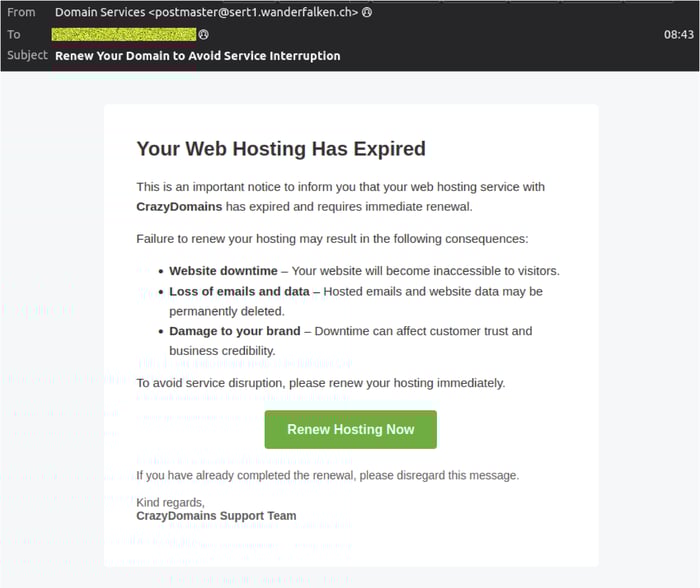
MailGuard is detecting and blocking a phishing campaign designed to pressure recipients into “renewing” a domain or hosting service, then harvesting credit card details, and attempting to capture additional verification codes and a card PIN. The email presents as an urgent service notice from “Domain Services”, warning that web hosting has expired and claiming the recipient must act immediately to avoid downtime, data loss, or reputational damage. The call to action directs users to a fraudulent payment journey that imitates a legitimate billing experience, but is hosted on an unrelated domain.
What the scam looks like
In the example intercepted by MailGuard’s filter network, the message:
- Uses the subject line: “Renew Your Domain to Avoid Service Interruption”
- Claims: “Your Web Hosting Has Expired” and urges immediate renewal to avoid disruption
- Signs off as “CrazyDomains Support Team”
- Appears to come from:
- Display name: Domain Services
- From address: postmaster(at)sert1(dot)wanderfalken(dot)ch
How the scam works
This campaign is straightforward, and effective, because it borrows a familiar business fear, service interruption, and turns it into a payment trap.
Step1, the lure:
The email claims a hosting or domain service has expired and frames the consequence as urgent and costly, downtime, data loss, brand impact. The aim is to rush a decision before the recipient verifies the sender or checks their actual domain registrar.
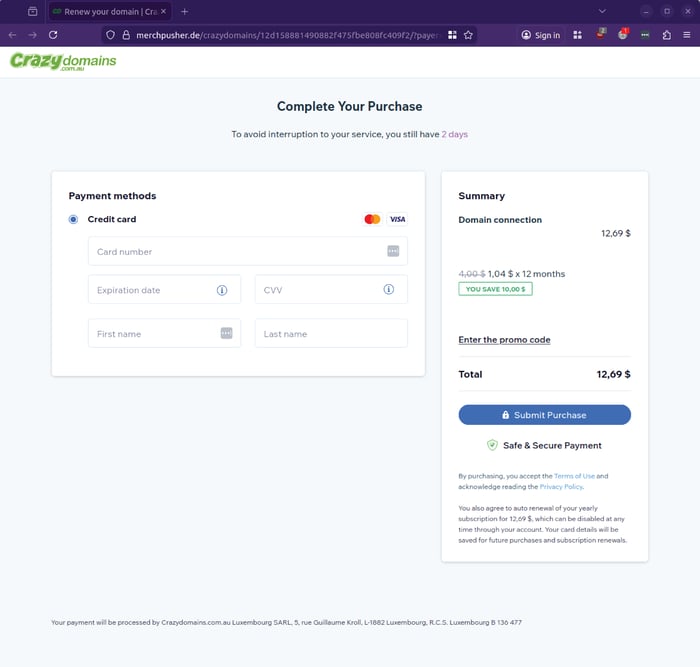
Step2, credit card capture:
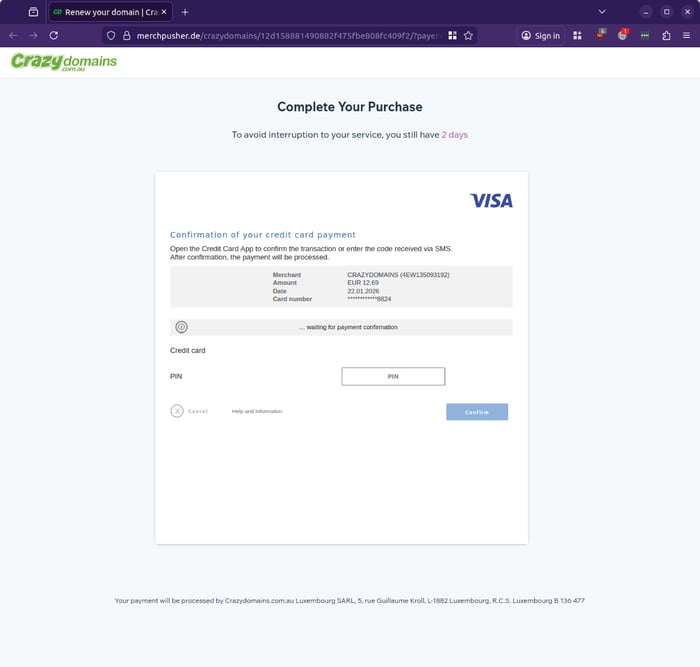
Clicking through takes the victim to a page titled “Complete Your Purchase”, requesting credit card details. The page includes an order summary and a “Submit Purchase” action, which can create a false sense of legitimacy.
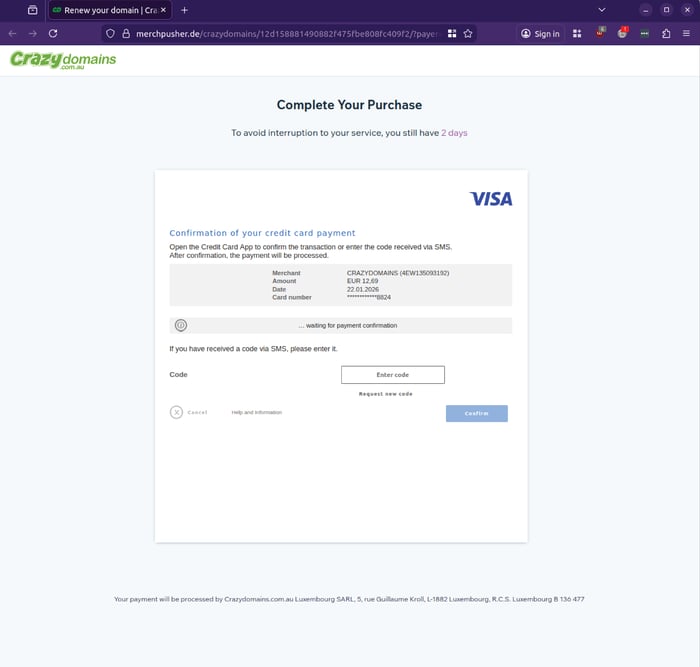
Step3, code capture:
After card details are entered, the next screen requests a code received via SMS or prompts the user to confirm a transaction in their banking app. This mirrors real card verification flows, and may be used to authorise an attempted charge.
Step 4, PIN capture attempt:
In the observed sequence, the flow then attempts to capture a card PIN. This isa major red flag, reputable online merchants do not ask for your card PIN via a web form. MailGuard’s team did not proceed past this step.
Key red flags to share with your team
Even when a phishing email looks polished, the underlying signals often give it away:
- Sender mismatch
A genuine renewal notice should originate from the provider’s official domain, not an unrelated address like postmaster(at)sert1(dot)wanderfalken(dot)ch. - Pressure, urgency, and fear language
Threats of downtime, data loss, or reputational damage are common social engineering techniques, they push recipients to act before validating. - Payment pages hosted on unrelated domains
In the screenshots provided, the payment flow is hosted on a different domain, not a verified CrazyDomains property. That mismatch alone is enough to stop, and report. - Requests for SMS codes or a card PIN
Attackers increasingly chain steps to defeat safeguards. Any site asking for your SMS code or card PIN should be treated as malicious.
What to do if someone clicked or entered details
If a staff member has interacted with this scam, move quickly, and treat it as a potential financial fraud incident:
- Contact your bank or card issuer immediately, request a block, chargeback guidance, and monitoring for attempted transactions
- Reset passwords if the user reused credentials on the phishing site (even if it “only” asked for card details, some flows also collect personal data)
- Capture the email headers, URLs, and screenshots, then report internally to IT or security for containment and broader warning
- Review email security controls, particularly protections for link redirection, impersonation, and lookalike domains
Why this matters
This campaign is a reminder that phishing does not need to be technically complex to succeed. A credible business scenario, a realistic-looking payment page, and a well-timed sense of urgency can bypass even experienced users, especially when the request feels operational rather than suspicious.
MailGuard continues to monitor threats like this across its filter network and will publish updates as the campaign evolves.
What to tell staff and customers to watch for
Share these practical indicators with teams:
- Be wary of emails that do not address the recipient by name
- Messages urging action via a single button, especially “Renew Hosting Now”
- Sender addresses that do not match the organisation being impersonated
- Renewal processes that request credit card details
- Any page requesting an SMS security code and/or PIN immediately after payment details, particularly when reached via an email link
- Sudden redirects to a legitimate website after entering details, which can be used to disguise the scam
Stay Safe, Know the Signs
MailGuard advises all recipients of these emails to delete them immediately without clicking on any links. Responding or providing personal details can lead to identity theft, data breaches, and financial losses.
Avoid emails that:
- Aren’t addressed to you personally.
- Are unexpected and urge immediate action.
- Contain poor grammar or miss crucial identifying details.
- Direct you to a suspicious URL that isn’t associated with the genuine company.
Many businesses turn to MailGuard after a near miss or incident. Don't wait until it's too late. Reach out to our team for a confidential discussion by emailing expert@mailguard.com.au or calling 1300 30 44 30.
One Email Is All That It Takes
All that it takes to devastate your business is a cleverly worded email message that can steal sensitive user credentials or disrupt your business operations. If scammers can trick one person in your company into clicking on a malicious link or attachment, they can gain access to your data or inflict damage on your business.
For a few dollars per staff member per month, you can protect your business with MailGuard's specialist AI-powered, zero-day email security. Special Ops for when speed matters! Our real-time zero-day, email threat detection amplifies our client’s intelligence, knowledge, security and defence. Talk to a solution consultant at MailGuard today about securing your company's inboxes.
Stay up-to-date with MailGuard's latest blog posts by subscribing to free updates. Subscribe to weekly updates by clicking on the button below.