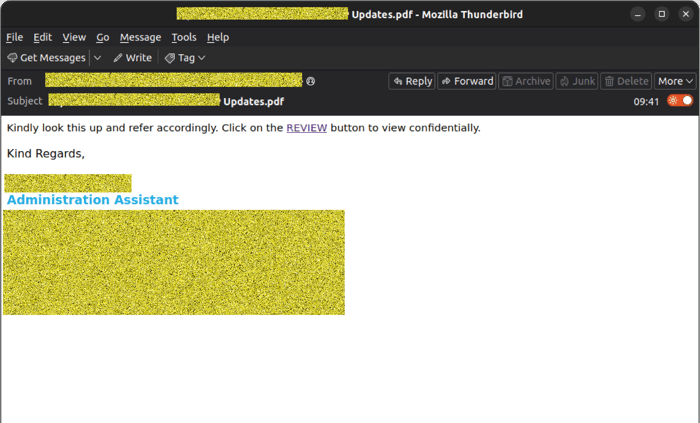
A new phishing campaign intercepted by MailGuard is exploiting a tactic that can easily catch busy employees off guard, a message sent from a real, compromised business email account, followed by a second email warning recipients not to open the first message. The compromised sender details have been obscured to protect the company’s identity, but the employee is an Administrative Assistant in the healthcare sector, working on behalf of a medical specialist group.
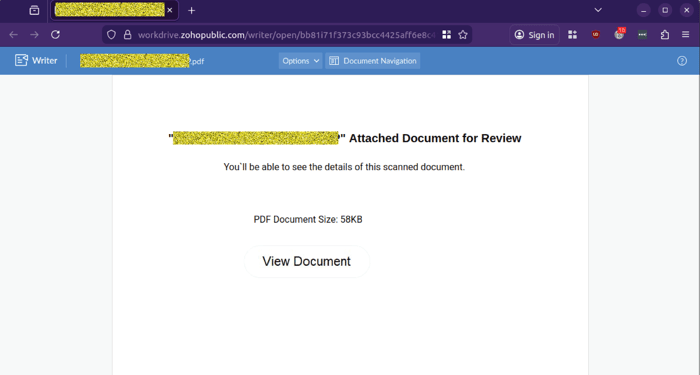
The attack is simple, credible, and dangerous. MailGuard has identified and blocked emails sent from the compromised third-party account, impersonating the employee and designed to steal Microsoft credentials and potentially to install malware on victim networks. The first email delivers a link to what appears to be a PDF document for review. That link leads to a file hosted on a Zoho Work Drive, which then redirects the recipient to a fake Microsoft sign-in page designed to steal login credentials.
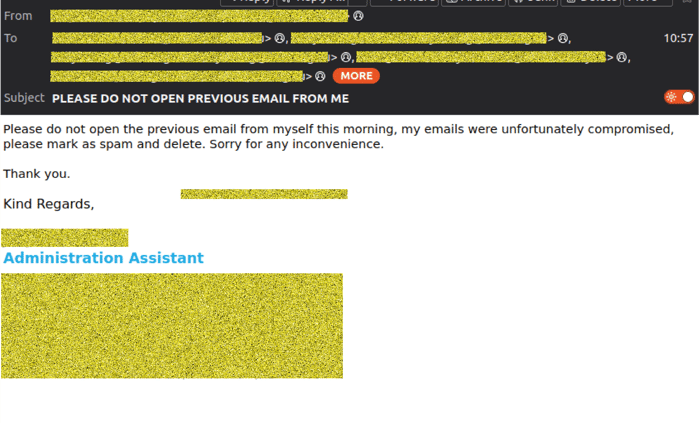
A follow-up apology email from the employee account, claims the sender’s email was compromised and asks recipients to mark the earlier message as spam and delete it. While that may appear helpful or reassuring, it also confirms something important, this campaign relies on the trust associated with a real sender, a real mailbox, and a believable business context. In this instance, a file from an administrative assistant at a medical specialist group. MailGuard blocked this threat before it reached protected users.
Why this scam matters
This is not a sophisticated malware-heavy attack. It does not need to be.
The strength of this campaign comes from social engineering, trust abuse, and the use of legitimate-looking infrastructure. The email appears to come from a genuine business contact, in the form of an Admin Assistant in the healthcare sector. The linked file is publicly hosted on a known cloud collaboration service, and the landing pages are designed to imitate Microsoft’s sign-in flow. To many recipients, the sequence may appear routine and legitimate. That’s exactly why these attacks continue to succeed.
The modern phishing threat is no longer limited to poorly written emails filled with spelling errors and suspicious attachments. Increasingly, attackers are using compromised accounts, cloud-hosted content, and familiar brand impersonation to build a convincing path from inbox to credential theft.
For businesses using Microsoft 365, the consequences of one successful login theft can be severe. Stolen credentials can be used to access email, contacts, files, Teams conversations, shared documents, and other cloud services. They can also be used to launch further phishing attacks internally or externally, spreading the threat through trusted business relationships, healthcare partners and patients.
For the compromised business, they have the embarrassment and humiliation of being breached, and the reputational harm that brings into question the trust that patients and healthcare partners place in the inability of that practice to protect sensitive patient data and records.
How the scam works
MailGuard’s filtering systems observed the following sequence:
1. A legitimate-looking email arrives from a compromised third-party account
The initial message came from a real business email address associated with a compromised sender account. In this case, the display name and sending address appeared consistent with a genuine contact, which increases the likelihood of trust and engagement.
2. The message references a document for review
The phishing email uses a short, businesslike request asking the recipient to review a file, in this case an attachment or link presented as “Updates.pdf”. The language is sparse and generic, but believable enough to invite a click from a distracted user, especially since the file is being shared by an assistant on behalf of a medical specialists group.
3. The link opens a hosted file page on Zoho Work Drive
Rather than linking directly to a suspicious domain, the email directs the user to a publicly hosted file page on Zoho Work Drive. This helps the attacker appear more legitimate and may reduce suspicion, as users often recognise cloud file-sharing brands.
The file page claims the recipient will be able to view the details of a scanned document and includes a “View Document” button.
 4. The user is redirected to a fake Microsoft login page
After clicking through, the victim is taken to a phishing site impersonating Microsoft’s sign-in experience. The first screen asks for the user’s email address.
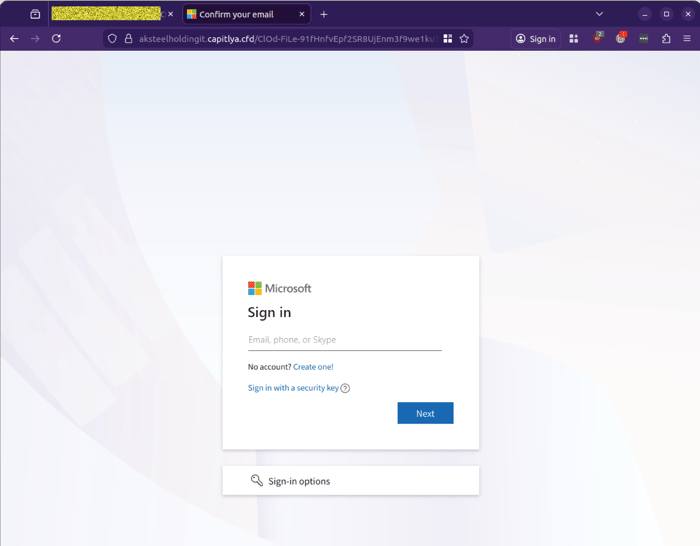
The second page asks for their Microsoft account password.
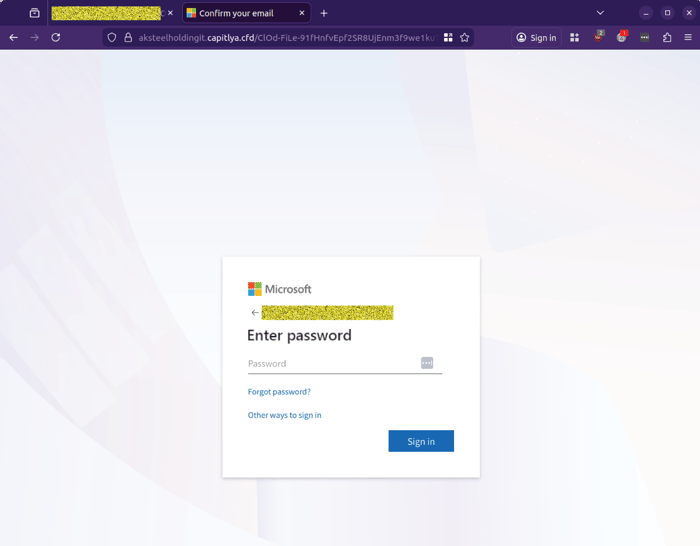
These pages are designed to mimic Microsoft branding and layouts closely enough to capture credentials from users who are moving quickly or assuming the workflow is genuine.
5. A second email attempts to contain suspicion
In a further twist, the compromised sender later distributes an apology email warning recipients not to open the earlier message, claiming their mailbox was compromised and advising people to mark it as spam and delete it.
This may be a genuine attempt by the compromised user to warn contacts after discovering the breach, but it also highlights how quickly a compromised mailbox can be weaponised to target trusted recipients.
What to watch out for
There are several warning signs in this campaign that business users and security teams should note.
The first is the use of a real sender account. This can lower suspicion significantly because the sender may be known to the recipient, or at least appear to belong to a genuine organisation.
The second is the use of cloud-hosted content. Attackers increasingly abuse reputable file-sharing and collaboration platforms because the links appear less suspicious than an unknown or obviously malicious domain.
The third is the use of a credential harvesting flow that imitates Microsoft 365. Microsoft-themed login prompts remain a highly effective lure because so many businesses depend on Microsoft services every day.
The fourth is urgency without context. Messages that ask recipients to review a file or act quickly, but provide little detail, should always be treated with caution, especially when they lead to an external site requesting credentials.
Why leadership should pay attention
For business leaders, this threat is another reminder that cyber risk often enters through everyday workflows, not dramatic technical exploits.
A simple request to review a document can become the starting point for account compromise, business email fraud, data exposure, and further downstream attacks. Because the initial message comes from a real mailbox and uses familiar cloud services, employees may not realise they are dealing with an attack until credentials have already been handed over.
This is why layered email security remains critical.
Security awareness training matters, but it should not be the only line of defence. Staff are busy. Attackers know that. Modern phishing campaigns are designed to exploit trust, familiarity, and routine behaviour. The most effective protection is stopping dangerous messages before employees are forced to make a judgment call.
MailGuard’s real-time, AI-powered, threat detection blocked this campaign before it reached protected users, preventing recipients from engaging with the malicious workflow and helping reduce the likelihood of credential theft and follow-on compromise.
Stay Safe, Know the Signs
MailGuard advises all recipients of these emails to delete them immediately without clicking on any links. Responding or providing personal details can lead to identity theft, data breaches, and financial losses.
Avoid emails that:
- Aren’t addressed to you personally.
- Are unexpected and urge immediate action.
- Contain poor grammar or miss crucial identifying details.
- Direct you to a suspicious URL that isn’t associated with the genuine company.
Many businesses turn to MailGuard after a near miss or incident. Don't wait until it's too late. Reach out to our team for a confidential discussion by emailing expert@mailguard.com.au or calling 1300 30 44 30.
One Email Is All That It Takes
All that it takes to devastate your business is a cleverly worded email message that can steal sensitive user credentials or disrupt your business operations. If scammers can trick one person in your company into clicking on a malicious link or attachment, they can gain access to your data or inflict damage on your business.
For a few dollars per staff member per month, you can protect your business with MailGuard's specialist AI-powered, zero-day email security. Special Ops for when speed matters! Our real-time zero-day, email threat detection amplifies our client’s intelligence, knowledge, security and defence. Talk to a solution consultant at MailGuard today about securing your company's inboxes.
Stay up-to-date with MailGuard's latest blog posts by subscribing to free updates. Subscribe to weekly updates by clicking on the button below.