MailGuard has intercepted a new phishing email campaign impersonating Centrelink and the Australian Government’s myGov service. The scam urges recipients to “review your income and asset information” by a specific due date, but instead directs them to a multi‑step phishing journey designed to steal myGov credentials, SMS codes, identity documents and security question answers.
What the Email Looks Like
The phishing email is formatted to closely resemble an official Centrelink communication. It uses familiar branding, a routine subject line, and language that appears legitimate at first glance.
- Display name: norepy@services.au
- Display address: noreply@edenrideapp.com
- Sending address: unique Amazon SES address per message
- Subject line: Reminder: Review Your Income and Asset Information
The email reminds the recipient to review income and asset information held on record and warns that payments may be affected if the review is not completed. It includes a link to “sign in” to complete the review.
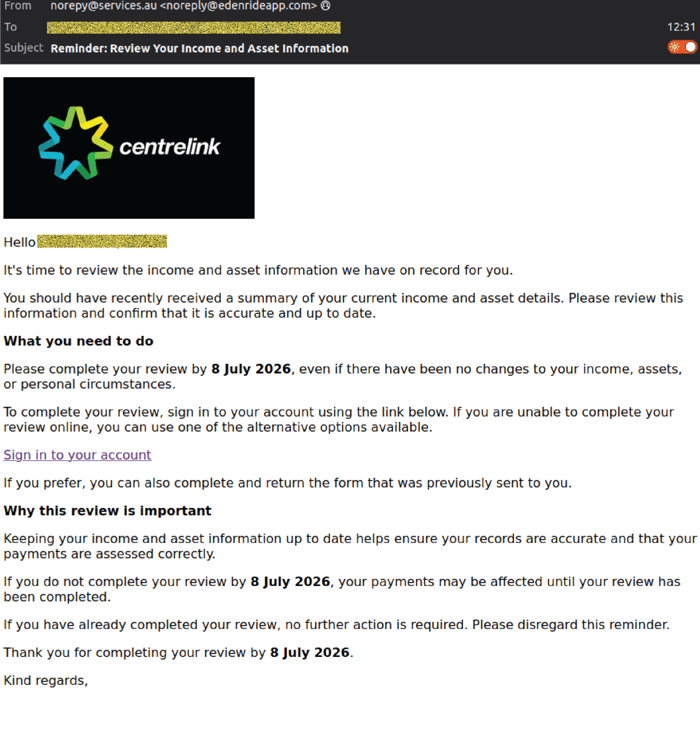 Example phishing content shown using Centrelink branding. Not affiliated with Centrelink.
How The Scam Works
Clicking the link takes the recipient to a phishing site that imitates the myGov portal. The URL visible in the browser is not an official myGov domain and is instead hosted on a lookalike address designed to appear trustworthy.
The first page presents a myGov‑branded landing screen with messaging such as “We’re here to help” and a prominent “Sign in” button, encouraging users to proceed.
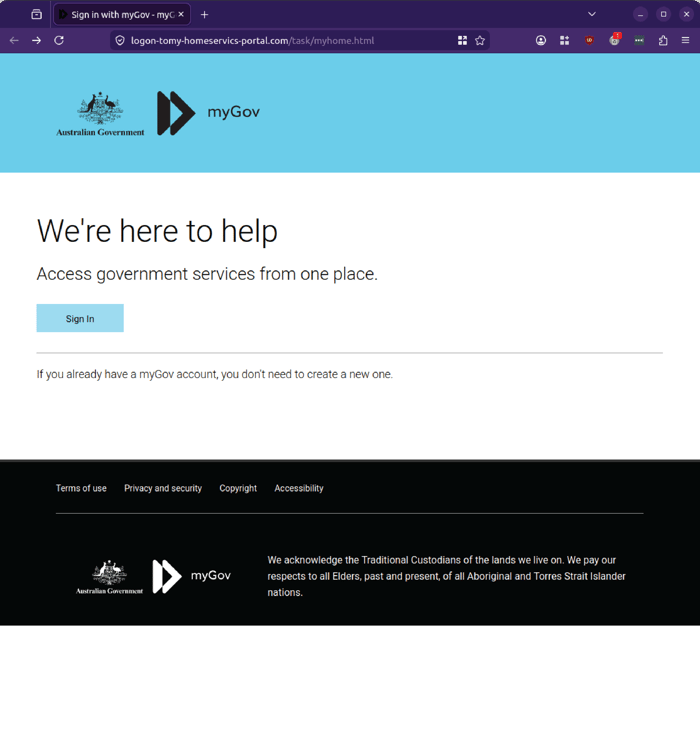 Example phishing content shown using myGov branding. Not affiliated with myGov.
Clicking “Sign in” leads to a login page that closely imitates the myGov sign‑in interface. The page offers options such as Digital ID or passkey, and prominently displays fields for “Username or email” and “Password”, along with a “Sign in” button.
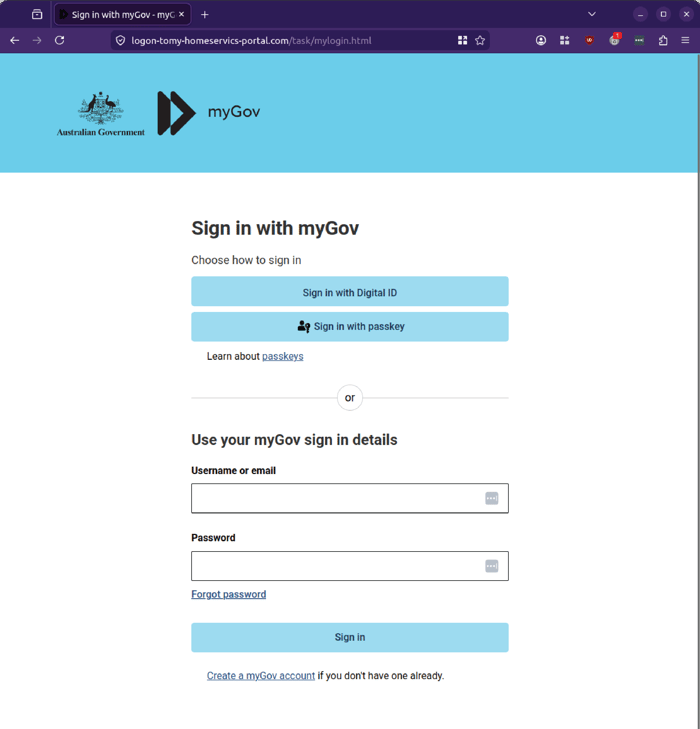
Example phishing content shown using myGov branding. Not affiliated with myGov.
If the user enters their details, the next page displays an error message such as “The information you entered is incorrect. Please try to login again,” and prompts them to re‑enter their username or email and password. This repetition is a common tactic used to validate credentials and encourage users to try alternative combinations, increasing the chance of capturing a working username and password.
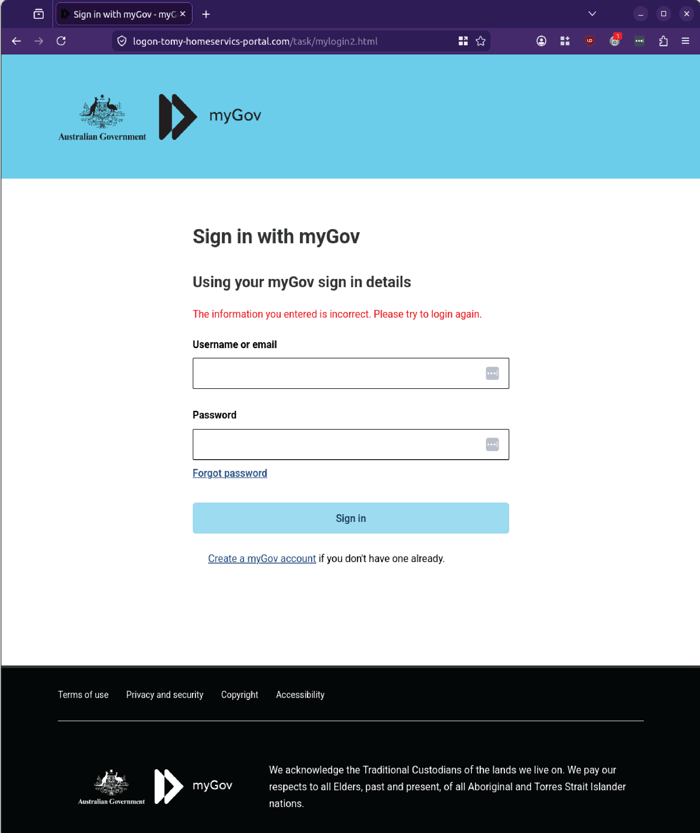
Example phishing content shown using myGov branding. Not affiliated with myGov.
Once credentials are entered, the scam escalates by presenting an “Enter code” page. The user is instructed to input a code sent by SMS to their mobile number and click “Next”. MailGuard’s analysis indicates the attackers are attempting to capture one‑time codes used to secure myGov accounts, potentially enabling them to bypass multi‑factor authentication.
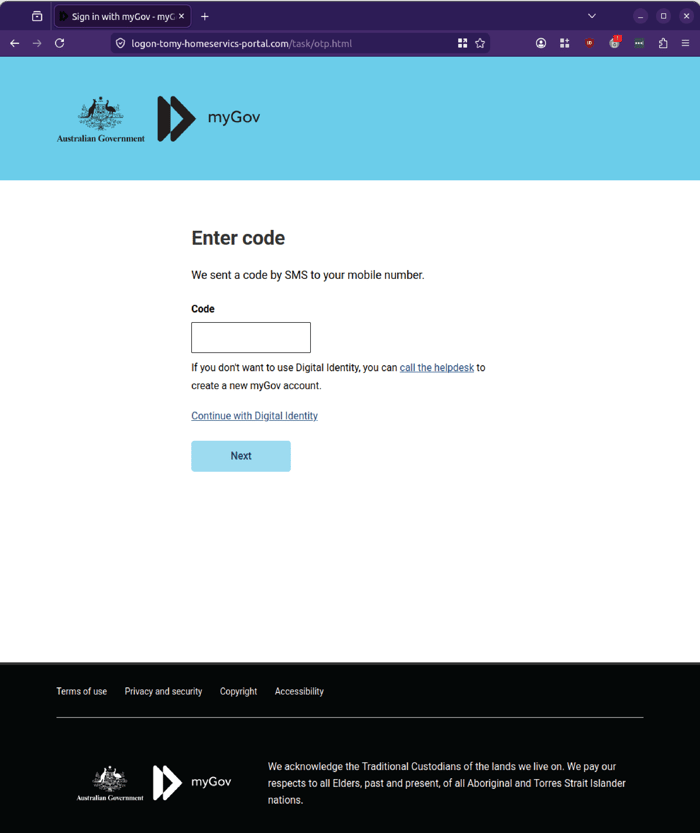
Example phishing content shown using myGov branding. Not affiliated with myGov.
The next page instructs the user to prepare identity documents for verification, such as:
- Medicare card
- Selfie (picture of your face)
- Driver licence
A green “Continue to verification” button invites the user to proceed.
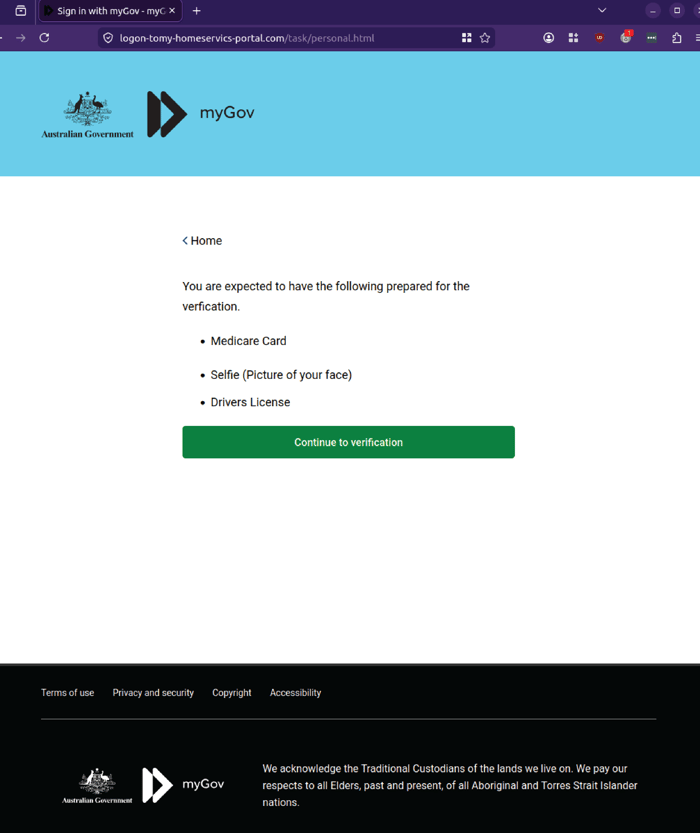
Example phishing content shown using myGov branding. Not affiliated with myGov.
The following page presents a “Personal Information” section with upload fields for “Int’l Passport or Driver License Front” and “Int’l Passport or Driver License Back”, along with a large “VERIFY” button.
The attacker is attempting to harvest high‑value identity documents that can be used for identity theft, account takeover and fraud.
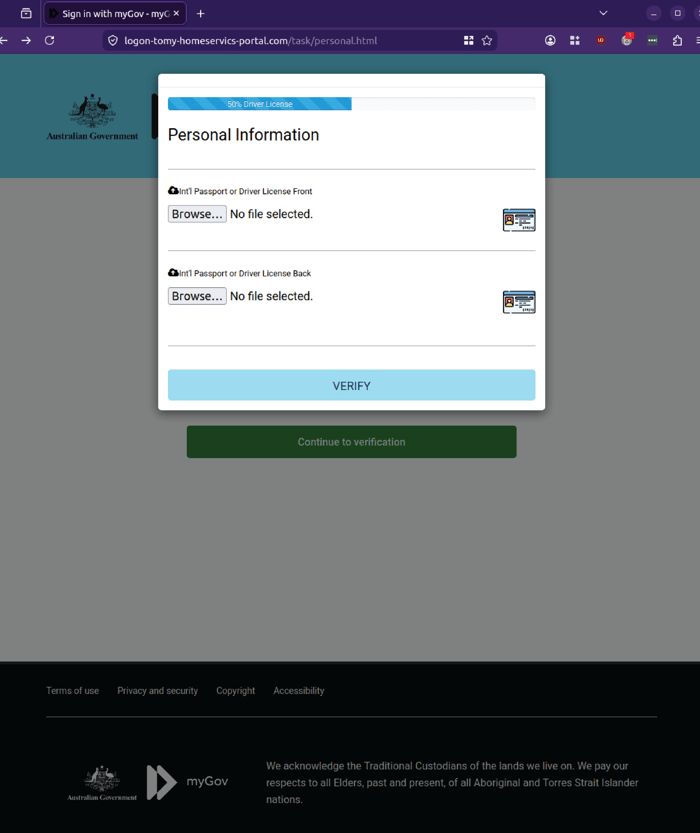
Example phishing content shown using myGov branding. Not affiliated with myGov.
The journey then moves to a “Verify your Security Questions” page. The user is asked to select and answer multiple security questions, with fields for “Security Question 1”, “Security Question 2” and “Security Question 3”, and a “Continue” button.
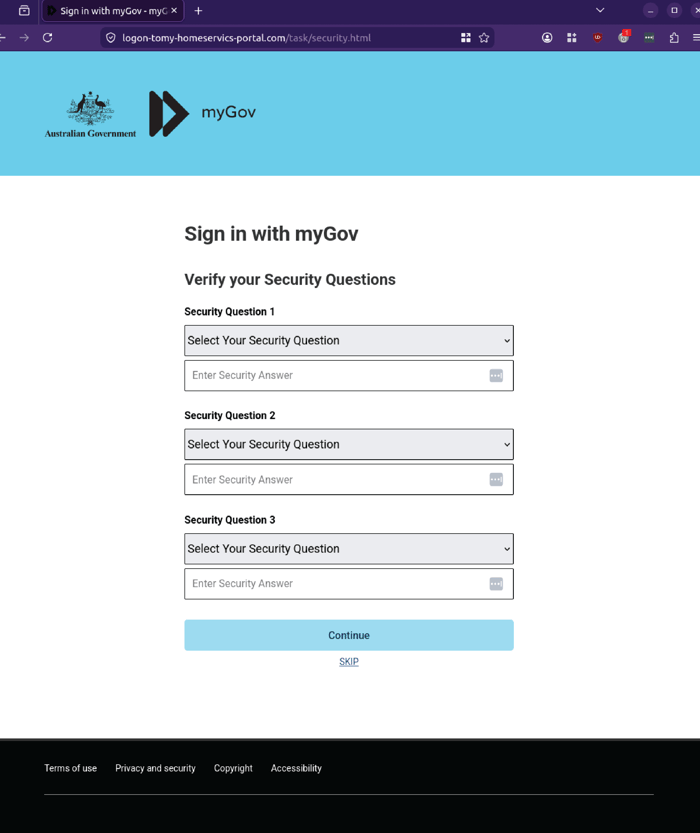
Example phishing content shown using myGov branding. Not affiliated with myGov.
A further “Enter code” page prompts the user to input another SMS code and click “Next”, reinforcing the impression of a legitimate multi‑factor verification process.
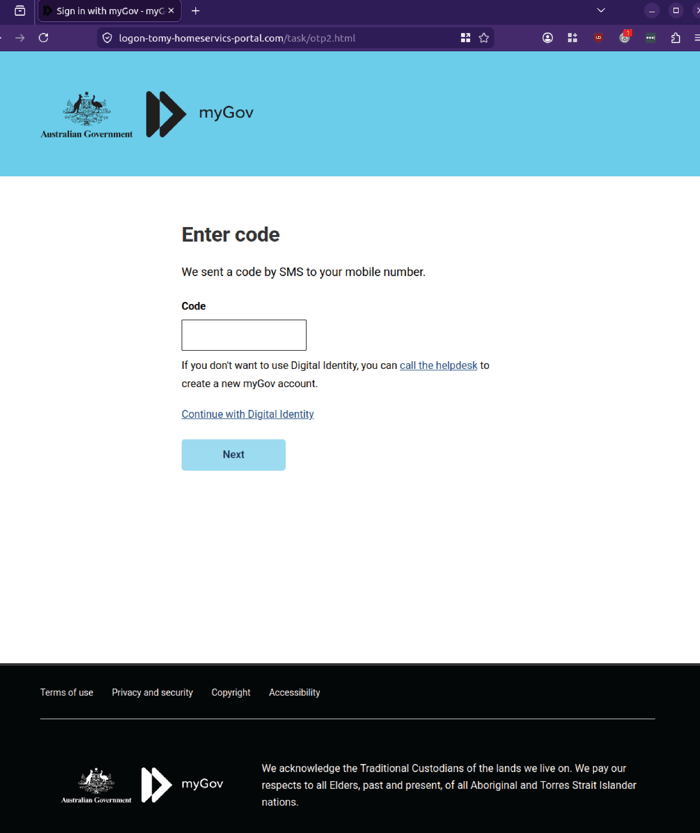
Example phishing content shown using myGov branding. Not affiliated with myGov.
The final page displays a large green checkmark and the message “VERIFICATION COMPLETE”, along with text stating the user is eligible to receive a refund from the Australian Taxation Office and that funds will be deposited within a set timeframe. In testing, the journey did not redirect anywhere beyond this point, suggesting the primary objective is data collection rather than immediate account navigation.
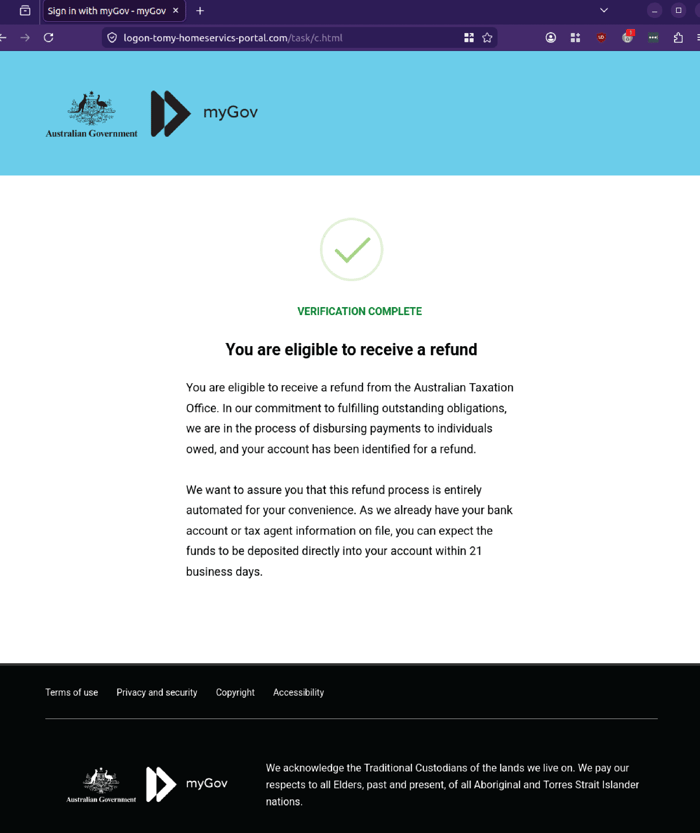
Example phishing content shown using myGov branding. Not affiliated with myGov.
Why This Campaign Is Concerning
This campaign is notable for its depth and persistence. Rather than stopping at a single credential capture page, the attackers have constructed a multi‑step journey that closely mimics official myGov flows, including login, SMS verification, identity document upload, security questions and confirmation messaging.
Each step is designed to feel routine:
- A reminder email from Centrelink
- A familiar myGov landing page
- A standard username and password prompt
- An SMS code entry screen
- Requests for identity documents and security questions
- A final “verification complete” message with a refund notice
Individually, these elements may not raise immediate suspicion. Together, they create a comprehensive identity theft pathway.
For risk, security, technology and business leaders, this type of attack is particularly concerning because it targets:
- Account credentials (username, password)
- Multi‑factor authentication codes (SMS)
- Identity documents (Medicare, driver licence, passport)
- Security question answers
The combination of these data points can enable attackers to take over myGov accounts, access linked services, commit tax fraud, open new accounts, and conduct broader identity‑based attacks.
Warning Signs to Watch For
There are several warning signs in this campaign:
- The email is not sent from an official Services Australia or myGov domain.
- The display address uses noreply@edenrideapp.com, which is unrelated to Centrelink.
- The underlying sending addresses are unique Amazon SES identifiers, not government infrastructure.
- The link in the email is an Amazon SES tracking URL that redirects to a non‑legitimate domain.
- The phishing site uses myGov branding but is hosted on suspicious URLs that do not match the official myGov domain.
- The journey requests multiple high‑value data points, including credentials, SMS codes, identity documents and security question answers.
Recipients should be cautious of any unexpected review or verification emails, especially those that request sensitive information via embedded links. Accessing myGov and other government services via known, bookmarked URLs or official apps, rather than email buttons, significantly reduces the risk of successful phishing attacks.
Stay Safe, Know the Signs
MailGuard advises all recipients of these emails to delete them immediately without clicking on any links. Responding or providing personal details can lead to identity theft, data breaches, and financial losses.
Avoid emails that:
- Aren’t addressed to you personally.
- Are unexpected and urge immediate action.
- Contain poor grammar or miss crucial identifying details.
- Direct you to a suspicious URL that isn’t associated with the genuine company.
Many businesses turn to MailGuard after a near miss or incident. Don't wait until it's too late. Reach out to our team for a confidential discussion by emailing expert@mailguard.com.au or calling 1300 30 44 30.
One Email Is All That It Takes
All that it takes to devastate your business is a cleverly worded email message that can steal sensitive user credentials or disrupt your business operations. If scammers can trick one person in your company into clicking on a malicious link or attachment, they can gain access to your data or inflict damage on your business.
For a few dollars per staff member per month, you can protect your business with MailGuard's specialist AI-powered, zero-day email security. Special Ops for when speed matters! Our real-time zero-day, email threat detection amplifies our client’s intelligence, knowledge, security and defence. Talk to a solution consultant at MailGuard today about securing your company's inboxes.
Stay up-to-date with MailGuard's latest blog posts by subscribing to free updates. Subscribe to weekly updates by clicking on the button below.