A new phishing campaign is impersonating Telstra, using a fabricated duplicate invoice payment to lure recipients into a fake refund process that harvests 'Telstra My Account' login credentials, credit card details, and a one-time SMS code in a single visit.
What the Scam Looks Like
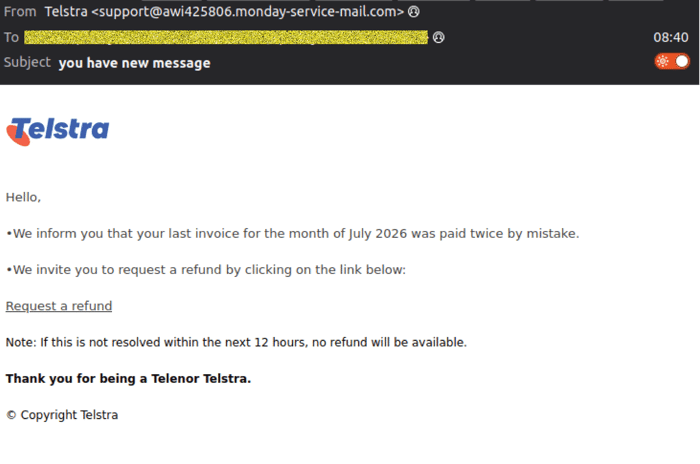
The email itself is deliberately low-key. Rather than a dramatic subject line, it arrives with the generic heading "you have new message", styled to look like a routine account notification. The body tells the recipient their last invoice for July 2026 was accidentally paid twice, and invites them to "request a refund" by clicking a link, adding a 12-hour deadline to create urgency.
A small but telling error appears in the email's sign-off, which thanks the recipient for "being a Telenor Telstra," mixing in the name of an unrelated European telco. It's the kind of slip that's easy to miss at a glance, but a useful tell if you know to look for it.
 Example phishing content shown using Telstra branding. Not affiliated with Telstra.
A rotating sender built to blend in
The email appears to come from Telstra <support(at)awi425806.monday-service-mail(dot)com>, sent through infrastructure associated with a compromised bulk email account, an increasingly common technique that lets scammers send at scale from a domain with an established sending reputation.
The actual sending address is unique for every message, but follows a consistent pattern: "bounces+111710889-" followed by a short hex code, a hyphen, the recipient's own email address, and finally "(at)email.awi425806.monday-service-mail(dot)com." The recipient's own address effectively gets stitched into the sender field of the email attacking them, a detail most people would never think to check, but one that shows how this campaign is being generated and sent programmatically at volume.
Inside the phishing flow
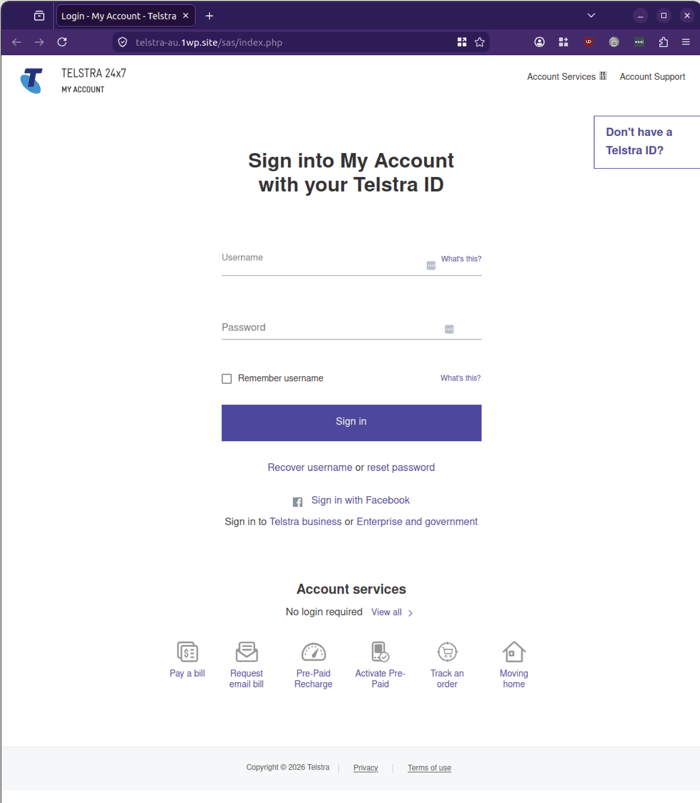
Clicking "Request a refund" leads to a convincing replica of the Telstra My Account login page, hosted on telstra-au.1wp(dot)site, a free web hosting domain with no connection to Telstra.
Step 1: Credentials. The fake login page asks for the visitor's Telstra ID username and password, styled closely enough on the real Telstra login experience that it would pass a quick glance.
 Example phishing content shown using Telstra branding. Not affiliated with Telstra.
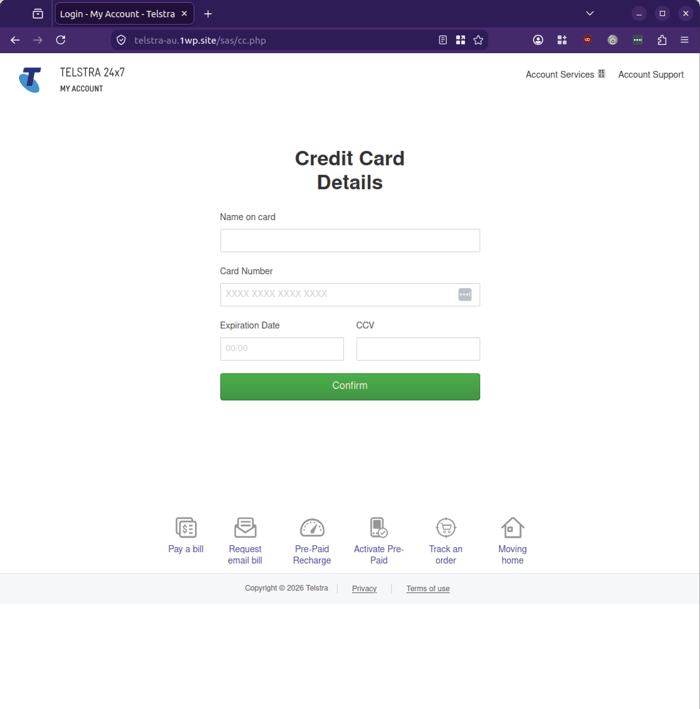
Step 2: Card details. After "signing in," the site moves straight to a Credit Card Details page requesting the name on the card, full card number, expiry date, and CVV, framed as necessary to process the refund.
 Example phishing content shown using Telstra branding. Not affiliated with Telstra.
Step 3: One-time SMS code. The site then asks for a one-time code sent to the victim's phone to "confirm" the refund, complete with card network logos to add a veneer of payment-processor legitimacy.
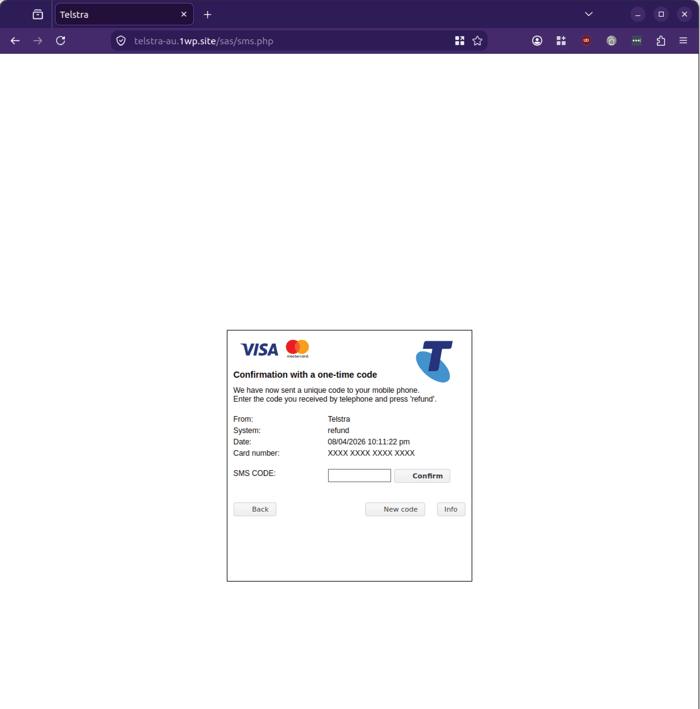
Example phishing content shown using Telstra branding. Not affiliated with Telstra.
When MailGuard's analysts tested this step with fake data, the page returned a "code error" and prompted for a new code to be entered.
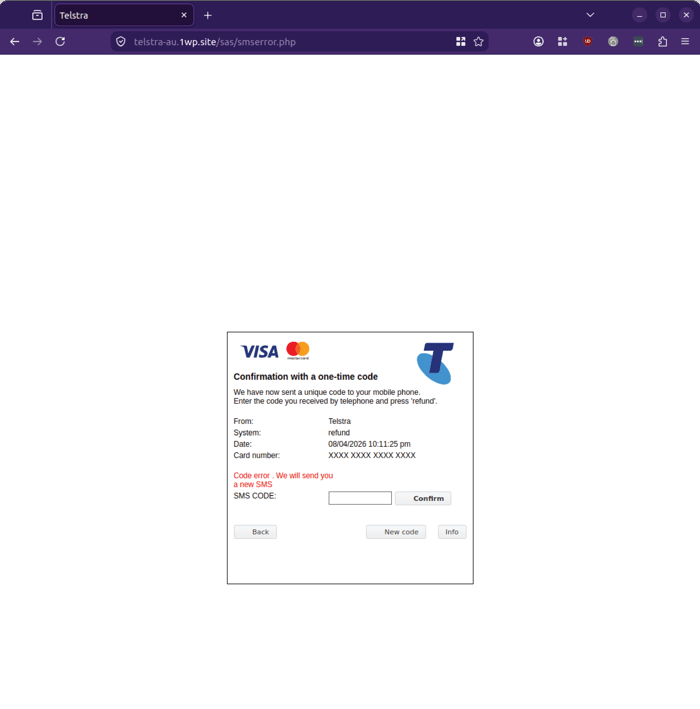 Example phishing content shown using Telstra branding. Not affiliated with Telstra.
Step 4: Fake success page. After a second attempt, the flow ends on a simple confirmation screen reading "your invoice has been paid successfully," before ops notes indicate a genuine visitor would be redirected on to the real Telstra website.
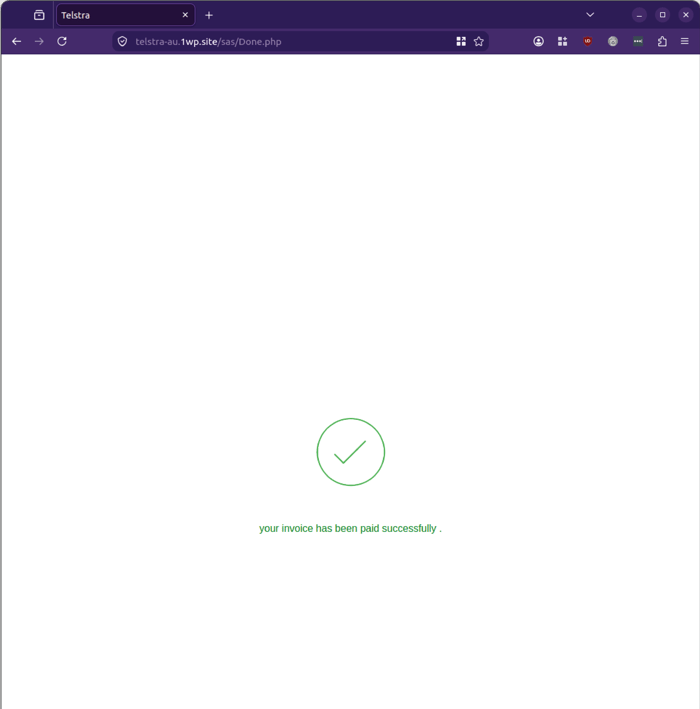 Example phishing content shown using Telstra branding. Not affiliated with Telstra.
Why this scam is worth flagging to your team
A few details make this one more dangerous than a typical credential-phishing attempt:
-
It asks for everything in one visit. Login credentials, full card details, and a live SMS verification code together give an attacker enough to attempt account takeover and unauthorised charges in the same session.
-
The "paid twice" pretext is mundane, not alarming. A billing error is a plausible, low-drama scenario that doesn't immediately trigger the same suspicion a "your account will be suspended" threat might.
- The redirect back to the real Telstra site at the end is a deliberate piece of misdirection, designed to leave the victim believing the process worked normally rather than realising their details have already been captured.
Stay Safe, Know the Signs
MailGuard advises all recipients of these emails to delete them immediately without clicking on any links. Responding or providing personal details can lead to identity theft, data breaches, and financial losses.
Avoid emails that:
- Aren’t addressed to you personally.
- Are unexpected and urge immediate action.
- Contain poor grammar or miss crucial identifying details.
- Direct you to a suspicious URL that isn’t associated with the genuine company.
Many businesses turn to MailGuard after a near miss or incident. Don't wait until it's too late. Reach out to our team for a confidential discussion by emailing expert@mailguard.com.au or calling 1300 30 44 30.
One Email Is All That It Takes
All that it takes to devastate your business is a cleverly worded email message that can steal sensitive user credentials or disrupt your business operations. If scammers can trick one person in your company into clicking on a malicious link or attachment, they can gain access to your data or inflict damage on your business.
For a few dollars per staff member per month, you can protect your business with MailGuard's specialist AI-powered, zero-day email security. Special Ops for when speed matters! Our real-time zero-day, email threat detection amplifies our client’s intelligence, knowledge, security and defence. Talk to a solution consultant at MailGuard today about securing your company's inboxes.
Stay up-to-date with MailGuard's latest blog posts by subscribing to free updates. Subscribe to weekly updates by clicking on the button below.