A new phishing campaign is impersonating myGov, using a fabricated “secure message” notification to lure recipients into a multi‑step web flow designed to harvest myGov login credentials, multiple one‑time SMS codes, security question answers, full name and date of birth, and images of a driver’s licence, all in a single visit.
What the Scam Looks Like
The email itself is deliberately low‑key. Rather than a dramatic subject line, it arrives with the generic heading “You have (1) New Message”, styled to look like a routine myGov or ATO account notification.
The body tells the recipient they have “1 New MyGov Notification” and “1 new secure message(s)” waiting, and invites them to click a blue “View Message” button to review it. The email includes Australian Government and Australian Taxation Office branding, along with language about secure links and legally binding communications, details that make it feel like a standard government notice rather than a threat.
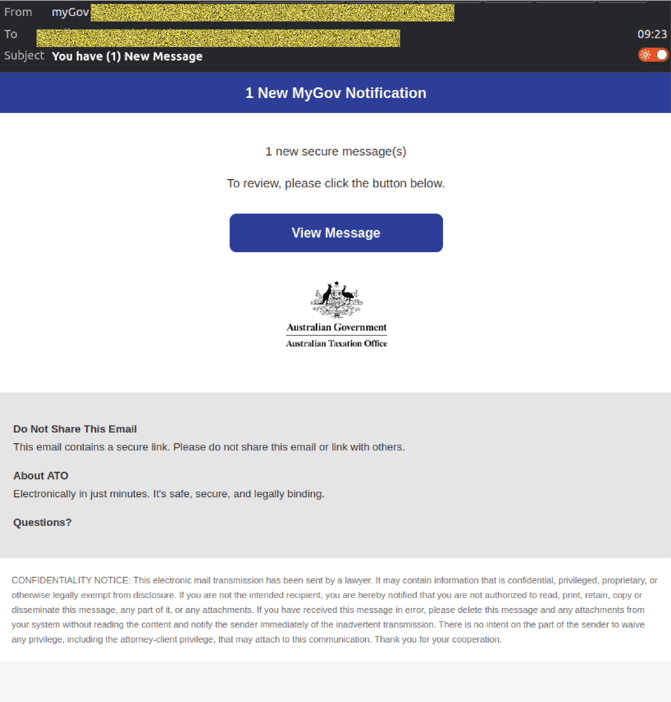 Example phishing content shown using myGov branding. Not affiliated with myGov.
A rotating sender built to blend in
Behind the branding, the sender details tell a different story:
- Display name: myGov
- Display address: workspace(at)sasinm.com
- Sending address: workspace(at)sasinm.com
None of these align with legitimate myGov infrastructure, but the email is styled convincingly enough that a busy staff member or individual taxpayer could miss the mismatch.
Example phishing content shown using myGov and ATO branding. Not affiliated with myGov or the Australian Taxation Office.
Inside the phishing flow
Clicking “View Message” leads to a phishing site that closely mimics the look and feel of the official myGov portal, including Australian Government and myGov logos, familiar colour schemes, and footer acknowledgements.
From there, the fake site walks visitors through a staged, escalating sequence of pages.
Step 1: Username and password
The first page is a “Sign in with myGov” screen requesting:
- Username or email
- Password
It closely mirrors the genuine myGov sign‑in experience, including links such as “Forgot username” and “Forgot password”, and a button to “Create a myGov account if you don’t have one already.”
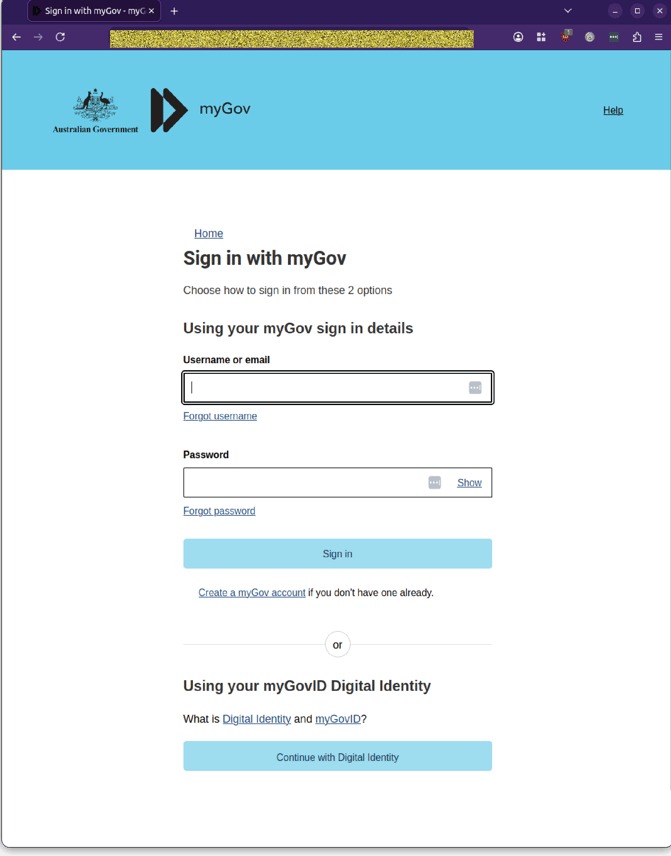 Example phishing content shown using myGov branding. Not affiliated with myGov.
Step 2: SMS code
After “signing in,” the site moves to an “Enter Code” page, instructing the user to enter a code sent by SMS to their mobile number. A text box labelled “Code” and a “Next” button are presented, along with references to Digital Identity and helpdesk support.
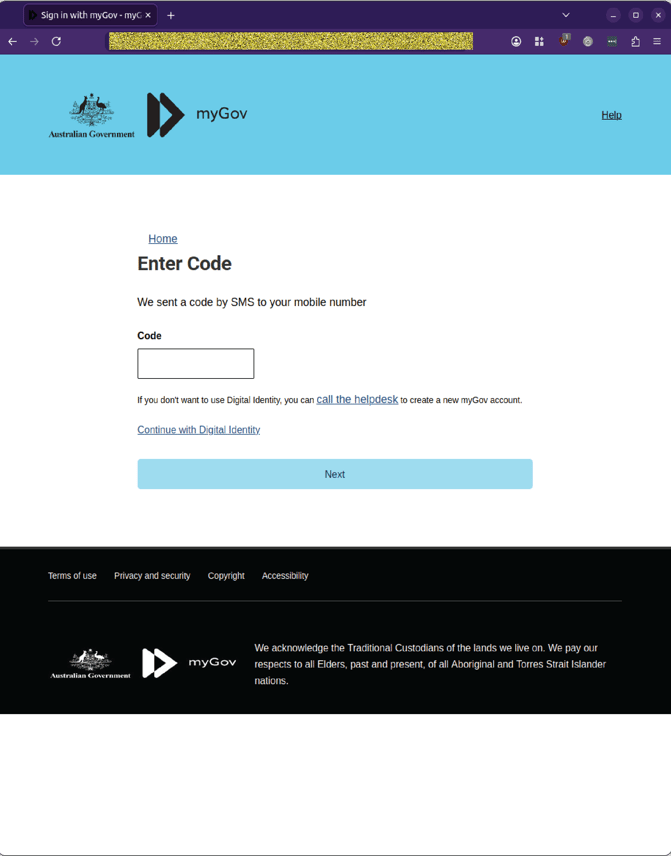 Example phishing content shown using myGov branding. Not affiliated with myGov.
Step 3:Security questions
The next page is titled “Sign in with myGov” and prompts the user to verify three security questions:
- Security Question 1 – Select question and enter answer
- Security Question 2 – Select question and enter answer
- Security Question 3 – Select question and enter answer
A “Submit” button completes the step.
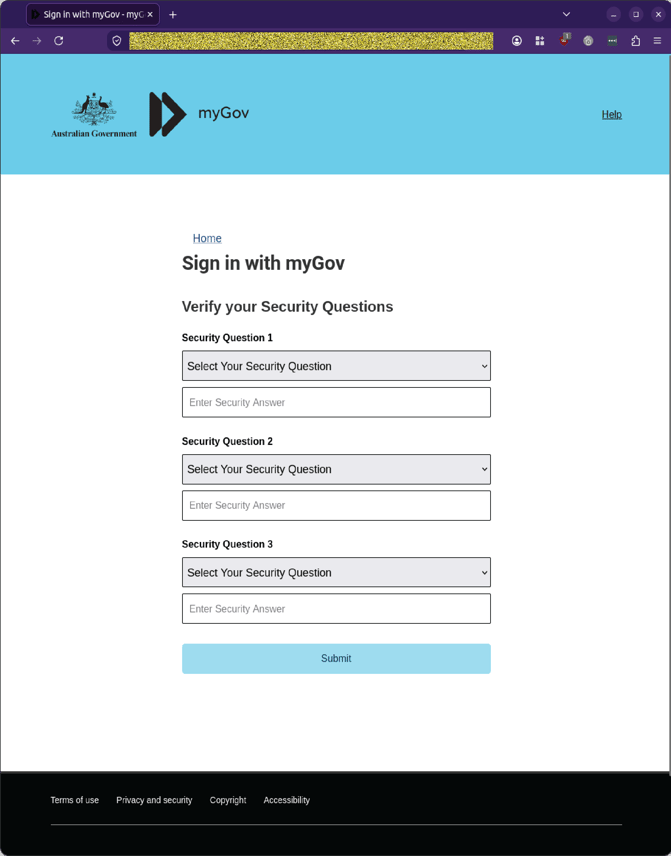
Example phishing content shown using myGov branding. Not affiliated with myGov.
Step 4:Full name and date of birth
The flow then moves to a “Personal Information” page requesting:
- Full Name
- Date of Birth (dd / mm / yyyy)
Again, the layout and footer closely resemble the genuine myGov environment.
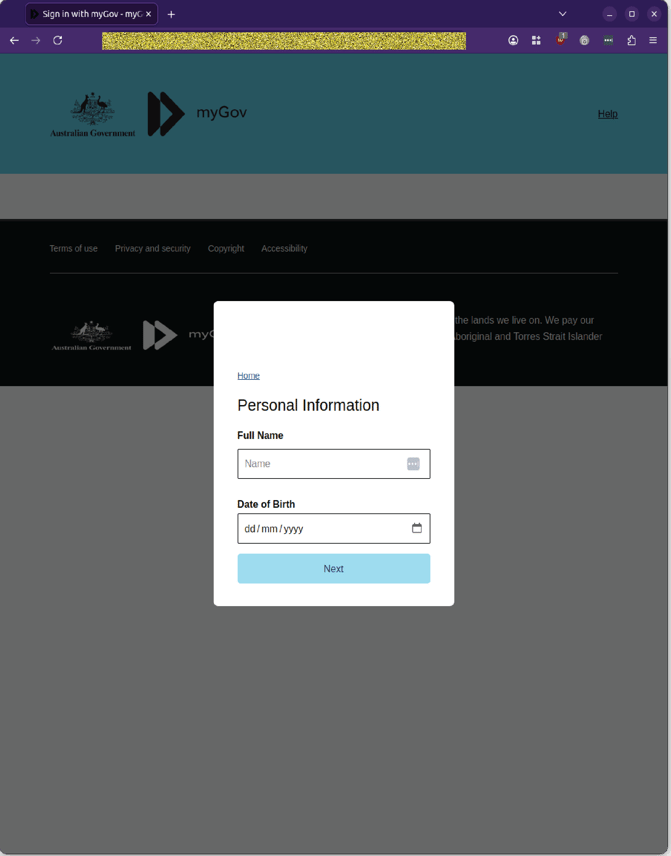
Example phishing content shown using myGov branding. Not affiliated with myGov.
Step 5:Another SMS code
A further “Enter Code” page appears, asking for another SMS code. This repetition is likely intended to reinforce the illusion of a secure, multi‑factor process while capturing additional live codes that could be used for account takeover.
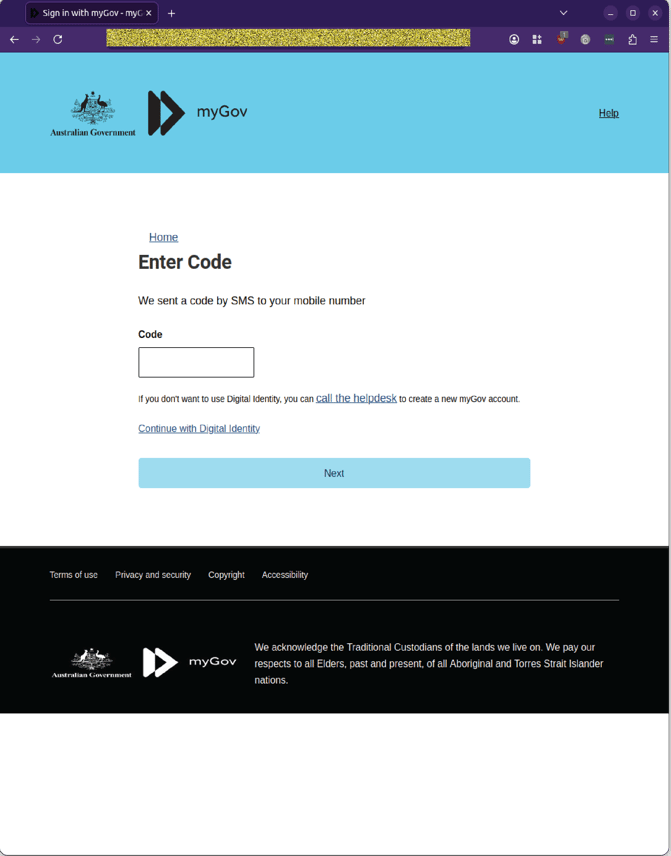
Example phishing content shown using myGov branding. Not affiliated with myGov.
Step 6: Driver’s licence images
The next step is a “Drivers License” upload interface, with fields for:
- Driver License Front
- Driver License Back
Each field includes a “Browse…” button and a “submit” button to upload images.
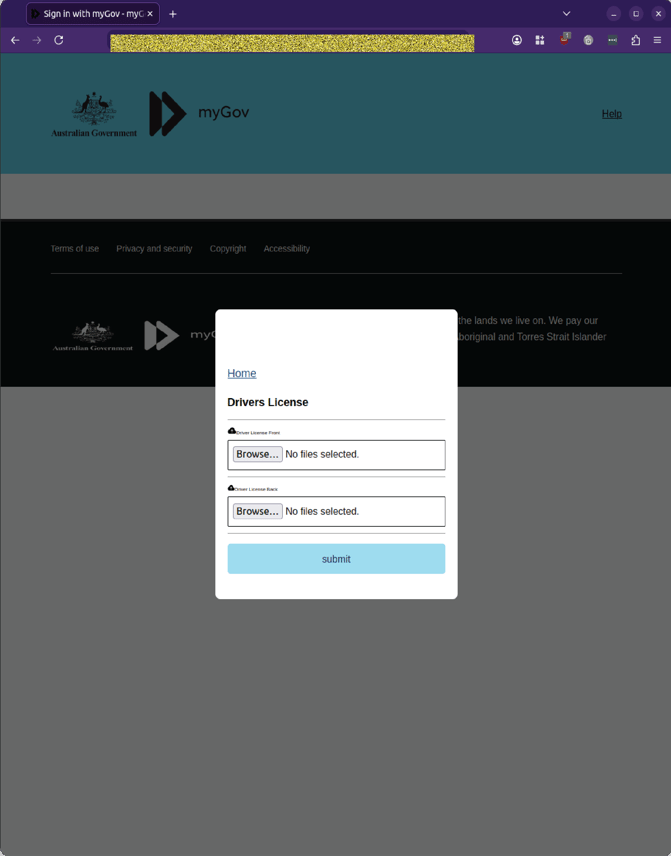
Example phishing content shown using myGov branding. Not affiliated with myGov.
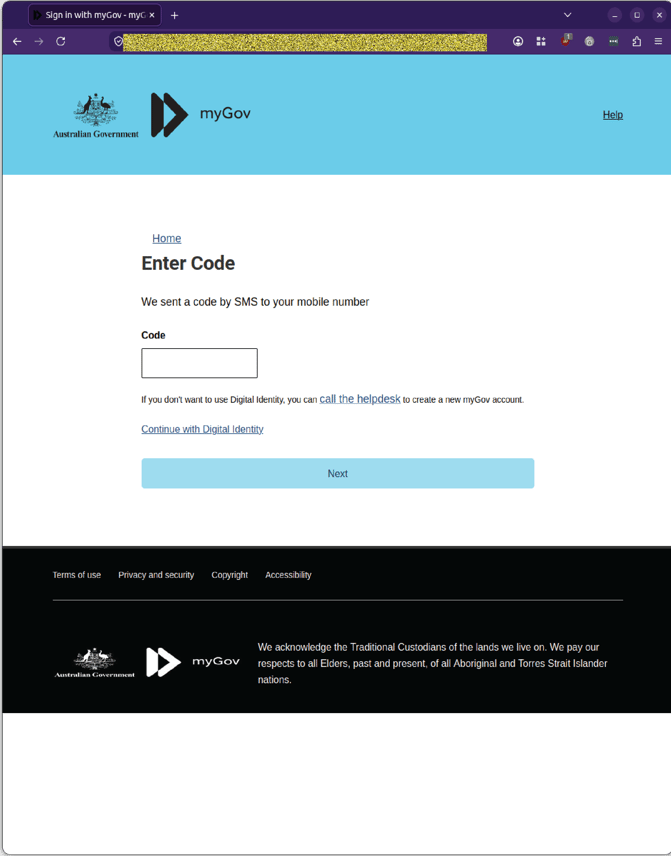
Step 7:Another SMS code
A third “Enter Code” page then asks for yet another SMS code, further increasing the attacker’s chances of capturing a valid, time‑sensitive verification code.
Example phishing content shown using myGov branding. Not affiliated with myGov.
Final step: Fake confirmation and redirect
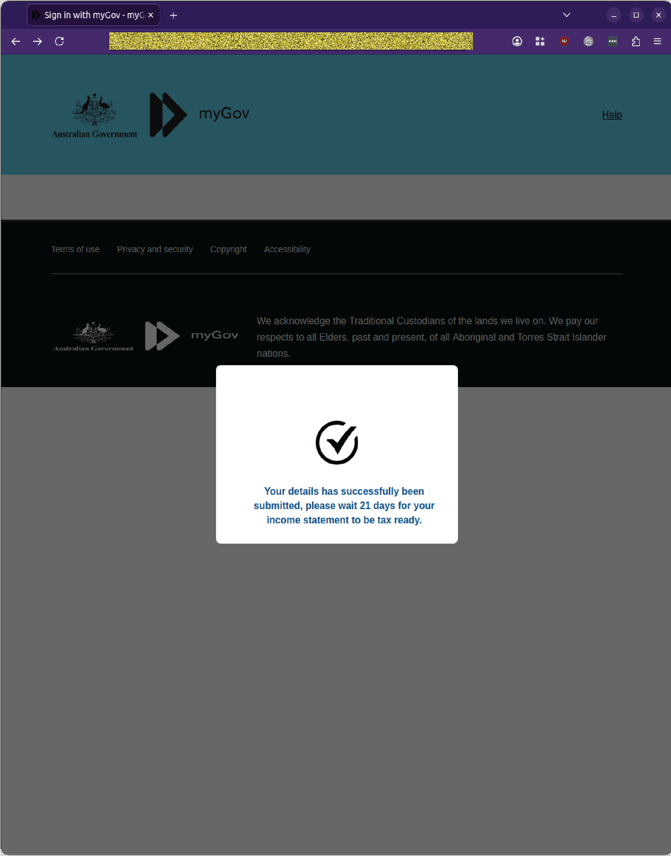
The flow ends on a confirmation screen stating that “Your details has successfully been submitted, please wait 21 days for your income statement to be tax ready.” MailGuard’s analysts observed that a genuine visitor would then be redirected to the legitimate myGov site, a deliberate piece of misdirection designed to leave the victim believing the process worked normally rather than realising their details have already been captured.
Example phishing content shown using myGov branding. Not affiliated with myGov.
Why this scam is worth flagging to your team
A few details make this campaign more dangerous than a typical credential‑phishing attempt:
- It asks for everything in one visit. The flow captures myGov login credentials, multiple one‑time SMS codes, security question answers, full name, date of birth, and driver’s licence images. Together, that gives an attacker enough to attempt account takeover, identity theft, and further fraud in the same session.
- The “secure message” pretext is mundane, not alarming. A new myGov or ATO notification is a plausible, low‑drama scenario that doesn’t immediately trigger the same suspicion a “your account will be suspended” threat might. Many people expect to receive tax‑related messages around key dates.
- The staged verification steps feel authentic. Multiple SMS codes, security questions, and personal information pages mimic the layered security experience users associate with government services, making the process feel legitimate.
- The redirect back to the real myGov site at the end is deliberate misdirection. Ending on a familiar confirmation message and then redirecting to the genuine portal is designed to leave the victim with a sense of normalcy, reducing the likelihood they will realise their details have been stolen and report the incident quickly.
For organisations whose staff use myGov for tax, benefits, or government services, this kind of scam has implications beyond individual loss. Compromised identities can be leveraged to access other systems, open accounts, or bypass controls that rely on government‑issued documentation.
Stay Safe, Know the Signs
MailGuard advises all recipients of these emails to delete them immediately without clicking on any links. Responding or providing personal details can lead to identity theft, data breaches, and financial losses.
Avoid emails that:
- Aren’t addressed to you personally.
- Are unexpected and urge immediate action.
- Contain poor grammar or miss crucial identifying details.
- Direct you to a suspicious URL that isn’t associated with the genuine company.
Many businesses turn to MailGuard after a near miss or incident. Don't wait until it's too late. Reach out to our team for a confidential discussion by emailing expert@mailguard.com.au or calling 1300 30 44 30.
One Email Is All That It Takes
All that it takes to devastate your business is a cleverly worded email message that can steal sensitive user credentials or disrupt your business operations. If scammers can trick one person in your company into clicking on a malicious link or attachment, they can gain access to your data or inflict damage on your business.
For a few dollars per staff member per month, you can protect your business with MailGuard's specialist AI-powered, zero-day email security. Special Ops for when speed matters! Our real-time zero-day, email threat detection amplifies our client’s intelligence, knowledge, security and defence. Talk to a solution consultant at MailGuard today about securing your company's inboxes.
Stay up-to-date with MailGuard's latest blog posts by subscribing to free updates. Subscribe to weekly updates by clicking on the button below.