MailGuard has detected and intercepted a phishing campaign that uses a fake employee learning or compliance notice to lure recipients into opening a malicious PDF and surrendering their Microsoft 365 credentials.
The scam is designed to look like an internal university or workplace document workflow, on the Schoox LMS platform. It uses a familiar compliance-style prompt, references learning materials and due dates, and attempts to create a sense of urgency around required employee action. Behind the façade, the objective is straightforward, credential theft.
This is the kind of attack that works because it imitates routine business communication. It does not rely on sophisticated malware or noisy attachments. Instead, it uses a simple HTML email and a PDF containing a link to a phishing site, then guides the recipient through a staged credential harvesting process built to look credible.
What the scam looks like
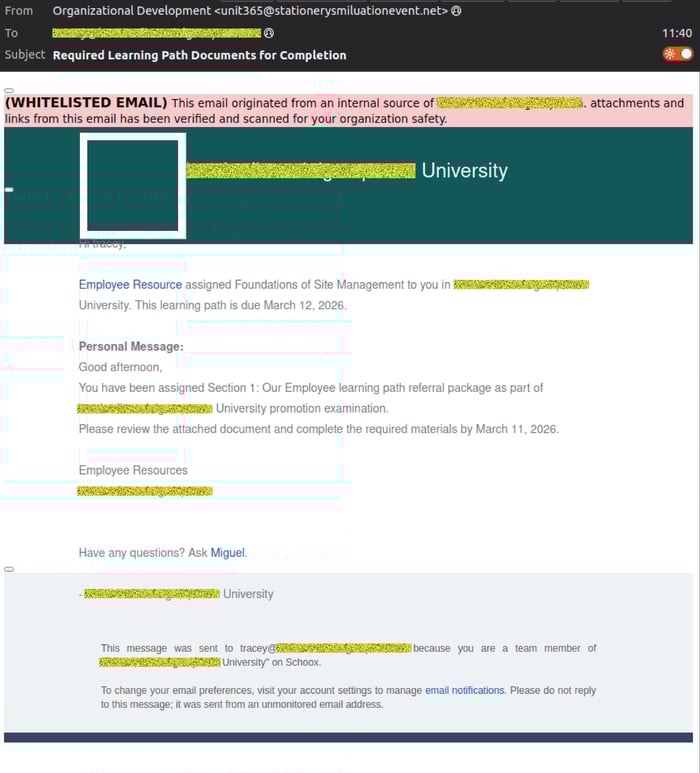
In the examples intercepted by MailGuard, the email purports to come from “Organizational Development” using the address: unit365(at)stationerysmiluationevent(dot)net
The message claims the recipient has been assigned a required learning path or employee resource document that must be reviewed by a deadline. The wording is designed to feel administrative and routine, which can make the request seem legitimate at first glance.
The email includes a PDF attachment and encourages the user to review the attached material to remain compliant with internal documentation or training requirements.
Here's an example, with the target company name and user email address obfuscated 👇
How the scam works
This phishing campaign uses a multi-step credential theft process.
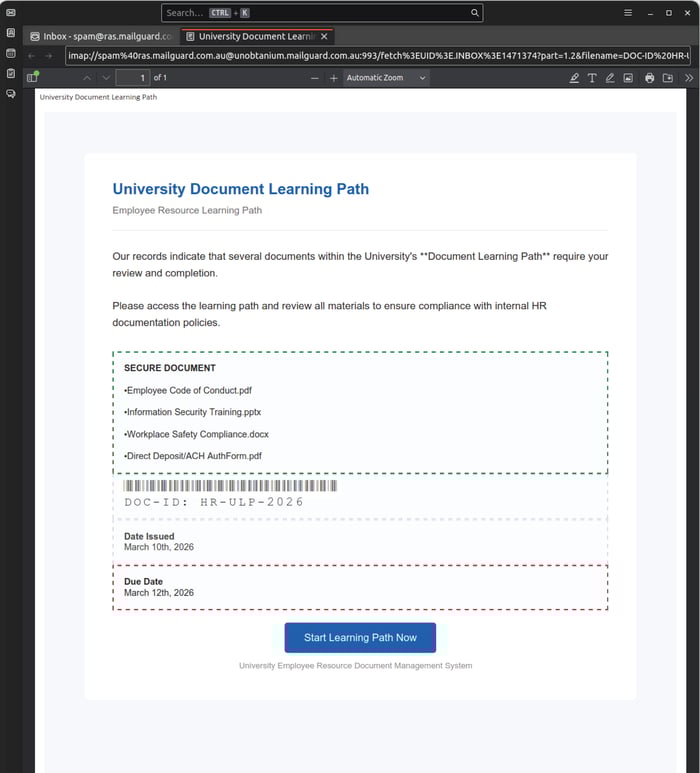
Step 1, a PDF attachment creates false legitimacy
The attachment appears to be a workplace or university-style document titled around a “Document Learning Path” or similar employee resource theme. It lists what looks like internal files, such as policies, training presentations, compliance documents, or payroll forms, and presents a button inviting the user to start or access the learning path.
At this stage, the attachment is not the final payload. Its real purpose is to move the recipient from the email client into a phishing environment.
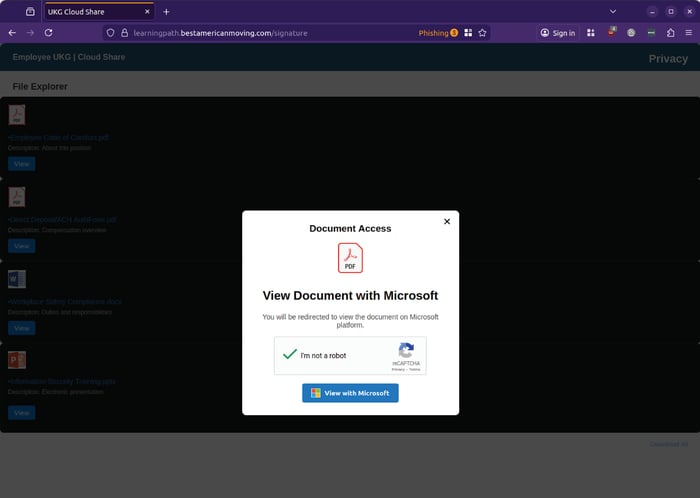
Step 2, the victim is told they must “view with Microsoft”
After clicking through, the user is taken to a fake file-sharing or cloud document page. This page presents what appears to be a document access prompt and tells the user they must use Microsoft to view the file. A fake verification prompt is included to make the page appear trustworthy.
This is a common tactic in phishing campaigns targeting Microsoft 365 users. Attackers know that recipients are used to opening documents through Microsoft-branded workflows, so the transition feels plausible.
Step 3, the phishing site validates the intended target
The next stage asks for the user’s username. According to MailGuard’s operations team, the phishing page appears to recognise which email addresses were sent the lure.
When a test address unrelated to the campaign was entered, the site responded that the username was incorrect. When the actual recipient address from the intercepted run was used, the phishing flow advanced to the next stage and changed branding to match the targeted customer.
That behaviour suggests the operators are validating intended victims and tailoring the phishing experience in real time, which can make the attack more convincing and more dangerous.
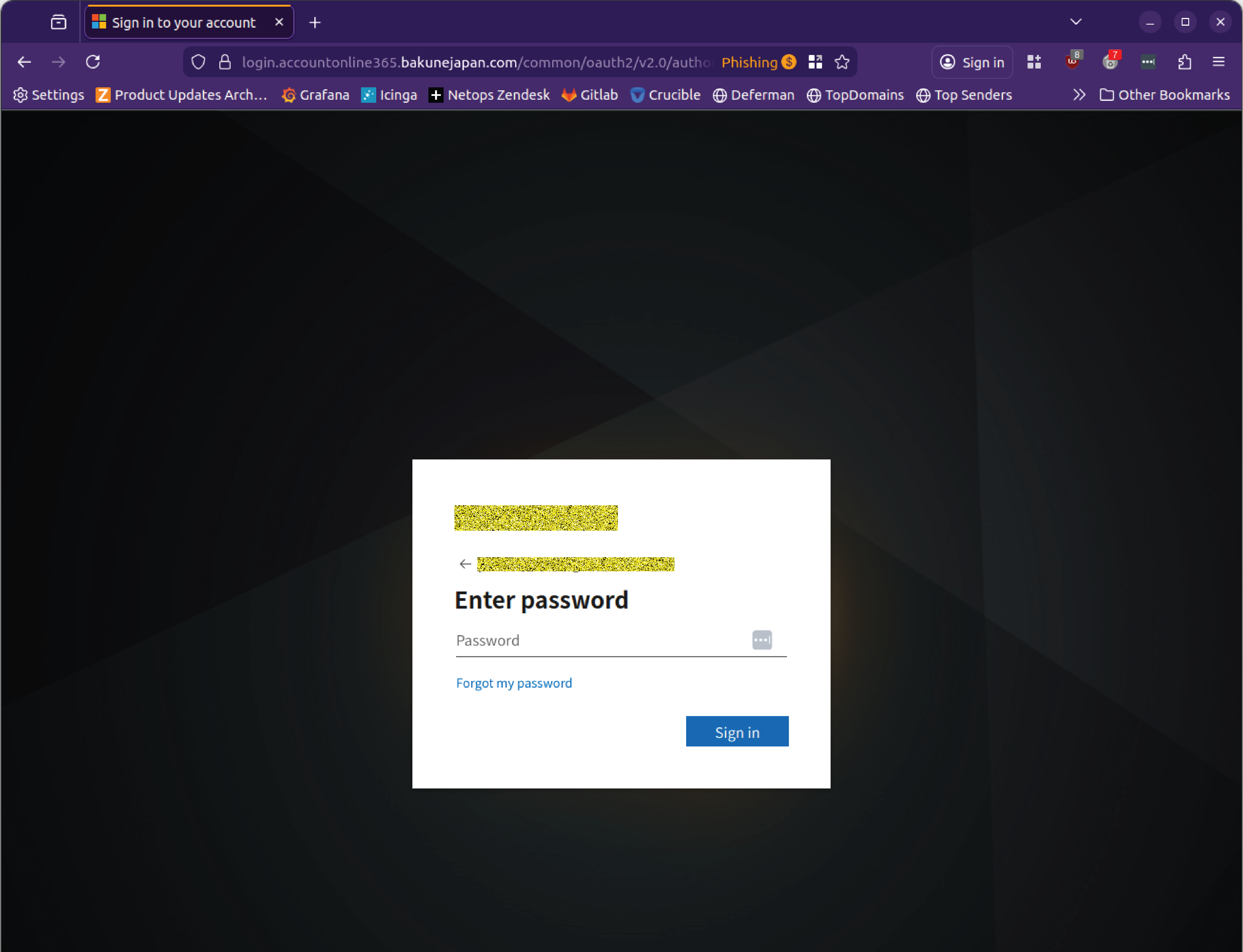
Step 4, the user is prompted for their Microsoft password
Once the phishing site has accepted the username, it moves to a password entry page styled to resemble a Microsoft sign-in screen. In the example analysed by MailGuard, it was not possible to proceed beyond this point, leading to suspicion that the site may be attempting to actively authenticate with the provided credentials behind the scenes.
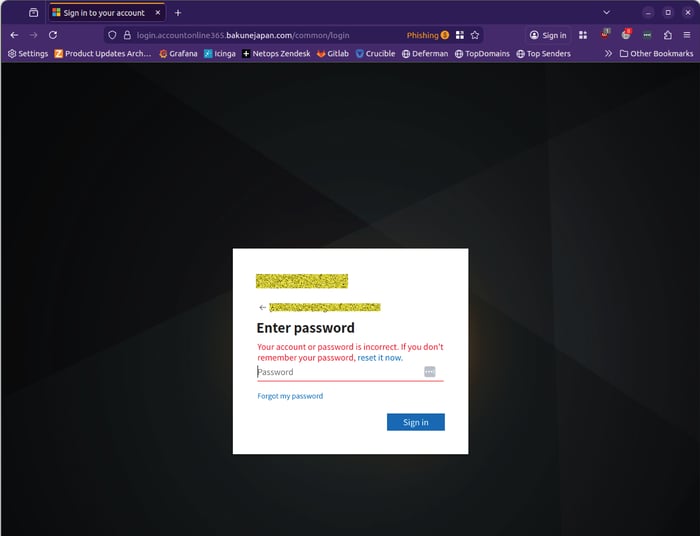
If that is the case, this is more than a simple static credential collection page. It may be part of a live login attempt designed to capture working credentials and use them immediately.
Why this scam is dangerous
This threat is a strong reminder that phishing does not need to be technically elaborate to be effective.
The campaign uses familiar business language, routine internal themes, and a staged journey that feels believable to employees who regularly access cloud documents, complete training, or interact with Microsoft 365. The lure is especially effective because it imitates ordinary process rather than obvious fraud.
For businesses, the compromise of a single Microsoft 365 account can create serious downstream risk, including:
- unauthorised access to email and sensitive business data
- internal impersonation and business email compromise
- theft of stored documents and contact lists
- further phishing sent from a trusted account
- exposure of payroll, HR, finance, and customer information
That is why modern email threats must be stopped before they reach the inbox. Once a convincing phishing message lands in front of a busy employee, the organisation is relying on human judgement under time pressure, which is exactly what the attacker wants.
What to watch out for
There are several warning signs in this campaign:
- the sender domain does not align with the organisation it claims to represent
- the message creates urgency around internal compliance or required action
- the attachment leads the user away from the email into an external credential prompt
- the page uses Microsoft branding to borrow trust
- the workflow asks for credentials in a context that should not require re-authentication
Businesses should be particularly cautious with messages involving HR, training, payroll, policy acknowledgements, document review, and compliance deadlines, because attackers know these topics are likely to attract immediate attention.
Stay Safe, Know the Signs
MailGuard advises all recipients of these emails to delete them immediately without clicking on any links. Responding or providing personal details can lead to identity theft, data breaches, and financial losses.
Avoid emails that:
- Aren’t addressed to you personally.
- Are unexpected and urge immediate action.
- Contain poor grammar or miss crucial identifying details.
- Direct you to a suspicious URL that isn’t associated with the genuine company.
Many businesses turn to MailGuard after a near miss or incident. Don't wait until it's too late. Reach out to our team for a confidential discussion by emailing expert@mailguard.com.au or calling 1300 30 44 30.
One Email Is All That It Takes
All that it takes to devastate your business is a cleverly worded email message that can steal sensitive user credentials or disrupt your business operations. If scammers can trick one person in your company into clicking on a malicious link or attachment, they can gain access to your data or inflict damage on your business.
For a few dollars per staff member per month, you can protect your business with MailGuard's specialist AI-powered, zero-day email security. Special Ops for when speed matters! Our real-time zero-day, email threat detection amplifies our client’s intelligence, knowledge, security and defence. Talk to a solution consultant at MailGuard today about securing your company's inboxes.
Stay up-to-date with MailGuard's latest blog posts by subscribing to free updates. Subscribe to weekly updates by clicking on the button below.