MailGuard is intercepting a new phishing campaign impersonating Docusign, using a seemingly routine document-signing notification to direct recipients towards downloading remote access software.
Cybercriminals continue to exploit the familiarity and trust people place in everyday business services. In the latest campaign detected and intercepted by MailGuard's filter network, attackers are impersonating Docusign with an email claiming that a document is awaiting review and requires action.
However, rather than directing recipients to a genuine document-signing process, the email leads them through a series of redirects to a webpage that attempts to download a remote access application disguised as a document.
The approach is particularly concerning for businesses because it uses a familiar business workflow to encourage recipients to download and run software they may not recognise.
How the Docusign phishing email works
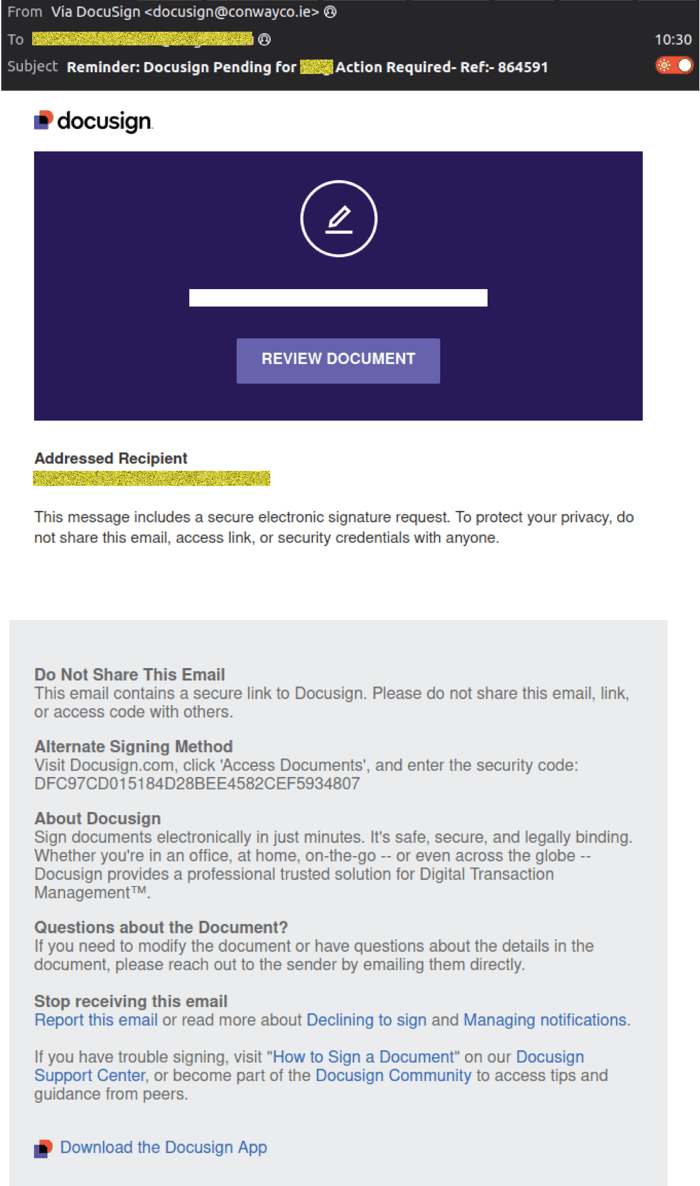
The email arrives displaying the sender name Via Docusign, with the sending address:
docusign(at)conwayco.ie
Its subject line reads:
Reminder: Docusign Pending for [recipient] Action Required - Ref:- 864591
The message uses Docusign branding and a prominent REVIEW DOCUMENT button to create the impression that the recipient has an outstanding electronic signature request.
It also includes familiar-sounding language about secure electronic signatures, document access and protecting the recipient's privacy.
These elements are designed to make the notification appear consistent with a legitimate business communication.
Example phishing content shown using Docusign branding. Not affiliated with Docusign.
The phishing email impersonates Docusign, using a pending document notification and a prominent Review Document button to encourage recipients to follow the link.
From a document notification to a software download
Clicking the Review Document button does not take the recipient to a legitimate Docusign document.
Instead, the link initially directs the browser through one of two Google-hosted URLs:
- google[.]ws/share/google
- google[.]lu/share/google
These links redirect to a website hosted at:
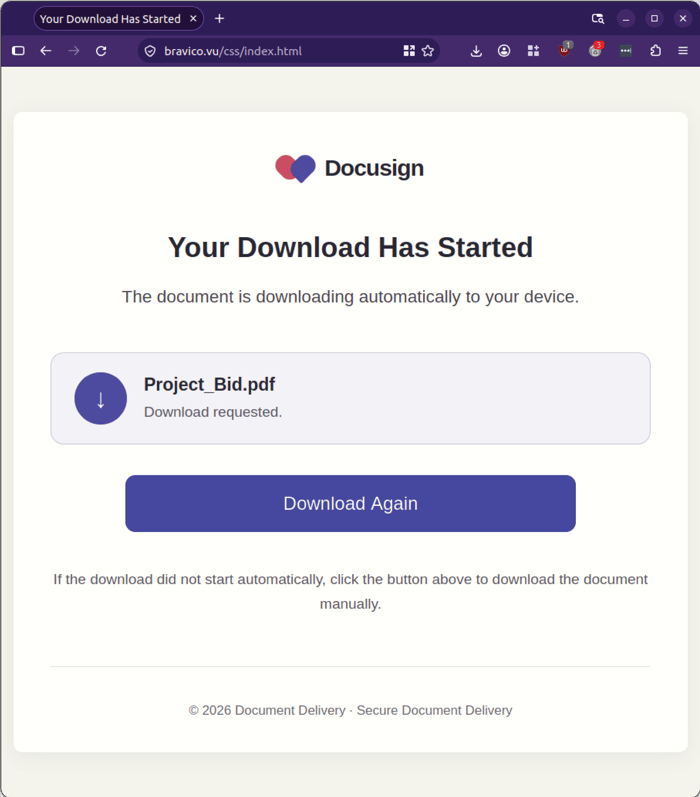
bravico[.]vu/css/index[.]html
The landing page is designed to resemble a document delivery service. It displays a Docusign-style logo, the heading Your Download Has Started, and a notification claiming that a document called Project_Bid.pdf is downloading automatically.
A prominent Download Again button reinforces the impression that the recipient is retrieving a PDF document.
However, the download mechanism directs the recipient to retrieve an executable file named:
ScreenConnect.ClientSetup.exe

The file is downloaded from a ScreenConnect-hosted address associated with a trial account:
acecareinc[.]screenconnect[.]com/Bin/
ScreenConnect is remote access software. While such software has legitimate business uses, its delivery through an unsolicited and misleading email notification is a significant warning sign.
Recipients expecting a PDF document should be particularly cautious when a download instead involves an executable application.
Example phishing content shown using Docusign branding. Not affiliated with Docusign.
The fraudulent landing page claims that Project_Bid.pdf is downloading automatically, while the download mechanism directs recipients to an executable file.
Why remote access software in an unexpected email matters
Remote access applications allow users to connect to and interact with another computer. They have legitimate applications in business environments, including IT support, troubleshooting and remote administration.
However, when recipients are persuaded to download and run remote access software through a deceptive email, it creates a potential security risk.
Unlike a conventional document download, an executable application can introduce new functionality to a device. Remote access software can provide the ability to interact with a computer remotely, depending on how it is installed and configured.
The specific executable identified in this campaign is hosted through a ScreenConnect trial account. MailGuard's analysis has identified the download as remote access software, although it has not established whether the executable has been modified from its normal offering. It is therefore important not to confuse the legitimate software with the suspicious delivery method observed in this campaign.
For businesses, the key concern is the use of deceptive email communications to encourage employees to download and execute software they were not expecting.
Warning signs to look out for
There are several indicators that recipients should consider when assessing an email claiming to be from Docusign or another trusted document-signing service.
1. Check the sender's email address
Although the display name reads Via Docusign, the actual sending address is docusign(at)conwayco.ie.
The sender's display name alone does not establish that an email is legitimate. Always check the complete email address and consider whether the domain matches the organisation the message claims to represent.
2. Be cautious of unexpected document requests
The email creates a sense of urgency by claiming that a document is pending and requires action.
If you are not expecting a document to review or sign, avoid following links simply because the email appears to come from a familiar service.
3. Pay attention to the destination of links
The links in this campaign initially use Google-hosted URLs before redirecting to an unrelated domain.
A familiar-looking brand or link does not guarantee that the destination is legitimate. Hover over links where possible to inspect their destination, and be wary of unexpected redirects.
4. Be suspicious of unexpected executable downloads
Perhaps the most important warning sign in this campaign is the discrepancy between what the landing page promises and what is actually downloaded.
The webpage claims to be downloading a PDF document, but the download is an executable file named ScreenConnect.ClientSetup.exe.
A legitimate document-signing request should not require recipients to download unexpected remote access software.
If a supposed document download results in an executable application, do not open or run it.
Protecting your business against deceptive email threats
This campaign highlights how cybercriminals can exploit trusted business brands and familiar workflows to encourage potentially risky actions.
Employees regularly receive requests to review documents, approve transactions and sign agreements electronically. This familiarity can make it easier for deceptive notifications to pass an initial visual inspection.
Businesses should reinforce the importance of verifying unexpected document requests, checking sender addresses and exercising caution before downloading or running software received through email links.
Where employees encounter an unexpected executable download, they should avoid running it and report the incident to their IT or security team.
If the file has already been executed, organisations should promptly involve their IT or security team to assess the device and determine whether any further action is required.
MailGuard continues to intercept emerging email threats through its specialist email security network, helping businesses protect their employees and reduce the risk of malicious email activity reaching their inboxes.
Stay Safe, Know the Signs
MailGuard advises all recipients of these emails to delete them immediately without clicking on any links. Responding or providing your personal details can result in your sensitive information being used for criminal activity and may have a severe negative impact on your business and its’ financial well-being.
MailGuard urges users not to click links or open attachments within emails that:
- Are not addressed to you by name.
- Appear to be from a legitimate company but use poor English or omits personal details that a legitimate sender would include.
- Are from businesses that you were not expecting to hear from, and/or
- Take you to a landing page or website that is not the legitimate URL of the company the email is purporting to be sent from.
- Many businesses turn to MailGuard after an incident or a near miss, often as a result of an email similar to the one shown above. If unwanted emails are a problem for your business, don’t wait until it’s too late.
Reach out to our team for a confidential discussion by emailing expert@mailguard.com.au or calling 1300 30 44 30.
One Email Is All That It Takes
All that it takes to devastate your business is a cleverly worded email message that can steal sensitive user credentials or disrupt your business operations. If scammers can trick one person in your company into clicking on a malicious link or attachment, they can gain access to your data or inflict damage on your business.
For a few dollars per staff member per month, you can protect your business with MailGuard's specialist AI-powered, zero-day email security. Special Ops for when speed matters! Our real-time zero-day, email threat detection amplifies our client’s intelligence, knowledge, security and defence. Talk to a solution consultant at MailGuard today about securing your company's inboxes.
Stay up-to-date with MailGuard's latest blog posts by subscribing to free updates. Subscribe to weekly updates by clicking on the button below.