MailGuard has intercepted a new phishing email campaign impersonating ChatGPT and OpenAI billing. The scam claims that the recipient’s last ChatGPT Plus payment has failed and urges them to “update your payment details”, but instead directs them to a fake Stripe checkout page designed to steal email addresses, credit card details and billing information.
What the Email Looks Like
The body of the email informs the recipient that the last payment for their ChatGPT Plus subscription failed on a specific date and states there is a problem with the payment method. It instructs the user to check with their bank or card issuer, then click a link to update payment details and resubscribe. A second link is presented as a “support article”, but both links point to the same destination.
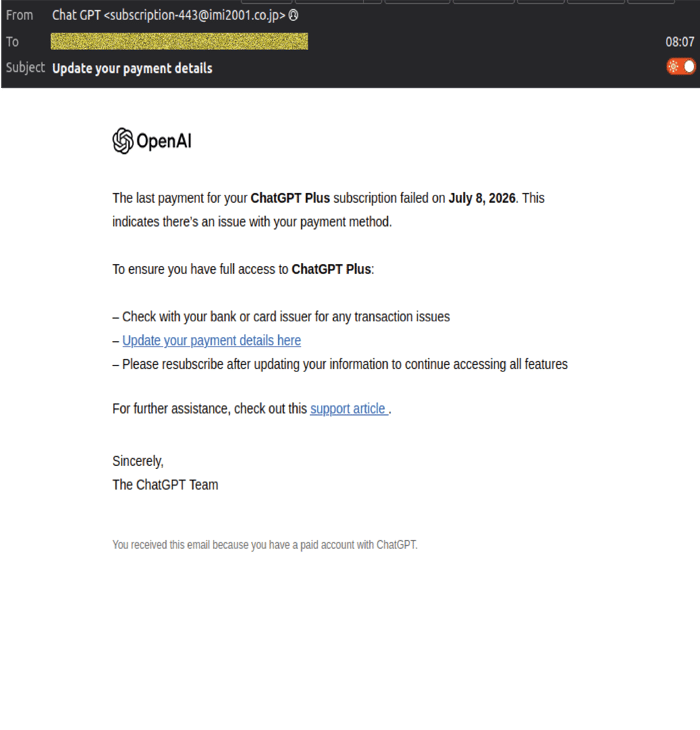 Example phishing content shown using ChatGPT branding. Not affiliated with ChatGPT.
How The Scam Works
Clicking either the “Update your payment details here” link or the “support article” link takes the recipient to a phishing site that imitates a Stripe checkout page used for OpenAI billing.
This layout is designed to mimic legitimate Stripe‑powered billing flows and encourage users to enter full payment details.
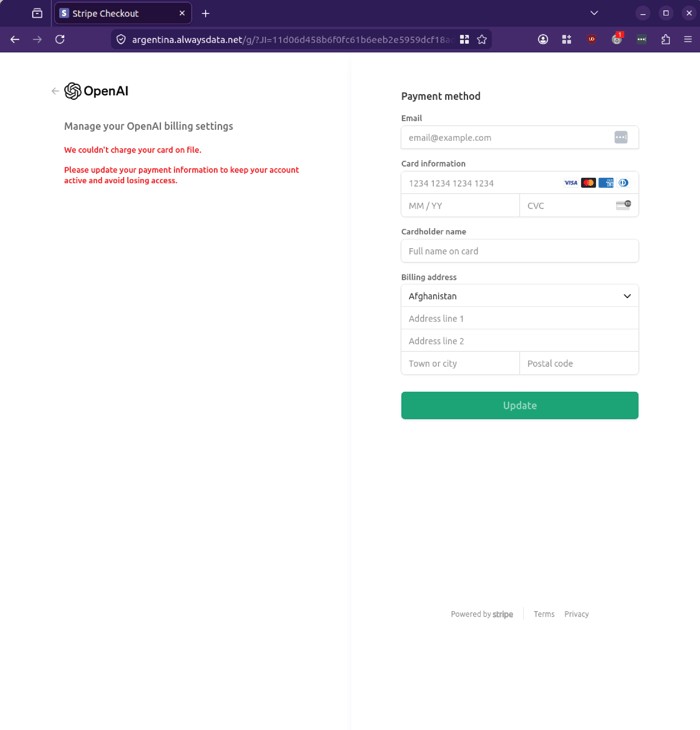 Example phishing content shown using ChatGPT branding. Not affiliated with ChatGPT.
When card details are entered, a VISA‑branded pop‑up appears with a loading indicator,MailGuard’s analysis indicates this step is used to create the impression of a secure transaction being processed, reinforcing trust and encouraging users to wait while their details are captured.
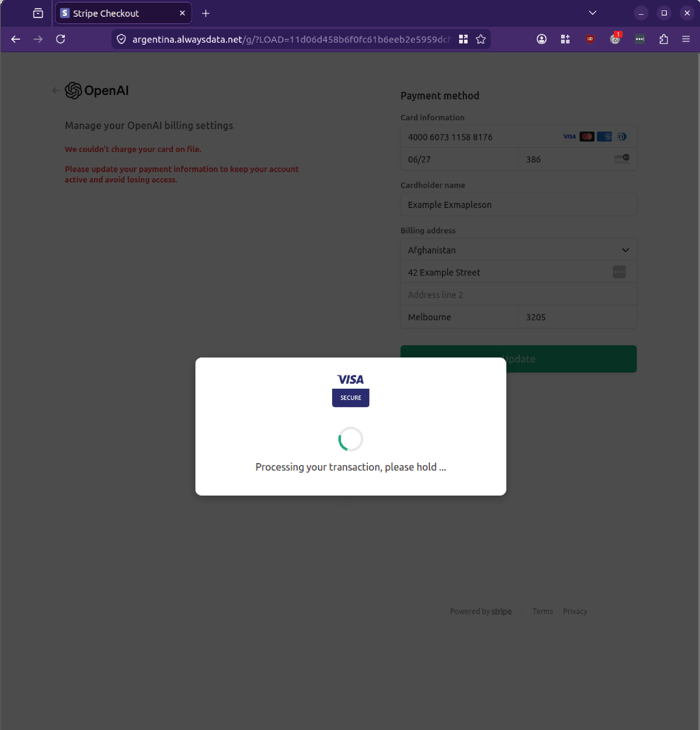
Example phishing content shown using ChatGPT branding. Not affiliated with ChatGPT.
After a short period, the VISA pop‑up times out, and the user is returned to the payment page, where an error message is displayed. MailGuard’s operations team observed this behaviour during testing using fake card details, confirming that the phishing site is designed to simulate a failed transaction. This tactic encourages victims to retry with different cards or re‑enter their information, increasing the likelihood of capturing valid payment data.
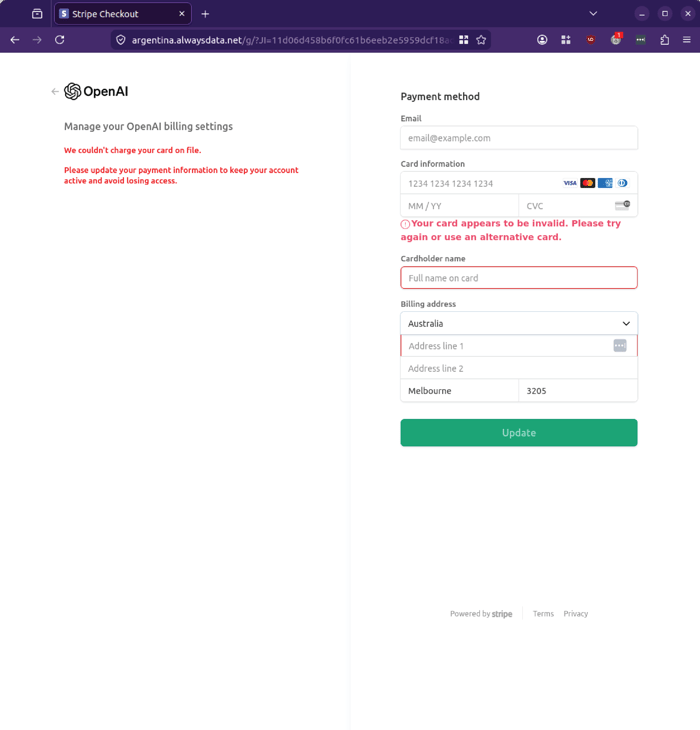
Example phishing content shown using ChatGPT branding. Not affiliated with ChatGPT.
In some variants, the phishing site presents a page titled “PAYMENT ISSUE” with a red warning box.
This variant reinforces urgency and encourages immediate action to “fix” the problem.
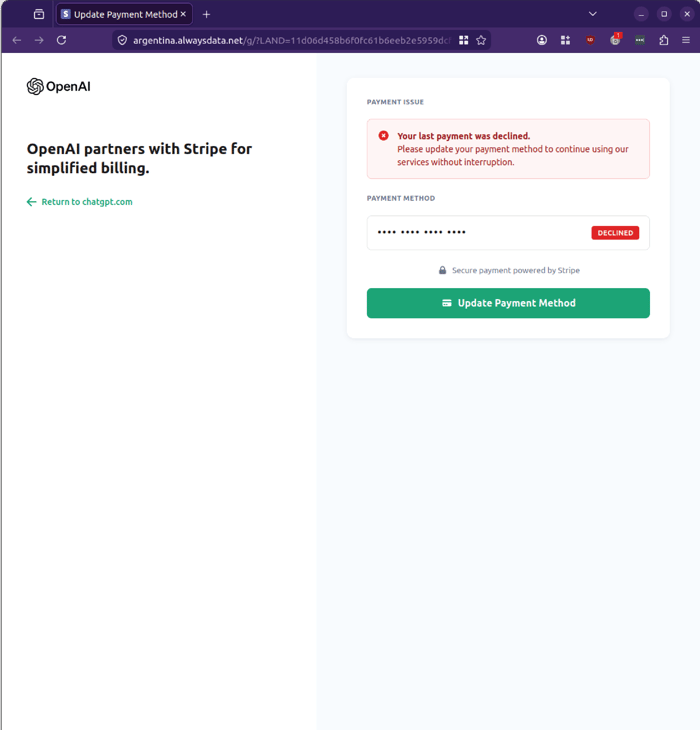
Example phishing content shown using ChatGPT branding. Not affiliated with ChatGPT.
Why This Campaign Is Concerning
This campaign is notable because it targets a widely used AI service and leverages familiar subscription language to drive action. Many organisations now use tools like ChatGPT for productivity, development and research, making billing‑related emails more likely to be trusted and acted upon quickly.
The attackers are attempting to collect:
- Email addresses
- Full card numbers
- Expiry dates and CVC codes
- Cardholder names
- Billing addresses
This combination of data can be used to conduct fraudulent transactions, commit card‑not‑present fraud, and support broader identity‑based attacks.
For risk, security, technology and business leaders, this type of attack highlights the importance of treating subscription and billing emails with the same scrutiny as traditional banking or utility communications.
Warning Signs to Watch For
There are several warning signs in this campaign:
- The sender domain (imi2001.co.jp) does not match OpenAI or ChatGPT’s legitimate domains.
- The display name “Chat GPT” is inconsistent with official branding.
- Both the “Update your payment details here” link and the “support article” link point to the same non‑OpenAI site.
- The Stripe checkout page is hosted on a domain such as argentina.alwaysdata.net, which is not associated with OpenAI or Stripe’s official infrastructure.
- Error messages and repeated prompts to re‑enter card details are used to encourage multiple attempts.
Recipients should be cautious of any unexpected payment failure notifications, especially those that request full card details via embedded links. Accessing billing portals via known, bookmarked URLs or official account dashboards, rather than email buttons, significantly reduces the risk of successful phishing attacks.
Stay Safe, Know the Signs
MailGuard advises all recipients of these emails to delete them immediately without clicking on any links. Responding or providing personal details can lead to identity theft, data breaches, and financial losses.
Avoid emails that:
- Aren’t addressed to you personally.
- Are unexpected and urge immediate action.
- Contain poor grammar or miss crucial identifying details.
- Direct you to a suspicious URL that isn’t associated with the genuine company.
Many businesses turn to MailGuard after a near miss or incident. Don't wait until it's too late. Reach out to our team for a confidential discussion by emailing expert@mailguard.com.au or calling 1300 30 44 30.
One Email Is All That It Takes
All that it takes to devastate your business is a cleverly worded email message that can steal sensitive user credentials or disrupt your business operations. If scammers can trick one person in your company into clicking on a malicious link or attachment, they can gain access to your data or inflict damage on your business.
For a few dollars per staff member per month, you can protect your business with MailGuard's specialist AI-powered, zero-day email security. Special Ops for when speed matters! Our real-time zero-day, email threat detection amplifies our client’s intelligence, knowledge, security and defence. Talk to a solution consultant at MailGuard today about securing your company's inboxes.
Stay up-to-date with MailGuard's latest blog posts by subscribing to free updates. Subscribe to weekly updates by clicking on the button below.