MailGuard has intercepted a new phishing campaign impersonating American Express, designed to steal online banking credentials and card security information. This campaign uses a simple HTML email and a multi‑step phishing flow that closely mimics genuine American Express pages.
How the scam works
The email arrives branded as an urgent security alert from “American Express | Account Limited”, claiming the recipient’s account has been temporarily restricted due to missing or incomplete information. The message urges the user to update their account immediately to avoid further limitations.
Screenshots show the email styled with American Express branding and a prominent button directing the user to review their details.
Step 1: Fake “account limited” email
The email claims essential information is missing and that card usage may be restricted until the user updates their details.
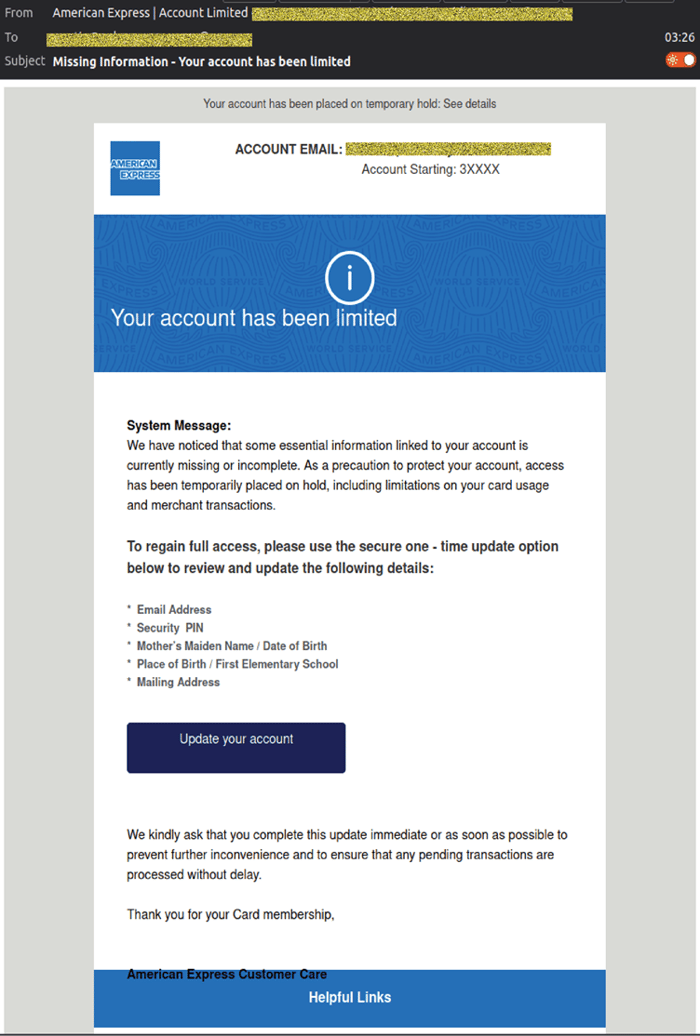
Attackers use this step to create urgency and prompt the victim to click without verifying the sender.
Step 2: Phishing login page
The link leads to a page that closely resembles the official American Express login portal, requesting the user’s ID and password.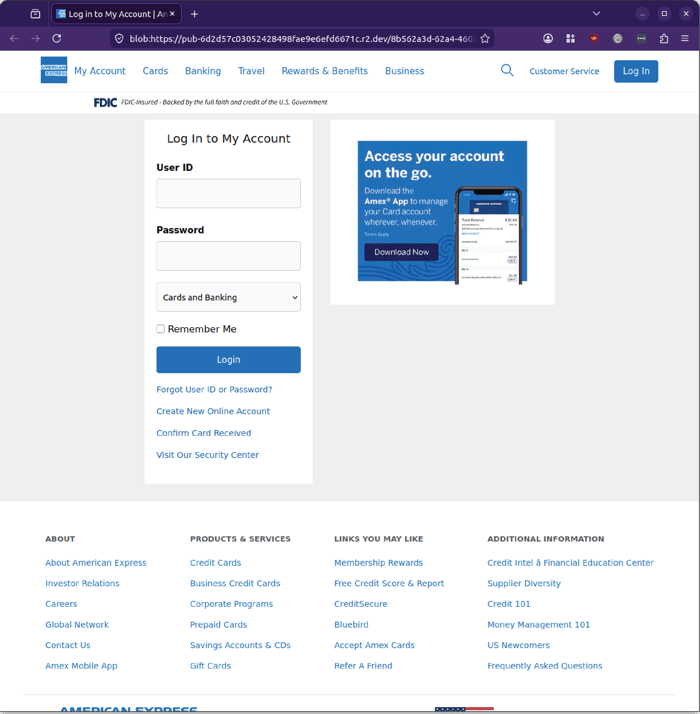
Here, attackers attempt to harvest online banking credentials.
Step 3: 3‑digit CID capture
After entering login details, the victim is taken to a page requesting the 3‑digit CID from the back of the card.
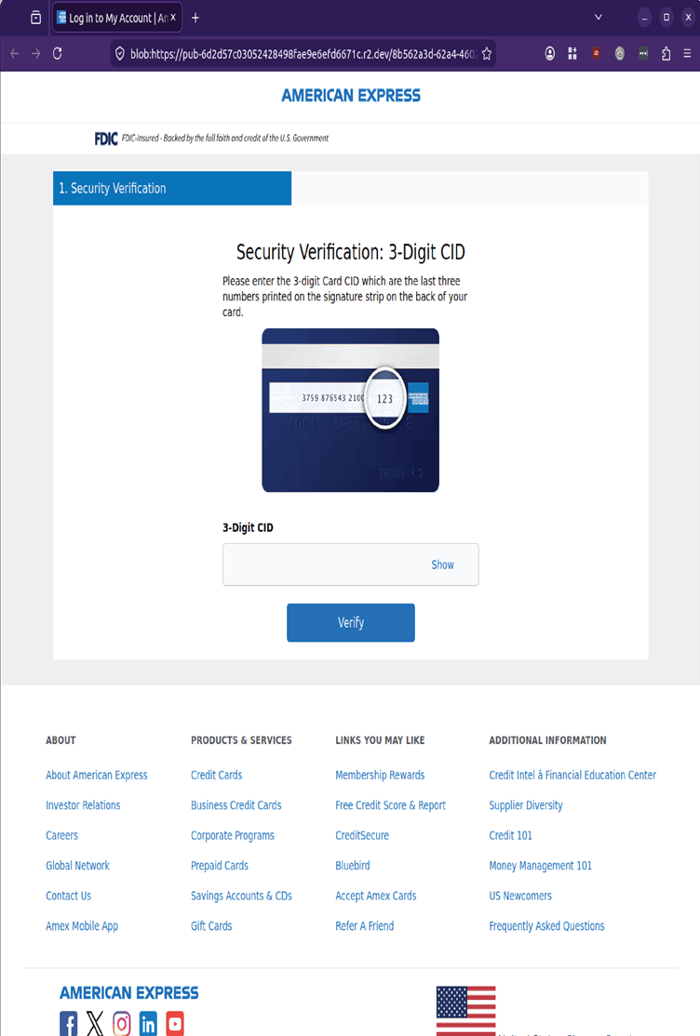
This step is designed to collect the card’s security code.
Step 4: Fake verification screen
A loading screen appears, instructing the user not to close or refresh the page.
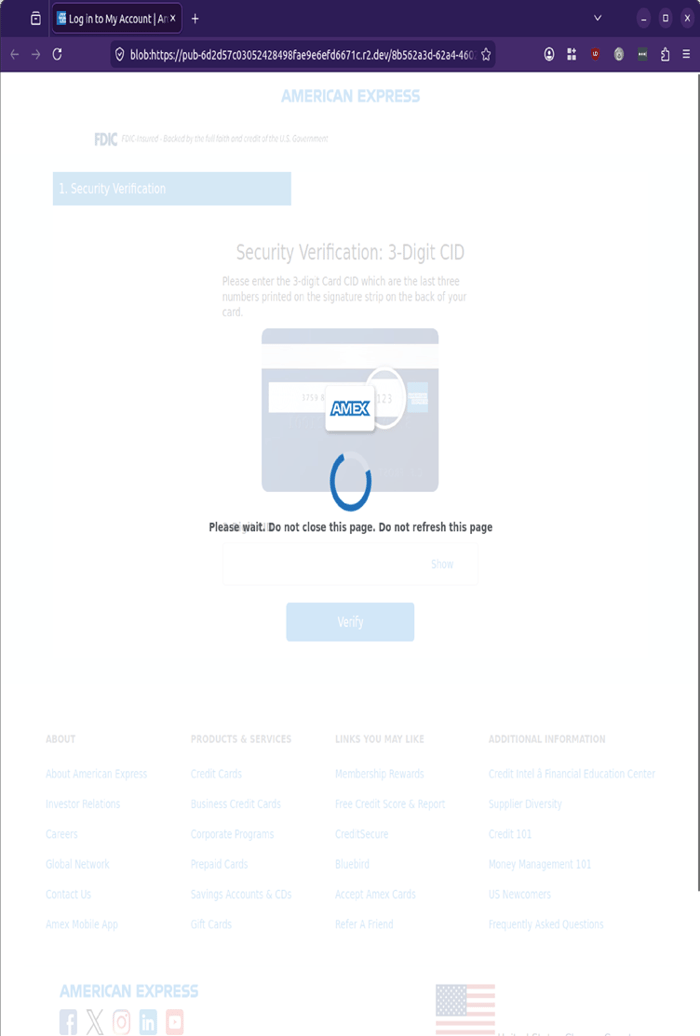
This step is used to validate and exfiltrate the captured information.
Key indicators of the threat
Based on MailGuard’s analysis:
- Display name “American Express | Account Limited” used to appear authoritative
- Sender addresses follow a consistent pattern designed to appear official
- Simple HTML email containing a single link
- Multi‑step phishing flow capturing both login credentials and card security details
- Highly realistic branding and layout mimicking genuine American Express pages
Why this matters for businesses
Although this campaign targets American Express cardholders, the implications extend into the workplace. Compromised credentials and card details can be used to:
- Conduct fraudulent transactions
- Attempt password reuse across corporate systems
- Support broader social engineering and business email compromise (BEC) attacks
With many employees managing personal accounts on corporate devices, a successful phishing attack can quickly escalate into a business‑level security incident.
Stay Safe, Know the Signs
MailGuard advises all recipients of these emails to delete them immediately without clicking on any links. Responding or providing personal details can lead to identity theft, data breaches, and financial losses.
Avoid emails that:
- Aren’t addressed to you personally.
- Are unexpected and urge immediate action.
- Contain poor grammar or misses crucial identifying details.
- Direct you to a suspicious URL that isn’t associated with the genuine company.
Many businesses turn to MailGuard after a near miss or incident. Don't wait until it's too late. Reach out to our team for a confidential discussion by emailing expert@mailguard.com.au or calling 1300 30 44 30.
One Email Is All That It Takes
All that it takes to devastate your business is a cleverly worded email message that can steal sensitive user credentials or disrupt your business operations. If scammers can trick one person in your company into clicking on a malicious link or attachment, they can gain access to your data or inflict damage on your business.
For a few dollars per staff member per month, you can protect your business with MailGuard's specialist AI-powered, zero-day email security. Special Ops for when speed matters! Our real-time zero-day, email threat detection amplifies our client’s intelligence, knowledge, security and defence. Talk to a solution consultant at MailGuard today about securing your company's inboxes.
Stay up-to-date with MailGuard's latest blog posts by subscribing to free updates. Subscribe to weekly updates by clicking on the button below.